
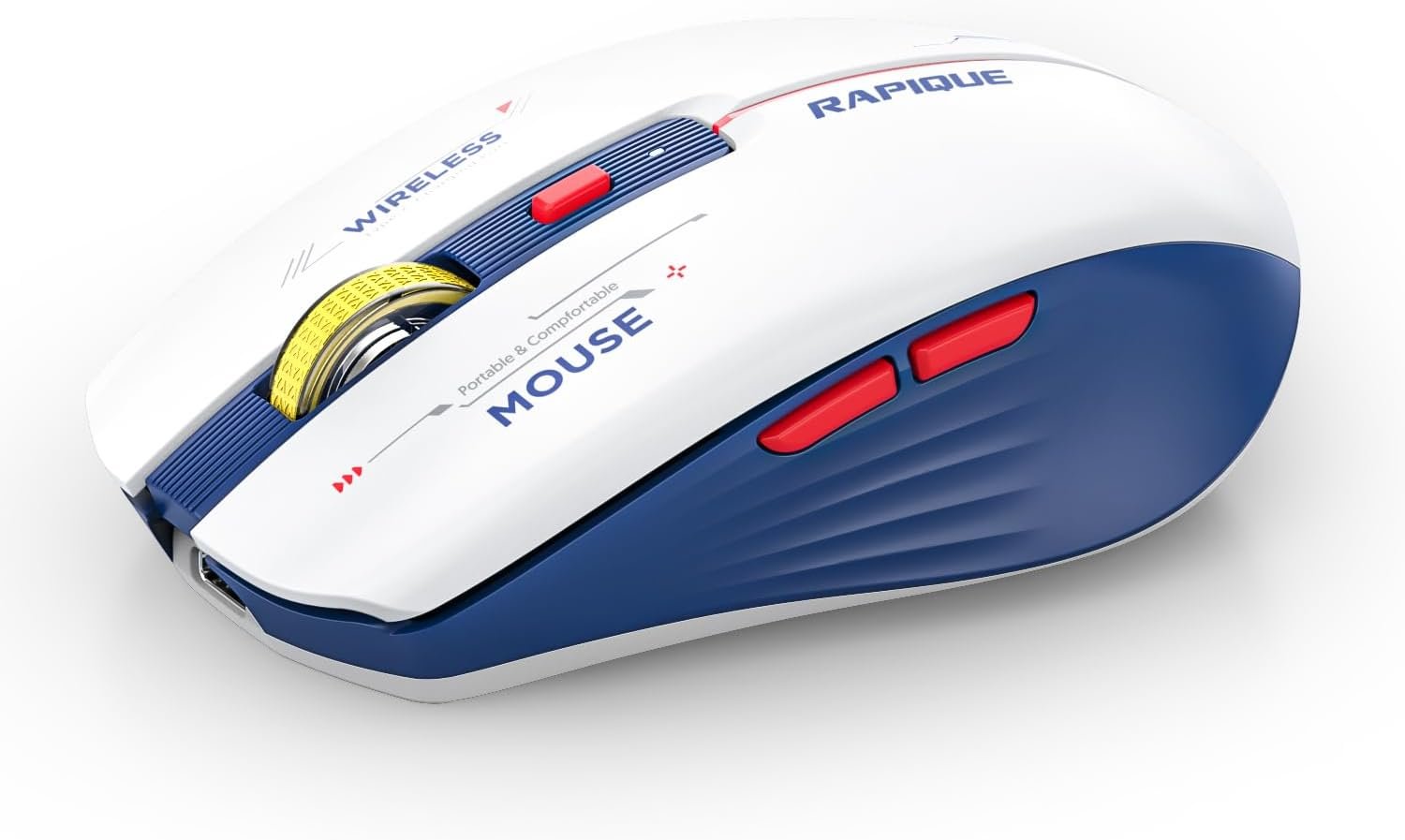
RAPIQUE Bluetooth Wireless Mouse – (BT1/BT2+USB) Tri-Mode High Performance, Rechargeable, Multi-Device Compatible with PC/Laptop/Computer/MacBook/iPad Air Pro (Blue and White)
$15.99
Related Products




Product description


 Wide Compatibility
Bluetooth Support:Windows 8/ window 10/ChromeOS/ Android/ Mac iOS 11 and above systems.2.4G Support:All devices with USB interface.Note: Bluetooth not available for Win7/XP 1 * Wireless Mouse 1 * User Manual 1*USB-C charging cable 1 * USB Receiver (Stored on the back of the mouse)
RAPIQUE Triple Mode Bluetooth Mouse
1 USB & 2 Bluetooth Triple Connection Modes
Ergonomic Shape & Cool Colors Matching – Slim ergonomic design makes you feel comfortable to use without getting tired. Cool Mecha Colors Matching show your uniqueness and make your desk different from others.Dual Bluetooth & 2.4GHZ Three Mode – Connects with three devices through dual Bluetooth and a 2.4GHz USB receiver. Simply switch between three devices with just one click.
Support cable charging with Type C ports at both ends. You can directly use the computer charger or mobile phone charger to charge the mouse. Short press the mode button on the bottom of the mouse to switch the mouse connection mode. Press and hold the mode button for three seconds, the green or blue indicator light will flash rapidly and the mouse’s Bluetooth will be reset for easy pairing with new devices.

Comfortable Grip
Super sleek design, the curve of the wireless mouse for a laptop fits the relaxed palm just right. The Unique lines and three-dimensional texture surface is anti-fingerprint and so comfortable to hold in hand.

3 Adjustable DPI and Quiet Click
Just click the DPI button to switch, 800-1200-1600 3-level DPI meets the needs of work and games. Advanced optical tracking technology ensures greater sensitivity for precise tracking on a wide range of surfaces.

Cool Mecha Colors Matching
The cool blue and white color scheme and red LED lighting accents make this wireless mouse visually distinctive. It is a good choice among many mice.

How to connect to iPad Pro/iPad Air/ Mini/ iPhone (ios 13/ios 14) via Bluetooth Mouse:
First slide the button at the bottom of the mouse to the bluetooth position. ( bluetooth mode)
(1) open ipad Settings >Accessibility>Touch >AssistiveTouch>Click to open (An auxiliary dot will appear on the screen)
(2) Go back to Settings>Click on the bluetooth>Click to open>BT MOUSE-1/2>connect and Pair.
Note:
Please recharge for 2~3 hour when the mouse is new before use.Please remove the protective film on the footpad before using it.The charging indicator light is blue, blue light means charging is normal, and light off means fully charged.If the Bluetooth occasionally disconnects when the mouse is in use, it means that the battery of the mouse is low, and charging can solve the issue.
INNOVATIVE MECHA STYLE DESIGN – Innovative and unique blue and white combination that will shock your view, plus fine craftsmanship to make your mouse shine. It’s a perfect gift choice.
EASY TO CONTROL 3 DEVICE – Dual Bluetooth 5.1 modes and wireless 2.4G technology. It realizes accessible switches between 3 devices by clicking the mode switch button located at the bottom of the mouse. The indication lights of BT1, BT2, and 2.4G USB are green, blue, and red, respectively. Simple & convenient to work from the desktop to the tablet, or laptop to Macbook、iPad, etc.
RECHARGEABLE & AUTO SLEEP FUNCTION – Supports TYPE C to TYPE C cable charging. It can be easily fast and stable charged using the USB C cable without replacing the battery. Better energy efficiency and environmental protection. It will enter sleep mode after 1.5 minutes of inactivity for power saving, and wake it up by clicking any button or moving the mouse.
SILENT CLICK & HIGH RESPONSIVENESS – This noiseless mouse reduces the noise by up to 90%, no need to worry about the click sound disturbing others. 3 Adjustable DPI Settings(800, 1200, and 1600)are very precise with every sensitive movement.
COMFORTABLE & COMPACT DESIGN – Ergonomic design with an elegant profile. It has 6 buttons including 2 buttons for forward and backward on the left side ideal for both work and gaming. Tested over 5 million times click lifespan ensure long-term stable use.
WIDE COMPATIBILITY – The BT 5.1 is compatible with windows 8/10/11 (but not windows 7 or XP), Android, and Mac OS systems; the 2.4G USB connected mode supports any USB-enabled device, which just needs to insert the USB receiver. It Fits desktops, laptops, PC, Macbooks, Chromebook, and Surface pro.
Note: 1. Bluetooth 5.1 supports the ios system for both iPad and iPhones, but the ios system has to be ios 14 or later version; 2. Long press the top DPI button to turn off the decorative light, and long press again to turn on it.
10 reviews for RAPIQUE Bluetooth Wireless Mouse – (BT1/BT2+USB) Tri-Mode High Performance, Rechargeable, Multi-Device Compatible with PC/Laptop/Computer/MacBook/iPad Air Pro (Blue and White)
Add a review

$15.99
K.C. –
Perfect!
UPDATED REVIEW:For starters, I have to start by saying this is the second Bluetooth Wireless Mouse I have purchased from Rapique. The last mouse I had from them was perfect in every way and would probably still be working today, however I dropped it one too many times and this last drop did it in (LOL). So I was thrilled to find that I could order another Rapique mouse and have it delivered the same day, which was perfect, because I desperately needed it for work the next day.Let me just say, if you are considering buying a wireless/Bluetooth mouse, this truly is the one you want to buy. After using my first Rapique mouse for a year and a half before it’s untimely demise, I have found that there are zero cons from my own personal experience in using this mouse daily. The packaging is small and light. The mouse comes with a USB-C charging cord, and it also has a USB plug if you choose to use the USB connectivity instead of the Bluetooth. I personally use Bluetooth and it works great!When I received my new mouse, I promptly charged it for a few hours (as instructed in the instruction guide.) Once charged, I turned it on and pressed the “mode” button on the bottom of the moues until BT1 lit up blue and started flashing. Before I could do anything else, my laptop picked up on the signal and automatically connected it for me! Talk about easy! I had actually forgotten how simple it was the first time I had purchased this mouse back in 2023.This mouse has a great connection and doesn’t skip around or have any glitches that some other brands can have. Other devices I’ve used in the past I’ve had to turn off and re-start or completely disconnect from my Bluetooth and set it up again. I’ve never had to do that with my Rapique mouse.I think the best feature of this mouse though, and I believe it’s one that SO many of us individuals who work in an office can appreciate, is that it is SUPER quiet. You literally cannot year any clicks whatsoever. When I say that this mouse is better and even quieter than the “ShhMouse” brand I purchased prior to 2023, I mean it! I work in an open concept office and I find the clicking of a mouse annoying. Especially when the noise is coming from MY mouse. So I was pleasantly surprised by this. It was one of the main reasons I purchased this second one!If you’re in need of a new, wireless mouse, this really is the best I’ve tried. And believe me, I’ve tried A LOT over the years leading up to 2023 when I first discovered Rapique. I’m hopeful that this 2nd Rapique mouse will last me as long, if not longer than my previous. And if/when this one kicks the bucket, I’ll definitely purchase another one.——————————————-(2023 review)I was looking for a quiet, bluetooth compatible mouse for work. I initially purhased a “Shhh Mouse” brand – and although it was quiet, it broke SUPER fast! So I was on the search again. After much research I decided on this RAPIQUE Bluetooth Wireless Mouse and I have not been disappointed! I’ve had it for many months now and it’s working great! I love that I can either use it as a Bluetooth or I can use the included USB plug (which stores nicely in the bottom of the mouse when not in use.) It comes with a cord to charge it and I have noticed that it charges quickly! I work 5 days a week in the office and I only need to charge this mouse once per week. My favorite part about this mouse though is just that it’s quiet! The others I’ve used in the past were loud whenever I would have to click. If I found it obnoxious, I know others did as well. I have absolutely zero issues with this mouse. If/when this mouse dies – I will 100% be buying another one.
Jay –
Quiet, versatile, reasonable cost
Just got this, so no idea how long it’ll last, but this is a nice mouse. Very light, usb rechargeable, it can be connected via Bluetooth or a usb receiver. Easy to pair. The buttons don’t make any sound, so no clicking all over. I got the yellow one and it is sharp, feels good in the hand and easy to use.
jonnygothisgun –
Best compact mouse on the market.
This thing is awesome. I originally got one for my 8yr old for gaming because it’s small to fit his hands, and matches the white of the ROG Ally we paired it up to. Also having Bluetooth connectivity is a must because the Ally doesn’t have USB.Anyway, whenever I used it I was always surprised how good it was for being a cheap little mouse.I liked it so much I ended up getting one for myself for my own mobile gaming setup when I’m on the go. Easy to pack, easy to setup and battery lasts a long time, like weeks between charges (albeit 3-5 hrs max daily use sometimes less) it has a nice subtle RGB cycle too which is a neat touch.Really hard to expect any more than this for the 15 bucks or whatever I paid for it. Really solid.If there was one with side scroll function and 2 more macro buttons I’d pay twice what this cost. Insane value.
JChiBears –
Main buttons SILENT, A-
Update: After about a year of near constant extreme use as the mouse for a 24 hour station it has performed admirably, but the scroll wheel stopped scrolling.Original review: First of all I love this mouse. Where I work we use our mice constantly on 12 hour shifts clicking 50+ times a minute in a small office within an office. It is now silent in there & I love it! I don’t ever depress the scroll wheel but scrolling with it is delightful and silent. I love the dpi selection, all the way up I can move edge to edge across 2 monitors with barely a flick but you can still control it precisely. I use it on the deskpad that came with our adjustable desks, the wood surface, & honestly MY JEANS! Seriously, I walk around a little sometimes to save my eyes and I can just have the mouse in my hand hanging down at my side and do my job effectively most of the time. Seriously this mouse is amazing!Ok, I have more likes that I will list but there is 1 issue. The 2 arrow buttons for going forward a page and back, they click. Loud. Luckily any time I personally use it was an accident so I don’t mind, but the coworkers that have used it have complained it’s “almost quiet”. Also, the red lettering has kind of begun to rub off a little bit after 3 months of extreme use (see below).Ok back to why this mouse is awesome.Speed.Racer.The lights are good, I kinda wish there was options to switch the colors rather than just on/off but the silence and awesome control make up for it 100% to me. By the way, to turn it off just hold the DPI button until it’s off. Our office is only lit by the 7 banks of 4-6 large monitors so I leave the fancy light on. We have lights and a dimmer switch, but originally this was a room for production so even the lowest is like daylight. We work 24 hours with 12 hour shifts so there’s 4 of us and 2 of them use it & me over the Logitech & HP “silent” mouse that were originally there. I’m the only one that charges it, I asked them not to for testing. It’s never acted weird or as far as I know gotten “low”. I charge it while I’m using it for a few hours twice a week. Amazing battery life, with lights on. Amazing. I’m not going to count up the clicks, but the left button has been being used near constantly half or more of all the hours in the last 3 months with the only issue being the lettering. Buy this mouse. Also it’s red, white and blue with a yellow accent if you don’t mind the proportions you could almost consider it patriotic haha. Best mouse under $100 in my opinion.
DB –
Great for the price!
This mouse works great no lag. Easy to pair. Battery life. Great product. AAA+
Blackfox –
Es suave, elegante y hace bien el trabajo
Stefan P. –
This is probably one of the best Multi-use Mice i’ve had for travel,with dual BT and Wireless USB connectivity that’s 3 devices that I can pair with with no trouble switching between.
milagros –
Muy bonito, facil y rápida instalación.
Christian –
Es muy buen producto lo recomiendo a demás tiene un diseño muy padre y es ligero además que es recargable 10 de 10
Sousa de Andrade –
O melhor que já adquiri.