

Ergonomic Wireless Keyboard and Mouse Combo, Rechargeable 4000mAh Backlit Keyboard with a Soft, Faux Lambskin Palm Rest, Wave Keys for Natural Typing, Compatible with Windows/Mac/Chromes OS—SABLUTE
$54.99
Related Products





Product description


1 2


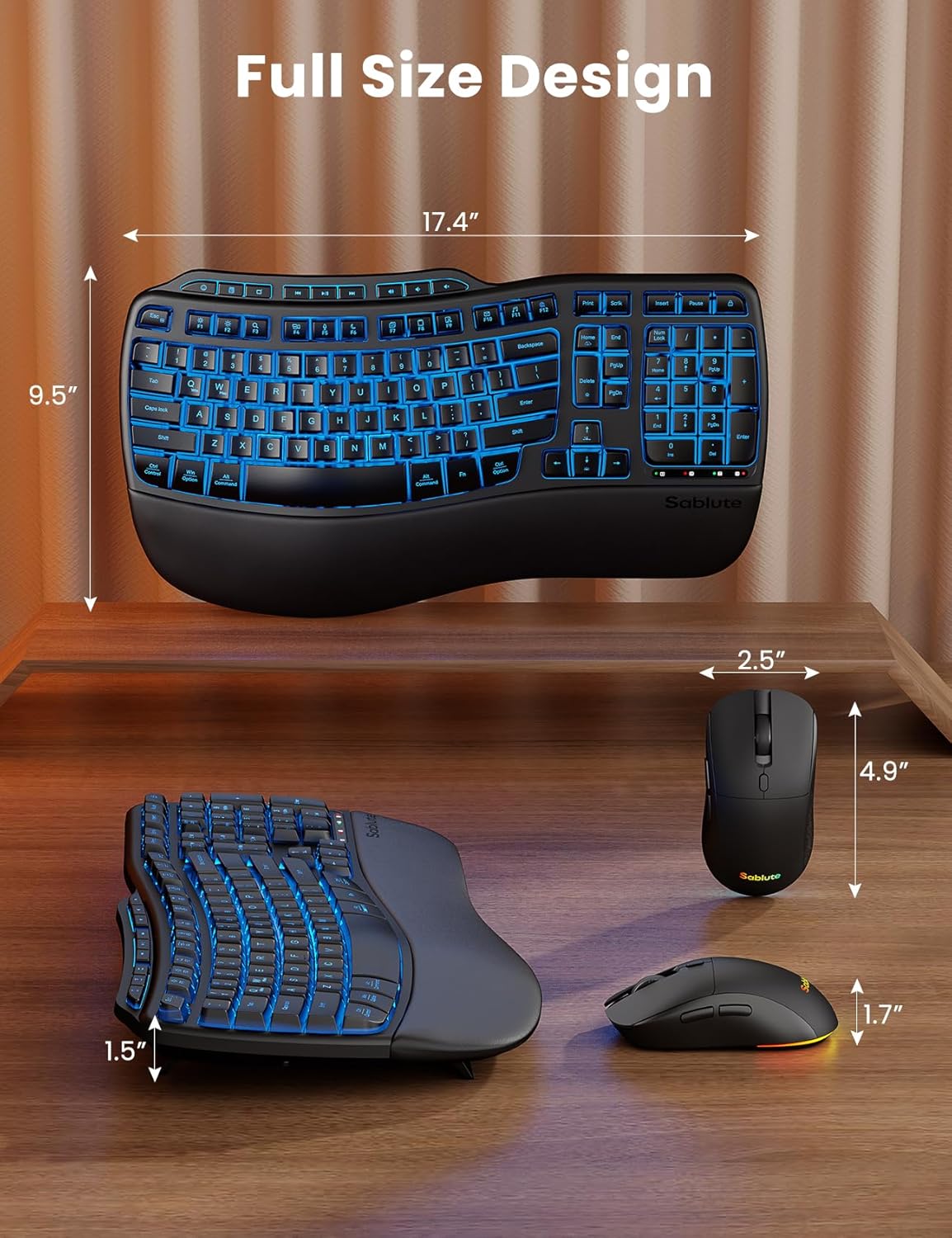
Premium Comfort & Craftsmanship – Experience the luxury of a silky-smooth faux lambskin leather palm rest paired with a refined matte finish. Unlike fabric, this synthetic leather is durable, sweat-proof, and easy to maintain. Every detail reflects thoughtful craftsmanship.
4000mAh Ultra-Long Battery – Work longer without interruption. With 2× the capacity of standard backlit keyboards and intelligent auto-sleep, this keyboard lasts weeks on a single charge.
10M Keystroke Durability – Built to handle 10 million keystrokes—twice the life of standard keyboards (5M). A smarter long-term investment that saves on replacements. (Peace of mind: 30-day return + 1-year replacement.)
Ergonomics Designed – Sit or stand—new adjustable front/back stands support healthy wrist posture. Wave keys deliver smoother, more comfortable typing, so you can type for 8 hours without fatigue. Perfect for pros, home offices, and daily work
Backlit Style – Sleek, refined lines and backlighting bring both style and focus to your workspace. Choose soft tones (blue, cyan, white) for calm productivity or bold colors (red, green, purple, yellow) to match your mood—one for every day of the week.
RGB Mouse – 700mAh battery, auto sleep mode, 6 buttons, and 3 DPI levels (800/1200/1600). Tired of mice with only cycling lights? This one lets you choose 6 fixed colors or 5 cycle modes. Plus, the keyboard has 9 shortcut keys to boost productivity.
Universal Compatibility – One 2.4GHz USB receiver (33ft) connects keyboard and mouse. USB-A & C combo works with 99% of devices—PC, laptops, tablets, desktops, Macs. plug and play.
10 reviews for Ergonomic Wireless Keyboard and Mouse Combo, Rechargeable 4000mAh Backlit Keyboard with a Soft, Faux Lambskin Palm Rest, Wave Keys for Natural Typing, Compatible with Windows/Mac/Chromes OS—SABLUTE
Add a review

$54.99
Dr. Nic –
Finally Found A Great Ergonomic Keyboard
I work from home and often put in long hours, so comfort is non‑negotiable for me. I also deal with wrist pain in my dominant hand, which makes an ergonomic design absolutely essential. After more than 10 years of relying on the Logitech Wave K350, I fell in love with it. I was disappointed to find that it had been discontinued, so I’ve been searching everywhere for a similar replacement, and I finally found it.Right out of the box, the quality looks and feels impressive. The keyboard charges quickly, and I love that you can keep using it while it’s plugged in. The USB‑C port on the side, paired with the right‑angle cable, is a thoughtful touch that keeps everything neat and out of the way.The backlighting is another great feature. Whether I’m in the mood for calm productivity (blue, cyan, or white) or want something more vibrant (red, green, purple, yellow), the lighting options make the whole setup feel customizable and fun. The 10 shortcut keys are the cherry on top, making everyday tasks quicker and more efficient.Typing on the wave‑style keys is incredibly smooth and comfortable. I can easily work an entire day without the fatigue I used to feel. It’s perfect for long work sessions, home offices, and anyone who types a lot. The mouse also feels great in hand, with a smooth matte finish that complements the keyboard nicely.After searching and searching, I’m so happy I found this combo. If you need comfort, quality, and thoughtful design, this is absolutely worth it.
Kindle Customer –
Fantastic Keyboard!
I work from home and am an avid PC gamer, which translates to lots of time at the computer; thus a keyboard that’s ergonomic and comfortable is an absolute necessity. For years, I, too was a faithful user of the Logitech Wave keyboard that seems to no longer be in production, and the journey to get to this Sablute keyboard was long and filled with tons of product returns.Another Amazon reviewer mentioned that Logitech connection by name, after HE tried this product, which is exactly what inspired me to try it, as well. If someone else felt it was a close approximation to The Wave, then I had to give it a try. Pleasantly, I have to say, they were right: this is as close as I’ve come to finding something that suits as well as The Wave, and this keyboard is a pleasure.The keys are buttery soft, and it’s quiet as a whisper. The wrist rest is comfortable, and I find something pleasant sensory-wise with the way the material feels; it’s just the right amount of squish. Since I’ve connected the keyboard to my PC, I’ve actually been looking for things to type up, because this keyboard just has a great feel to it.The backlight keys (which can be turned off if you prefer) are a bonus selling point for me It’s a fun feature on a product I’d absolutely use without it. They do dim after several minutes of inactivity, so your battery power is saved automatically, which is a unique feature I’m kind of impressed with.This is definitely a comfortable keyboard and if you’re looking for something to replace your Logitech Wave with, look no further. This is the keyboard for you!
Shanice –
Fancy
I needed a new keyboard so bad because my keys kept getting stuck. This keyboard is so nice, no keys are going to get stuck. I love the backlight on the keys which is great because I start work when it’s still dark and I don’t turn on the light. It comes with a mouse. I used this keyboard the same day I received, you don’t even need to set it up, just plug the usb cord in your laptop and the usb to the mouse and you are good to go. The keyboard is fancy and Im very efficient while using it at work.
Alex –
Good ergonomic Style and Backlight
Comfortable and easy to use. The wave keys feel natural when typing, and the soft palm rest really helps during long work sessions. The backlight is useful without being too bright, and the battery lasts a long time. Mouse works smoothly and setup was quick. Solid ergonomic combo for everyday use.
Mike –
Smooth, quiet keyboard. Reasonable replacement for Logitech Wave K350, except for the wrist rest
I have been searching high and low for a good replacement for my old Logitech Wave K350 keyboards, which I have been using for probably about 20 years, and have not had much luck. So far this is the closest I have found to a good replacement. Overall the keyboard has a great look, and the keys feel smooth and are very quiet. The layout is very similar to the K350, so if you liked those in the past this one is easy to adapt to. I like the backlighting which can be adjusted for color and brightness directly from the keyboard without requiring any software or drivers. Unfortunately it doesn’t remember your settings, and always defaults to dark blue. I like that color best, so it doesn’t bother me, but it’s worth noting that every time you shut it off, it powers back on in the default blue illumination.Many new keyboards (including the new version of Logitech’s Wave) have started switching out standard keys like print screen, scroll lock, etc. for odd specialty keys. Thankfully this one still has all the standard keys, along with a few specialty ones and media controls added in above the F keys. A couple of the standard keys like insert and pause are oddly located, but still in the same general area where they belong. They are also still primary keys, not buried under others with the Fn button.The power switch on the side is great because you don’t have to pick up the keyboard to turn it off. The USB-C charging port is on the side as well, which is not ideal, but they do provide a right angle cable so it’s not too much of an issue. For use at work, it’s probably the quietest keyboard I have ever used, and still feels tactile enough for me unlike some other quiet ones I have used.My biggest complaint is the wrist rest. The cushion is comfortable, but the left side is way too short, and it sticks out a bit too far in the center. My hand hangs off the side because of how narrow it is, and how much it curves in. I have tried a few similar keyboards that are much worse, so this is still usable for me, but this is a big miss by the manufacturer. A little less material extending out in the middle and a bit more on the left and right side would have gotten it 5 stars. The covering material feels very thin and somewhat cheap, but it’s comfortable and after the first 2 weeks or so of use, it still looks new. Time will tell how well that holds up. I suspect the first part to give out will be on the left where my hand hangs off the edge. I have a few K350’s that are approaching 15+ years old and the wrist rests on those still look perfect.The mouse with this set is pretty good for this price point. It is also illuminated, and like the keyboard, it does not save your settings when powered off. The switch on the bottom lets you choose to turn it on with or without the illumination. Interestingly, the default color for the mouse is a moving rainbow, while the keyboard is dark blue. They should have made them both keep the user applied settings, but if they were going to make it default every time it powers on, it seems like the right thing to do would have been to default them to be the same color. The keyboard doesn’t even have the moving rainbow as an option.The mouse keys are also VERY quiet, as is the fairly large scroll wheel. There is a selectable DPI, which is handy and often not found on mice at this price point. I primarily use a trackball so I haven’t used the mouse that much, but for this price point it seems above average.
christian bourassa –
Nice keyboard but the lights doesn’t workUpdate Dec 4: Got contacted by the seller and they were kind enough to send me a working replacement. I greatly appreciate the gesture. It’s nice to see companies who stand behind the quality of their product.Thank you.
CalgaryBen –
This Sablute wireless keyboard and mouse combo has been an excellent daily-use combo. On a full charge, I was able to use this combo daily (about 8 hours/day, for work) for about 3 weeks before needing to recharge (the keyboard gave out before the mouse did). The layout and feel of the keyboard is comfortable, and the soft palmrest makes using it really enjoyable. What I really like is that both the keyboard and mouse are ready to go when you are, even after a prolonged period of non-use, such as first thing in the morning (there’s no lag or sense of either device sleeping — as soon as you touch it, it’s awake and functional!).I initially thought the backlighting for the keyboard was just a bell/whistle I wouldn’t appreciate, but I actually found the gentle glow through the characters/symbols useful for finding keys in a dark environment, especially when the keyboard was new to me and I was not yet familiar with the layout. The backlighting on my keyboard seems to have a slight defect, where the left side has a slightly more blue hue, but it doesn’t bother me, but instead gives it an interesting gradient look. I’ve also since learned that if the keyboard backlight does not illuminate when you start typing on it, it means the batteries are low and need a charge (the red battery indicator LED is small and out of the way, so you might not notice, but not seeing the backlight is a good “something’s not normal” indicator), but fortunately the keyboard continues to work even on a low battery, so no productivity is ever lost.It’s nice that both keyboard and mouse can be used while they’re charging, so if one of them suddenly stops working due to the battery being depleted, you’re not frozen in your tracks because you can just plug in the USB-C cable and continue working. I tested using the keyboard and mouse as wired devices (with the provided cable plugged into either device and the other end into my computer), but it does not work that way (not detected as a device); it’s completely reliant on the wireless USB-A dongle (and by the way, Sablute included a USB-C adapter in case you have a newer computer with no USB-A ports).Pros● Single USB-A dongle (replaces 2 USB-A connections if you were using wired keyboard/mouse before)● Very much a plug and play dongle (worked immediately on Windows 11, no driver installation required)● No lag or delay; mouse is active and good to go as soon as you touch it, as is keyboard.● Backlight aids in finding keys in a dark environment● Rechargeable (USB-C) and lasts a long time on a full charge! My keyboard lasted about 3 weeks… the mouse lasted even longer.● Very comfortable layout and soft palmrestCons:● Uses up a USB-A port or USB-C port (with adapter), which may be precious/limited on some laptops; Bluetooth combo might be better in this case● Is completely dependent on the USB wireless dongle; if you lose it, the keyboard and mouse become useless● There is no battery charge indicator; having one either via an app in the OS, or from the device, would be helpful● The wireless communications at 2.4 GHz is prone to noise if you plug the dongle into a docking station or USB hub with poor shielding (not a fault of the combo, just a common issue with docks/adapters/hubs).
Catnip Critic –
I’m a software developer working from home, and I use this keyboard and mouse for my work, so I sit with them for multiple hours a day. I’ve had them for a couple of weeks now. So far I’m very pleased with this set. The padding on the keyboard is so comfortable! I’ve had some significant wrist pain before so I always make sure my wrist is supported, and the pad on the front of this keyboard really helps, it’s firm but also soft on the skin, like a suede texture. The keyboard layout did need some adjustment period to get used to typing blindly on because it’s quite a bit smaller than my previous one. The position of the home/end keys is especially grating unfortunately. The backlight is ok, frankly I don’t care for RGB, but it doesn’t bother me. The mouse is also fine however I would say the shape is not very comfortable for my hand, it’s a bit too long and not tall enough to give my wrist the best support. I might just need to get used to it. The mouse is decently sensitive for development work (I don’t know about gaming), and I actually kind of like the flowing RGB effect on the bottom of it. The dongle works fine although I wish there was a bluetooth option. I’ve recently started iOS development so I have two laptops now and I wish I could easily switch the peripherals to the other laptop.
Jason –
I’m a huge computer buff, so I jump at any chance to try out new peripherals and hardware whenever I can, to see how they stack up against everything else I’ve tried; so I can say with some certainty that this is a very *decent* keyboard/mouse combo for the price; they are both fully-featured, replete with RGB; and everything feels well-made.The RGB options on the keyboard seem somewhat limited unfortunately, lacking any of the more dynamic lighting features that most other modern keyboards have at this price range (things like ‘pulse mode’, ‘rainbow’, etc. are completely nonexistent here – but the various ‘solid color’ options it has are numerous and well-saturated, and they look really nice.The lighting options on the mouse, however, are a bit different – there is some dynamic lighting there – though there seems to be no sync of the lights with the keyboard (which is fine and quite common among mid-tier combos – but still worth knowing).One other caveat is that there is no Bluetooth support; and though none is mentioned on the listing it’s a bit of a surprise considering the large majority of even budget keyboards these days support it – but the included 2.4ghz dongle works great and it all connects just as fast as expected.The manual is good, easy to read and informative, as is the included quick-sheet – and setting it up is as easy as removing the dongle from the device, plugging it into your computer, and flipping the switch on both keyboard and mouse to ‘on’ (which is one benefit of using 2.4Ghz over Bluetooth, as the latter has a far greater tendency to be finicky with new connects).Overall I don’t think you can go wrong here. As long as you don’t mind a few missing RGB options (tbh, half the time I leave my other keyboards on solid colors anyhow – and only switch when I want them to look fancy), a lack of Bluetooth support and some slightly ‘squishy’ keys (I’m used to high-end mechanical switches – and while this doesn’t live up to that, it’s still not unpleasant to type with by any means), I think it’s an excellent bargain for the price.
Anna –
A few days ago, I got this SABLUTE Keyboard and mouse set and let me tell you it absolutely honestly changed the way I work at my desk every day. The keyboard feels so solid the moment I picked it up out of the box and it has this smooth, comfortable finish that makes typing feel effortlessly. What I really appreciate is that the back has pulled out clips on all four corners, so that I can elevate the keyboard to the exact angle, I like. It makes a whirl of difference during long typing sessions.The keys have a soft, cushioned tap that doesn’t get tiring, and the spacing feels very natural, so I don’t make as many typing mistakes. The built-in wrist rest gives my hands a gentle place to relax, it’s so soft uncomfortable, which really helps me when moving between emails, documents and browsing for many hours. The back light is another of my favourite feature. I appreciate and love, it makes the keys easy to see when I’m working early in the morning or late at night without needing to brighten the whole room, this is a very convenient and functional feature.The mouse glides smoothly with no skipping or lagging, and both pieces connect instantly once I plugged in the tiny receiver. There is no complication, pairing or software needed, it literally was effortlessly plugged and go. The keyboard also has extra functions shortcuts for a volume, media and quick commands, which makes it faster to switch between tasks without lifting my hands away.I really like the size of the keyboard. It is just right for me not too small not too large. What I noticed most is how much this set up improves my workflow. Typing feels easier, navigating the screen smoother, and my desk looks cleaner because there are no wires running everywhere. It just makes the whole workday feel lighter and more comfortable. For a home office set up, this SABULTE combo has been a real upgrade for me working from home every day. I feel that this keyboard is design with premium material and functionality that is going to last for a long time. If you are like me and you are looking for keyboard and mouse combo rechargeable 4000mAh backlit wireless keyboard with many unique features that is functional and well design to help improve your day-to-day workflow or just browsing then this combo might be for you as well. I absolutely recommend it.