

Contour RollerMouse Pro3: Ergonomic Design for RSI, Carpal Tunnel & Shoulder Pain, No Reach, No Grip, No Strain, Customizable Shortcuts, Adjustable Speed, Wired USB for Mac & PC
$309.00
Related Products



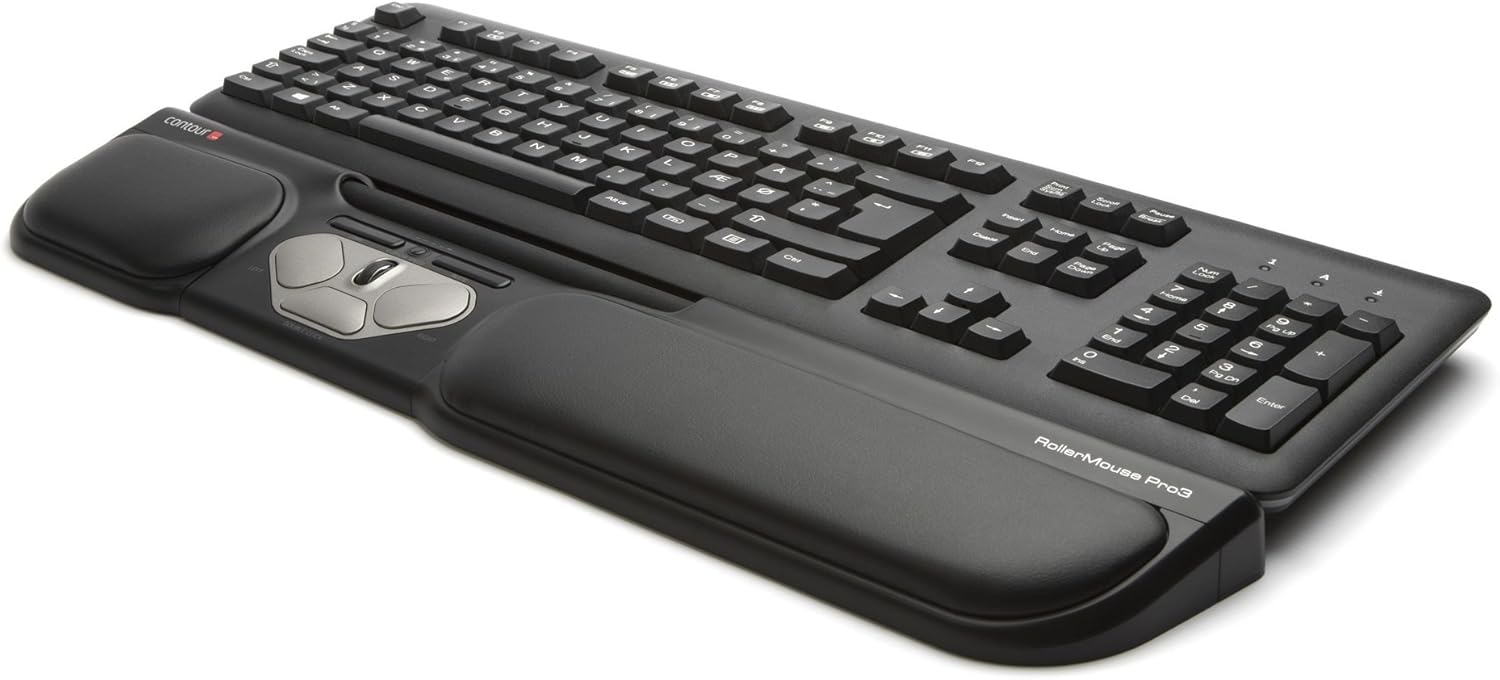


Roller Mouse Pro3 from Contour Design even better control and increased level of comfort With the Roller mouse Pro3 you will not feel unnecessary tension in the hand and shoulders to work in exactly the same way as a standard mouse As the Roller Mouse is placed before the keyboard it creates a inline-workstation and reduces the sensation of tension in your fingers due to the unique rolling bar The Roller Mouse is easy to use with both hands Physiotherapists and Ergon omen have proven that such computer work reduce the risk of carpal tunnel syndrome tennis elbow and can relieve RSI-Syndrome symptoms The Roller Mouse Pro3combines all the best features of the Pro2with an improved design and better functionality The new model is slightly thicker and fully height adjustable This ensures comfortable arm position when using a high positioned keyboard For added ergonomics in the workplace the rolling bar is a smooth easy to move and the click pressure can be adjusted individually The faux leather wrist support provides a more comfortable arm position In addition the Mac compatibility is improved and the edges recognition enhanced Details 29mm Height 17cm long rolling bar stimulates usage of both hands at the same time Adjustable mouse speed options from 200to 2600dpi 8button function 5buttons are programmable Comfortable Faux Leather wrist support which can be removed Aluminium base offers enhanced durability and stability Plug-and-play USB connection as Operating Systems PC Mac and HID (Linux) Dimensions (H/L/D) 2 9x 48 8x 9 9cm.
✅ ERGONOMIC CENTERED DESIGN FOR PAIN-FREE PRODUCTIVITY : Say goodbye to shoulder, neck, arm & wrist strain. The RollerMouse Pro3 sits directly in front of your keyboard, keeping your hands within shoulder width and eliminating the need to reach, grip or move a mouse – ideal for users with carpal tunnel, tendonitis or who want to prevent repetitive strain injuries (RSI).
✅ NO GRIPPING, NO MOVING HANDS, LESS FATIGUE : Control your cursor effortlessly by using any finger. The Rollerbar allows smooth, accurate cursor movement, and tap to click functionality – no need to grip or drag a mouse, reducing fatigue and tension.
✅ PREVENTION AND RELIEF FOR RSI & CARPAL TUNNEL : RollerMouse Pro3 is designed to reduce repetitive movements, offering a healthier, more comfortable alternative for users facing discomfort or users with carpal tunnel syndrome, Tennis Elbow or similar conditions.
✅ WORK FASTER WITH ONE-TOUCH SHORTCUTS : Boost your productivity with built-in Copy and Paste buttons. Customize five programmable buttons to streamline specific tasks in data entry, finance or software that demands extensive mouse use.
✅ CUSTOMIZABLE CURSOR SPEED FOR PRECISION & WORKFLOW : Seamlessly transition between 10 adjustable cursor speed settings (800–2400 dpi). Whether you’re working on content navigation and editing, daily emails or spreadsheets, CRM or ERP software or casual browsing, you’ll always have the precision you need.
✅ ALL DAY COMFORT WITH MEMORY FOAM WRIST SUPPORT : The leatherette wrist rest provides a soft, supportive base that conforms to your hands and can easily be disinfected. Enjoy fatigue-free comfort through long work sessions at home or in the office.
✅ EASY SETUP, UNIVERSAL COMPATIBILITY & PEACE OF MIND : Plug and play with Windows and macOS (no driver required). Fits all keyboard sizes and requires no mouse pad. Backed by a 2-year warranty and a dedicated customer support team.
✅ SUSTAINABLE DESIGN WITH REPLACEABLE COMPONENTS : RollerMouse Pro3 is built to last using durable materials, including post-consumer recycled plastic and recycled aluminum. Its replaceable components make it easy to repair, extend its lifespan and reduce electronic waste.
13 reviews for Contour RollerMouse Pro3: Ergonomic Design for RSI, Carpal Tunnel & Shoulder Pain, No Reach, No Grip, No Strain, Customizable Shortcuts, Adjustable Speed, Wired USB for Mac & PC
Add a review

$309.00
JuMeLiGu –
Cheaper than doctor visits!
UPDATE 12/2025 The roller mouse is still working wonderfully and the pain I mentioned in my original review has not returned. I am Extremely happy with this purchase – I highly recommend it and if this one ever stops working, I will buy another.Original Review:My shoulder wrist and forearm pain are gone! I regularly use two large monitors plus my laptop screen, moving the cursor across all of them is easy, once you hit the end of scroll bar if you haven’t made it to the desired area, there is a spring type of thing. Just push into the spring and the cursor resets and continues moving as needed.I was hesitant about getting the roller mouse because 1) I wasn’t sure how easy multiple monitors would be, it’s a snap and nothing to worry about. 2) I had used an ergonomic split keyboard for 15+ years, so I was concerned about not being able to use the older mouse with that style of keyboard. I decided to give it a try and now use a regular keyboard with no wrist pain as of yet. I’ve been using the roller mouse for a couple of months now. 3) The price had me think long and hard about it; but I decided to give it a try through Amazon because it’s easy to return if it didn’t work out, and because if it did work it’s much cheaper than doctor visits, physical therapy or surgery. I’m extremely happy to say I have not needed to go to the doctor for the pains I had and I no longer need to eat ibuprofen like candy. The only regret is that I didn’t find the roller mouse a couple of years ago.I use the number pad on the keyboard extensively, so I chose the Pro3, it’s perfect.
NiLiu –
Worth every penny!
Developed shoulder mouse injury and radial nerve pain due to years of using regular mouse. On my third week of using this roller mouse and my shoulder pain had subsided. Easy to use. No more gripping! Really like the roller bar , feels like butter. The only thing is that my ergonomic keyboard did not fit well with this mouse . It is curved with hand rest built in so it took alot of space and had to reach up to type . So had to revert back to regular keyboard. Which is fine for now since my job is 90% mouse dependent. Another thing are the pads . They are a bit stiff although I am very picky about that. Regular mouse pads hurts after long use so I usually make my own with soft materials. For this roller mouse pads, it’s built in . Wish they made it softer. Otherwise, it’s a good investment. Very expensive but outweighs long term injury! Highly recommend if you have shoulder mouse and nerve pain/injury.
Amazon Reader –
Best thing for trigger thumb/wrist issues
I was having issues several years ago with carpal tunnel and trigger thumb where surgeries and other treatments had been recommended by docs from the excessive mouse use my job requires. I tried a vertical mouse and the problems got worse. I tried this and started feeling relief immediately. No real adjustment to use it – super easy to use. Now, several years later my problems are still resolved. I have them at home and at my office and will never go back to using a regular mouse as long as this option exists. Rollerball is fabulous! One of my best purchases ever.
kellen –
Couldn’t live without it
I bought this for video and audio editing but it didn’t work well for the task. What the RollerMouse Pro3 really works well for is typing and general computer use. It’s so much faster than using a mouse. I’ve used mine enough the left button is getting worn but it’s still super comfortable and I can type for hours with greater speed and my hands and wrists don’t hurt. It’s a little pricey but if you value your time and want to type faster, it’s fantastic.
gscott –
Can’t work without it
For years, working with a computer meant removing your hand from the keyboard to the mouse (most times at least 12 inches away) back and forth a zillion times. This Rollermouse solved that hassle. The mouse, scroll wheel, right & left click, along with special copy & paste buttons and a double click button ….All within a finger’s reach without removing my hands from the wrist pad. Plus the support is awesome. I updated my MacOS to BigSur 11.4 and the scroll wheel stopped working. I contacted Contour Support and they had a new driver created in a day or so that fixed the problem.
Sandra Estrada –
Great
So far it’s amazing. I’ve had 1 before and have loved these ever since
Dave, Florida –
Works very well; Small learning curve though
I love the way it moves the cursor and scrolls. The long rollerbar has a wide range of motion and it’s easy and fun to use. the clicks of the buttons are smooth and it’s a thoughtful product. Ultimately I did not prefer two things that may not bother you: (a) The solution to the inevitable “end of range” issue, and (b) the height relative to my keyboard. ((a)) The rollerbar runs out of room on the left and right. It’s not infinite. When it runs out, you push an extra click to the right or left (using the rollerbar), and the cursor jumps to the far-right or far-left of screen. Not my preference but probably other less difficult folks would learn to use that. ((b)) Secondly, the housing shielding the rollerbar is rather high. This is kind of essential, that it have a housing to hold the rollerbar. But I bumped into it when typing certain keys low on my keyboard. I tried to raise up the keyboard to avoid this, but then I had the opposite problem: Rollerbar was now lower than the keyboard and hard to use. So, again, probably a learning curve that you can get used to with habit and practice. I just preferred to go back to a freestanding touchpad peripheral. The above really is a good product. Just giving you the skinny. Other adjustments they offer (click firmness, keyboard height arms, key programming which I didn’t get to) are all well-done. Cursor moves like a dream. The rolling and scrolling were delicious. Just expect a bit of learning on these small features and you’ll be golden.
Sylvie –
Cannot work on the computer without it!
Really easy to get used to. Let’s you distribute typing stress evenly between both hands. Since I started using it my elbow pain melted away.Love the ease of cutting & pasting. Best kept secret. Try it and within a week you will get addicted!
Amazon Customer –
Själv är jag tre gånger så snabb med muspekaren när jag använder det här istället för en vanlig mus. Var så nöjd med den jag har på jobbet att jag köpte det här exemplaret att använda hemma! Hade musarm för många år sedan, aldrig hänt igen när jag använder Rollermouse.
Claes Radstrom –
Expensive, but there is no substitute.My old roller mouse 2 finally died aftermore then a decade of (ab)use.
LINDA CARPENTIER –
Très bonne souris de très grande qualité qui aide pour ceux qui ont des douleurs aux mains ou aux bras. Je recommande!
rich –
It’s not a case of whether I like this product or not. The simple fact is that this has become a must accessory for me that I cannot live without. As a professional software developer of over 25 years using a keyboard and mouse constantly is key to making a living. Over the years I have developed various aches and pains in my hands that can be debilitating at times.The simple act of taking your fingers off the keys and rotating your hand to the mouse is an unnatural movement and one that was causing me a lot of discomfort. I have found it worse when I’m using a full size keyboard with a full numerical keypad etc and the mouse is further offset to my right.I have tried various ergonomic mice over the years, the best on the market, and none have quite worked for me as well as the rollermouse.The rollermouse sits underneath my keyboard and provides a comfortable palm rest. To move the cursor most of the time I simply stretch my right thumb down to the rollermouse and that’s usually enough to most of the time to manoeuvre the cursor to where I want to go.A mouse click can also be simulated by pressing down on the rolling bar also. If needed there are dedicated buttons for clicking/selecting also.There is a trade off in the sense that the control is less accurate that a conventional mouse, however over time you do become used to it more and more. Also the pointer reaches the edge of the screen and the bar has been moved all the way to the end. At this point if you keep trying to move the roller it will eventually re-adjust and let you keep moving the pointer in that direction and this is initially a little jarring.I don’t know how robust this product will be. It is collecting debris etc from my dirty hands over time etc as I eat lunch at my desk etc and probably don’t have the best hygiene :). I have read however that it is possible to take it apart to clean it. Perhaps occasionally I should use a wet wipe and wipe down the 70% of the bar that is exposed.I will conclude by saying that it’s a considerable investment, however I won’t be buying another mouse and regardless of how long this lasts I will be buying another because this has become a natural, pain free way to interact with my machine 8 hours a day 5 days a week. My mice are now tucked away in my desk and I have no intention of bringing them back into action anytime soon. Well worth the money! I’m interested in trailing the mobile version at some point when funds allow!
ODILE –
Tout d’abord, je précise que le modèle que j’ai acheté était en occasion, à un prix très très très bas par rapport au modèle neuf. C’est pour cela que je laisse les 5 étoiles, bien qu’il n’ait pas été précisé que les rehausseurs de clavier n’étaient pas fournis. J’ai été un peu déçue au départ que le dispositif soit incomplet, mais cette roller-mouse est tellement pratique et a si bien réussi à faire disparaître les douleurs et tensions que j’avais au bras droit en raison d’une mauvaise posture que ce que j’imaginais pouvoir être un inconvénient a bien vite été oublié. Cela fonctionne très bien comme ça et si besoin, je trouverai bien un système pour rehausser le clavier par mes propres moyens !La prise en main est très facile et rapide, le confort est incomparable, bref je recommande sans réserve cette souris !