
AVMATRIX HVS0402U Micro 4 Channel HDMI Live Streaming Video switcher
$549.00
Related Products




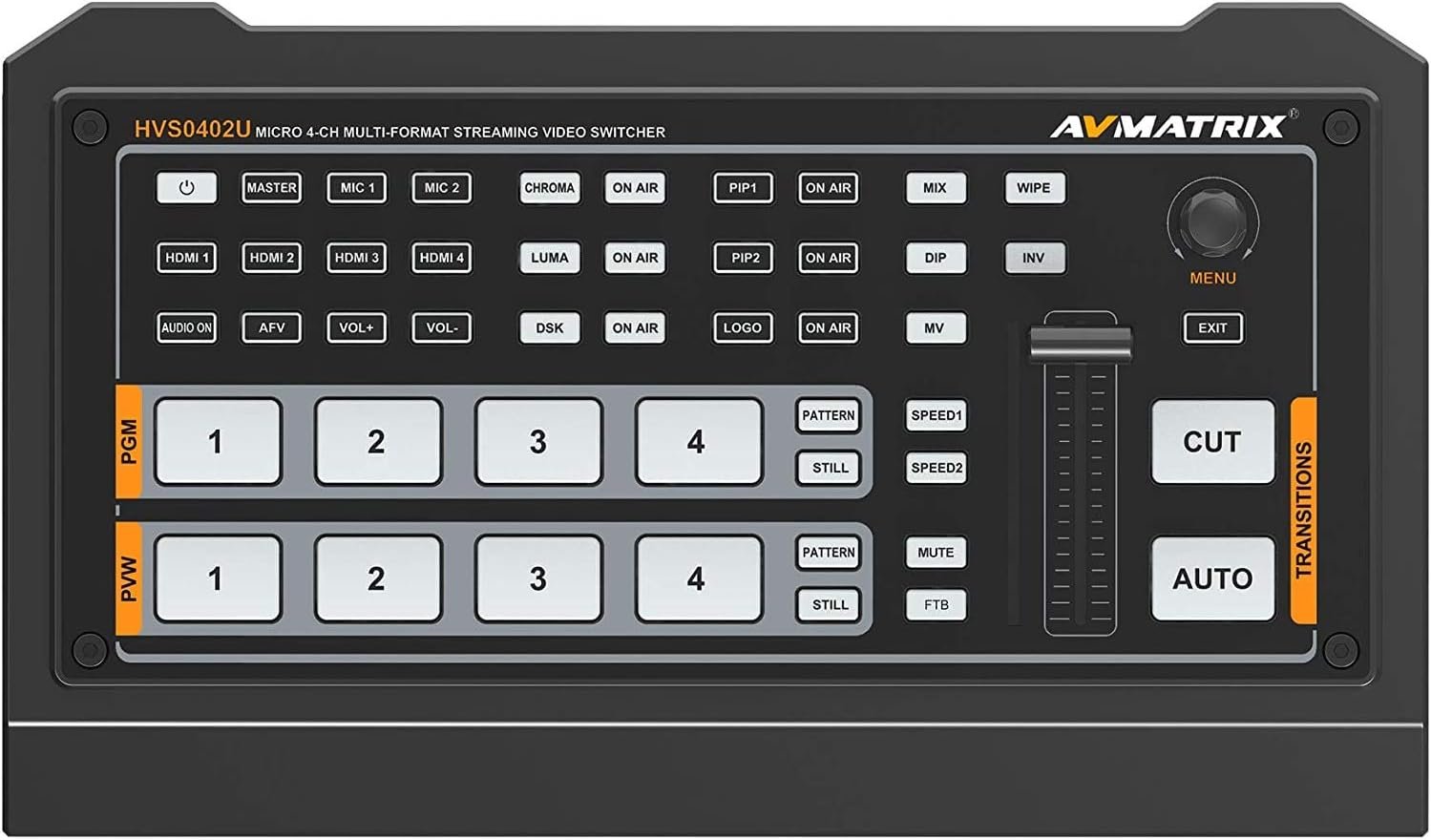
HVS0402U
MICRO 4 CHANNEL HDMI LIVE STREAMING VIDEO SWITCHER
4 channel auto-detected HDMI inputs
1×HDMI PGM output,1×HDMI multiview out, 1×USB type-C output
AUX output configurable and assignable
USB-C for capturing and streaming on PC
Clearly visible multiview & status page
Upstream key: Luma key, Chroma key, PIP×2/ POP
Downstream key and LOGO overlay
T-bar/ Auto/ Cut transitions; various effects: WIPE(9×2 patterns) / MIX/ DIP
Audio mixer: HDMI embedded audio and 2-Ch MIC/ line In; audio delay available
Media library: 49 default patterns, 16 imported images, 16 captured images, 2 color generators
LAN port for PC software remote control
FTB/ MUTE/ STILL/ GPIO for tally
customer configuration import and export
Overview HVS0402U is a 4-channel HDMI multi-format video Switcher with compact metal case design. It supports various functions including video switching, audio mixing, PGM/ multiview/ Aux out, different transition effects, Luma Key Chroma Key, DSK, LOGO, PIP/ POP, media library, pattern and color generator, etc. Inputs support multi-format, PGM output can be scaled, compatible with a variety of equipment. The unit supports stream performances and presentations on PC through the USB-C port. User can also customize different settings and import or export the configuration quickly for various scenarios. It’s a powerful and professional video switcher for your choices Video In HDMI type-A ×4 Video Out HDMI type-A PGM ×1 HDMI type-A Multiview ×1 USB2.0 type C ×1 (Streaming on PC) Assignable HDMI 1~4, PGM, Clean PGM, PVW, Color bar, Multiview Audio In MIC/ Line level (3.5mm stereo audio) ×2 PC Control Port LAN×1 Media Library USB type-A ×1(USB disk port for image import and firmware upgrade) Tally Port DB-15 ×1 Power In DC 12V ×1 FUNCTIONS Transitions T-Bar/AUTO/ CUT Effects Wipe (9×2 patterns)/ Mix/ DIP/ Pattern/ Still(freeze)/ MUTE/ FTB Layouts 2 styles of Multiview layout (6 windows and status)
HVS0402U is a 4-channel HDMI multi-format video Switcher with compact metal case design. It supports various functions including video switching, audio mixing, PGM/ multiview/ Aux out, different transition effects, Luma Key Chroma Key, DSK, LOGO, PIP/ POP, media library, pattern and color generator, etc.
Inputs support multi-format, PGM output can be scaled, compatible with a variety of equipment. The unit supports stream performances and presentations on PC through the USB-C port. User can also customize different settings and import or export the configuration quickly for various scenarios. It’s a powerful and professional video switcher for your choices
CHROMA KEY LUMA KEY CHROMA: Enable the Chroma Key LUMA: Enable the Chroma Key PIP1/PIP2: Enable two group of Picture in Picture. Size and position can be set via Menu. LOGO: Add logo bin from USB flash disk, enable the logo overlay ON AIR: make the corresponding Chroma/Luma/PIP/Logo on air
T-Bar Switch the PVW and PGM through T-Bar
. MULTIVIEW The switcher has two HDMI outputs (PGM/Multiview). The two HDMI ports are both the AUX out that user can define it as output of HDMI 1/ HDMI 2/ HDMI 3/ HDMI 4/ PGM/ Clean PGM/ PVW/ Color Bar/ Multiview (Refers to Part 6). Connecting the HDMI Multiview out to an additional monitor, user will get the multiview image. In the Multiview there are windows of PVW, PGM, HDMI 1, HDMI 2, HDMI 3, HDMI4 and Status/Menu page. See below image.
1 review for AVMATRIX HVS0402U Micro 4 Channel HDMI Live Streaming Video switcher
Add a review

$549.00
Shopper1234 –
Good solution that works right out of the box.
Nice product. I bought because obs and my streamdeck are too complicated and unreliable (spent days on YT to build scenes / macros that don’t work when you need it / all sorts of workarounds needed for Zoom). I purchased instead of the atem because, at the end of the day you still rely on the black magic software to get basic functionality out of the atem. I like the old school switcher slider and button setup of the avmatrix. Instructions are a little lacking so it took me a while to figure out how to use the dsk/usk features. The menu built into the multiview is easy to navigate. I just wish there was a button to quickly access the images to quicky Luma key in different graphics instead of getting into the menu. Also no motion graphics built in (aside from the transitions) I got around this by building all my Luma key graphics into a PowerPoint deck (or LibreOffice Impress) that I can easily scroll through and then using a cheap HDMI splitter from Menards to bring my 2nd monitor as an HDMI input so I can quickly overlay different lower thirds. Probably a host of different solutions out there but I’m not a graphic designer and don’t want to spend big $ on software solutions. The fan might be too loud for some people but it can be turned off. I wish it had XLR inputs but I was still able to run in my sure vocal/stage mic through an audio mixer so it doesn’t pickup any background sounds. on screen video levels make it easy to monitor audio in real time. Lastly I don’t think you can record directly into a usb harddrive. You can broadcast out to PC using USB C and simultaneously to the HDMI program out which is nice. Overall great starter switcher if you want a reliable hardware solution with easy to use buttons for livestreaming, presentations, and tutorials. Use cable ties and label the connections with painters tape to keep things tidy and organized. The comparable Roland switcher is 4x the price! Fun little switcher!