

Aqara Smart Light Switch H2 (2-in-1 Neutral, 4 Buttons, 3 Channels), Thread/Zigbee Protocol, Wall Switch for Smart Home, Supports Apple Home, Google, Alexa, Matter Over Thread
$54.99
Related Products




From the brand


As a leading provider of smart home solutions, Aqara excels in delivering a wide array of award-winning, user-friendly smart home products and platform solutions tailored for your home. We proudly serve over 12 million customers in more than 170 countries and territories. Our products are designed to offer convenience, security, and energy efficiency, making your home smarter, more sustainable, and adaptive to your evolving needs.
UWB Smart Lock U400
Aqara Smart Lock
Aqara Cameras & Hubs
Aqara Sensors
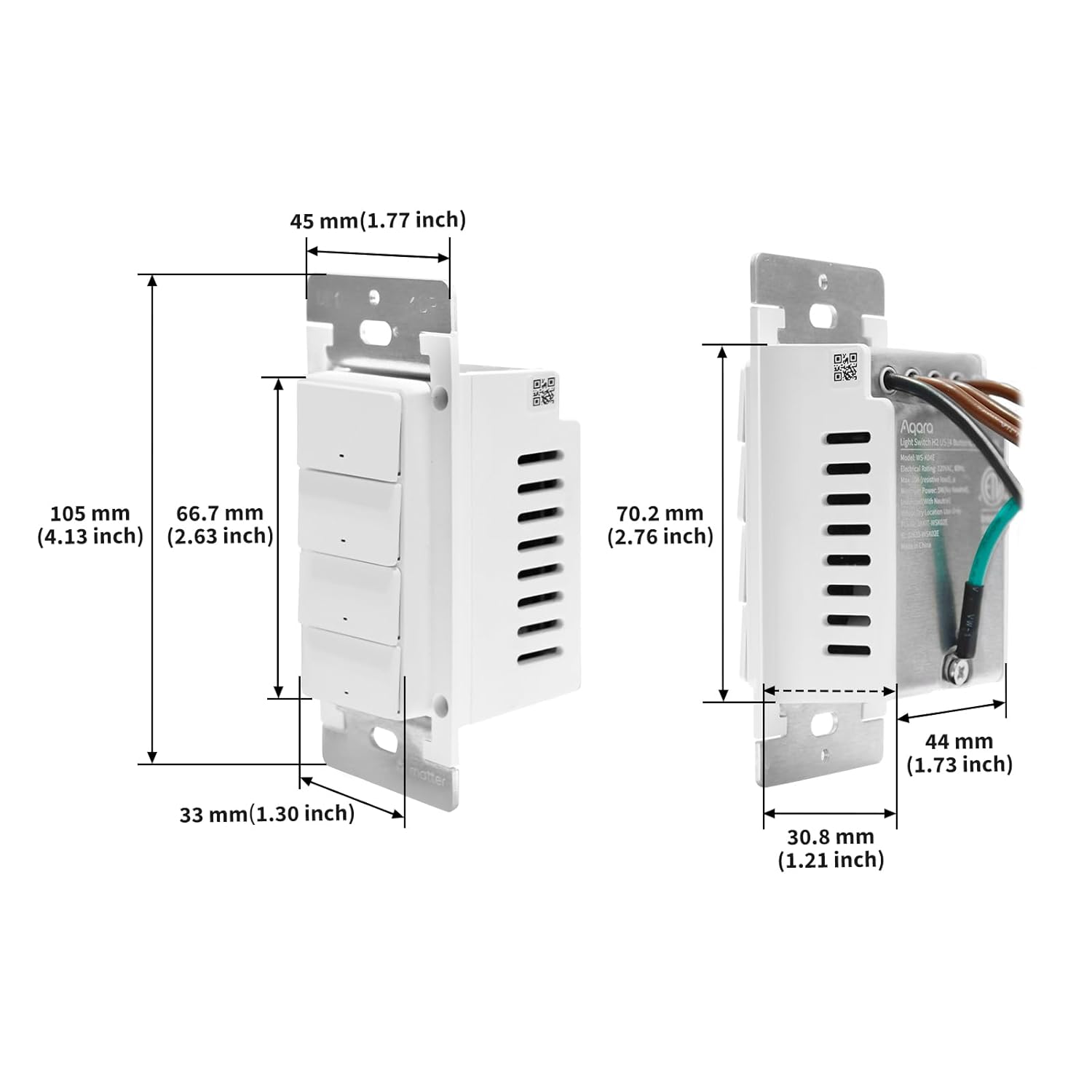
Decoupled Switch Mode: The switch includes 3 electrical switches (also functions as wireless switch) and 1 pure wireless switch, hence 4 wireless switches in total, enabling sophisticated and technically impressive automations when paired with other Aqara products. For the top 3 buttons, you can disable its physical control of the relay, allowing it to function like the decoupled buttons below for triggering scenes or automations
Thread/Zigbee Protocol: The smart light switch supports Matter-over-Thread and Zigbee, ensuring compatibility with major third-party platforms such as Apple Home, Google Home, Alexa, SmartThings, and Home Assistant. In Zigbee mode, users can access the full range of Aqara Home features, including MARS Tech and LED indicator customization.(Note:Zigbee2MQTT and comparable third-party USB dongles are not Aqara-supported. Full product functionality may be limited or unavailable)
2-in-1 Neutral Compatibility: There are no compatibility issues with the Smart Wall Light Switch, which supports both neutral and no-neutral wiring to simplify installation. However, features such as power monitoring and overload protection only work with neutral.(Note: These features may be unavailable in some third-party Matter ecosystems.)
Power-Off Memory Mode: This feature ensures your appliance retains its last settings after a power outage, automatically resuming operation as it was—either on or off. For added flexibility, you can customize its behavior in Aqara Home, choosing to restore previous settings, always power on, always power off, or even reverse the previous state. Note: This feature of customizing its behavior may not be available in some third-party Matter ecosystems. For full functionality, we recommend using Zigbee mode with an Aqara hub.
Home Automation: This smart switch supports remote control, scheduling, voice commands, and integration with other smart devices for seamless Smart Home automation
9 reviews for Aqara Smart Light Switch H2 (2-in-1 Neutral, 4 Buttons, 3 Channels), Thread/Zigbee Protocol, Wall Switch for Smart Home, Supports Apple Home, Google, Alexa, Matter Over Thread
Add a review

$54.99
Amazon Customer –
Good switch for Home Assistant
So I got this switch to use primarily in Home Assistant. I made sure to do my homework first before getting it. I was aware that depending on how you integrate it, you will lose some features. I first connected it to HA using Matter over Thread. That gave me the switch, power monitoring, and the extra button showed up under events. I had a good use case for the H2 because I have a bedroom with a ceiling fan that uses pull chain for the light and fan with only 1 switch. So I have the actual H2 switch control the ceiling light/fan as only a fan now and the smart button to control a lamp that I put in the room. That way both options are accessible from the switch and have smart controls.One thing I must say is that if you don’t have an Aqara hub then make sure to update the switch through the app. I put the H2 into HA immediately and controls were very inconsistent. Half the time it was instant, the other half had heavy delays or didn’t respond at all. After I updated the firmware, it works perfectly now. The switch is always instant. The smart button is too as long as you’re not pressing it in quick succession. It will eventually have a delay of maybe 1-2 seconds if you are pressing it repeatedly very quickly. But when I waited longer between each press it worked instantly every time. So it works perfectly fine for normal use.I did try Zigbee for fun though. I removed the switch, changed it to Zigbee mode using the Aqara app and reconnected it to HA using ZHA. It was very quick and simple but all you get is the switch. The smart button is not available and I don’t even remember checking if power monitoring was available.Overall I’m pretty satisfied with the switch. But my only expectation was to be able to connect it using Matter over Thread and have access to the smart button. Both of which were met. I see that some others were upset about losing options and features. I did my homework though and knew I wouldn’t have access to certain things. For my uses case I’m pretty happy with it. So be aware of what you may be losing out on and if you’re okay with that before buying the H2.
Merv –
Fantastic Apple HomeKit accessory
The Aqara light switch is fantastic Apple HomeKit accessory. Not only was it quick and easy to install the switch, it was even easier to pair it and setup routines in my HomeKit app. Our office has both Hue and Govee lights in which I programmed the other 3 buttons to do various functions with our lights. My spouse programmed one button for her Zoom Calls lighting which are a brighter and warmer lights. The office’s ceiling and desk lights work together through Matter protocol.It’s been only a week since installation, but so far no bugs or problems. I will update if this changes.
Thomas P. Stinson –
Works well with Aqara Hub
I intend to use this switch to control a bathroom fan/light combo. Fan, light, night light. After reading that it was Matter certified I assumed I was all set as I have multiple Apple TV boxes and a few HomePods. I was unable to add this switch using Apple Home. It would connect immediately but fail at the “setting up” screen. I considered returning it, but the 3 active buttons in a single gang device isn’t common and I like the style of it. I thought the best way to ensure the switch would work well in my house would be to add an Aqara M3 hub. Mildly frustrating as the Apple gear are Matter hubs, but such is life. I received my new Aqara hub and expected a painless Matter/Thread setup with my new switch. Nope. I was unable to connect this Aqara switch to the Aqara hub using the Matter/Thread protocol. Power cycled phone, hub, router and reset the switch many, many times. Still no luck with Matter/Thread. By now I was less concerned with establishing a Thread network and just wanted the switch to work! Using the Aqara app, I switched to Zigbee mode, accomplished by a firmware re-flash. Bam! The switch was added to the Aqara app successfully in just a few moments. My ultimate goal is to use Apple Home for ALL home automation and control and avoid using other apps, even Aqara’s own. It took a couple extra minutes but now I can ignore the Aqara app and use Apple Home, the same way I use Philips Hue products. The switch itself is high quality with tinned wire leads and a nice screw-less wall plate. Each button has an LED indicator for on/off that also changes colors to indicate different setup modes. Value for money is dependent on whether you already own a hub. At some point when I get a few more Matter/Thread devices I will probably attempt the Matter/Thread protocol on this switch but I’m happy with the Zigbee functionality for now. Strongly recommended if you already have a hub or plan to get one. Otherwise you may want to investigate other options, perhaps from Lutron. One final note: a factory reset requires a button to be pressed TEN times. This seems excessive compared to my other smart home stuff. Having a reset button like a router would be a nice upgrade.
Luis Larrea –
Hard
I didn’t want to buy an Aqara hub but I was having trouble with my Sonoff in HA that I decided to buy one. I originally bought the Aqara Hub M1S Gen 2 and I got excited because it was seeing the device. I eventually got it to the point where it flashed the H2’s firmware to use Zigbee so I got really excited! Unfortunately, when trying to finalize the pairing process, it said the H2 was not compatible with it. Let me say that I do appreciate the devices speaker and honesty!Anyway, I then incorrectly assumed I needed a newer hub so I bought the M3. I soon realized that all I really needed was the firmware flash that the M1S had already done! So I went back to my Sonoff on HA and realized I needed to flash it to Z2MQTT. I tried using the Texas Instrument software but I have the XXXXXX-P version and not the XXXXXX-E. So I had to install python and a bunch of pip modules.Now I have it working and just need to set it up to my liking. It was painful but it seems to work really well on paper so I’m excited to have it.
YG –
Great smart light switch, easy to install. Occasionally, there is some lag when switching, but otherwise great. The software (Aqara App) is also easy to use.I only wish they had a 2 button version that supports 3-way switching. The extra button is useful, but is not needed in some situations. Having that option would have been great.
SlowlyBeingManipulated –
Works using 4th gen Echo as the matter connector. i.e. add via Alexa app and scanned matter QR code. Can define function of both buttons in Alexa app without a fuss. Programable button experience feels immediate when triggering a kasa switch for example. Floor lamp plugged into kasa turns on right away.
dingdanipp –
I brought 8 of those. There is a noticeable lag in automation. Using as trigger the buttons have no lag. However if you don’t connect neutral it has an additional second of lag in automation (eg one switch controlled by the other). One may already install without the hassle of connecting neutral – but then realize the lag and has to install again.Edited: please connect to neutral if yon have one! Huge difference in latency when doing automation. They will not show up on Google home. Also they don’t actually trigger Aquara event in the message queue API.
Travis –
The unit failed after 1 month in service. I am getting no warranty support from either Amazon or Aqara.
Arnaud –
Réglage simple et fonctionnel