

TONOR USB Conference Microphone, 360° Omnidirectional PC Computer Condenser Mic with Mute Button for Online Meeting/Class, Zoom Call, Skype Chatting, Plug & Play (TM20)
$35.99
Related Products




Product description
The video showcases the product in use.The video guides you through product setup.The video compares multiple products.The video shows the product being unpacked. TONOR USB Conference Microphone, Merchant Video
 Balanced Sound
TM20 adopts an omnidirectional pickup pattern to capture the subtle sound from 360°.
 Noise Reduction
Built-in noise reduction technology effectively blocks noise and cuts echo to pick up clear sound.
 One Button Mute
Increase meeting efficiency while multitaskIng during a call by muting your mic with just a touch.
1 Balanced Sound
2 Noise Reduction
3 One Button Mute


Suitable for Many Scenes
1 Online Meeting 2 Small Office Meeting 3 Distance Learning
Specifications
Polar Pattern Omnidirectional Input Sample Rate 48kHz Bit Rate 16Bit Frequency Response 20Hz~20kHz Sensitivity -38dB±3dB (0dB=1V/Pa,1kHz) Output Impedance 2.2kΩ Max.SPL 105dB Package Includes Condenser Mic*1, USB Cable*1, Manual*1
Compare These Microphones
Add to Cart
Add to Cart
Add to Cart
Add to Cart
Customer Reviews
4.4 out of 5 stars 1,965
4.4 out of 5 stars 4,098
4.4 out of 5 stars 58,741
4.4 out of 5 stars 58,741
Price
$35.99$35.99
$25.49$25.49
$31.99$31.99
$19.99$19.99
Plug Type
USB A
USB A
USB A
USB A
Sampling Rate
48kHz
44.1kHz
48kHz
44.1kHz
Polar Pattern
Omnidirectional
Omnidirectional
Cardioid
Cardioid
Frequency Response
20Hz-20kHz
50Hz-16kHz
50Hz-20kHz
100Hz-16kHz
Sensitivity
-38dB±3dB
-38dB±3dB
-32dB±3dB
-38dB±3dB
Output Impedance
2.2kΩ
2.2kΩ
2.2kΩ
680Ω
S/N ratio
>60dB
96dB
68dB
56dB
With Stand
✘
✘
✔
✔
Suitable for
Meeting/Class/Zoom/Skype
Meeting/Class/Zoom/Skype
Podcasting/Recording/Streaming
Podcasting/Recording/Streaming
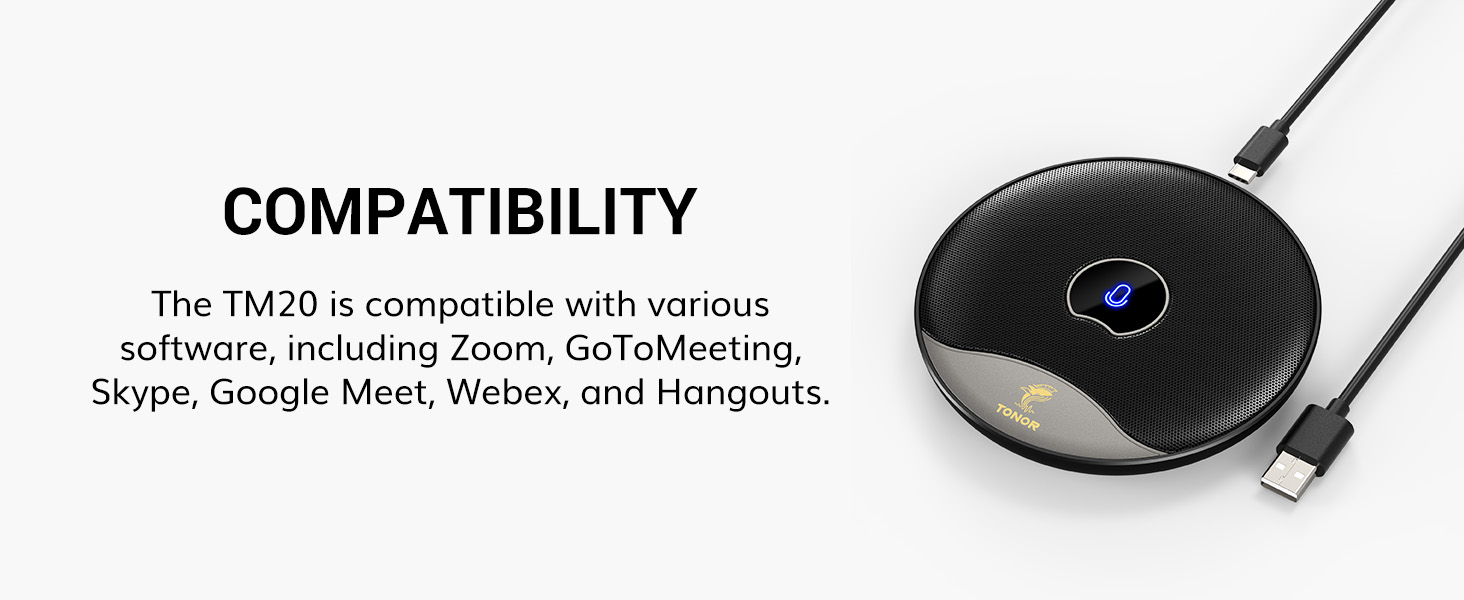
Compatibility: Not a speaker!!! The mic is perfect for online meeting/teaching and distance learning by using Zoom/Skype/GoToMeeting/WebEx/Hangouts/Fuze, etc.
Superior Sound Quality: Built-in noise reduction technology can effectively block the noise and eliminate echo to pick up clear sound.
Designed for Meetings: TM20 adopts an omnidirectional pickup pattern to capture the subtle sound from 360°. The mic can pick up the voices of all speakers around it with a wide pickup range(5m/16.4ft). When you move within the room, there are no differences in timbre.
Plug and Play: TM20 is a USB 2.0 mic, compatible with Windows and macOS. Just plug it into a laptop/desktop and get started, no driver software is required.
One Button Mute: The built-in indicator light informs the status(blue: working, red: mute). It makes your meeting more efficient while you multitask during a call to mute your mic with only one soft touch.
10 reviews for TONOR USB Conference Microphone, 360° Omnidirectional PC Computer Condenser Mic with Mute Button for Online Meeting/Class, Zoom Call, Skype Chatting, Plug & Play (TM20)
Add a review

$35.99
Fixer-upper –
Looks so good. Works so well. Seamless integration w/macOS
Pros:- Great talking to AI (saves a lot of time over typing)- Hears everything. Responds well to macOS settings input volume adj.- Looks fantastic.- Mute button is perfect.Cons:- Can’t think of any, just note it’s about 5″ or so, so you aren’t surprised (and it makes up for it with its low-sleek good looking profile, so it’s easy to ‘stash’)I double-sided taped it to my reclining zero-g desk, somewhat hidden under the monitor when reclining, yet picks up the sound perfectly.Thus I don’t have to stare at it constantly when working (e.g. no light in my eyes) but easy to see if it’s on mute and toggle mute with the slightest tap. As opposed to directional mics which stick out and or don’t have mute buttons or just aren’t as easy to see state or access.It’s just the most stylish one I’ve seen.It may be a feature of macOS, but I noticed the mute button doesn’t work on lock screen! That may be a security feature. Not that it matters, you can toggle it as long as you’re working.
Phil C –
Great Value ! Worked well in my situation. I would recommend
This worked well for me. I used it in a small auditorium that seats 200 people. the Microphone was attached to my computer at the front of the room and it was able to pick up speakers sitting in the last row about 30ft. I was using some AI software to take notes and transcribe the meeting. So any missed transcription could be due to an AI error. But 95% of the transcription was there. The room has good acoustic so that could have benefited the recording. Your milage may vary. Overall a good investment so far.
UCANTRUSTME –
ASTOUNDING SOUND!
I am usually quite critical of items I review and always try to do my best in helping you decide. So my reviews are not based on a FREE item given to me but ones I have purchased and used.I have been using this TONOR USB Conference Microphone for almost a year now. I use it weekly in our church service. We have a small old country church that we live stream our services on and needed an omni directional microphone for those on Zoom.I had tried a couple of other microphones that worked okay. Each had different issues which we were not completely satisfied with. Then we purchases the TONOR microphone and tried it. Let me say that it is the BEST microphone by far of the ones we tried.The microphone picks up sound from all over our church (which is what we want…especially when doing prayer requests). The sound is crystal clear even when people are talking quietly. The mute button in the center works great when I need to use it!We also run it from the front our church all the way to the back (about 75 feet) using a USB cord and it works flawlessly. There is never a lag. It is very durable. It has been accidently dropped a few times but no dents or damage and the sound quality remained excellent.I usually don’t give such high praise for an item but this microphone has worked perfectly over the last year…. and I believe it will last for MANY years!We are COMPLETELY SATISFIED and would HIGHLY RECOMMEND the TONOR USB Conference Microphone! A+++
Thomas Johnston –
Microphone Only, No Speaker
Good for Microphone but I did not realize it does not include speaker, it is a Microphone only.
Justin Omoi’s Music List –
Great Distance Capture!
This Omnidirectional Microphone is excellent for people who need to give conversations while moving around, or perhaps there are multiple people in the room trying to have a say. In my case, I will be building a microphone booth, and want to try to test a conversation from my table, to the person sitting in the room.This Mic is a USB type C device, which is great for the new devices coming around. It comes with a Type C to Type A ( the regular rectangle USB port ) So you can connect it to computers or laptops that require that port if needed be.The Mute function works with the touch of the finger, and clearly gives you a red, or blue indication to show if it is muted, or active. Visual indications are a blessing for those who don’t want the mic active for different reasons.My only negative point about the microphone, would happen to be the White noise ( Signal Noise Ratio ) at higher levels. In the video, I show how low of a signal around 0dB feels, and how it becomes more apparent as the level rises up. But for a $30 microphone, it is totally understandable. Not to mention, this is a microphone for conversation and movement. It is not meant for a professional recording of sorts. That is why I would still give this a 5 Star rating. If the microphone were to be a higher price, then I would have marked down for it.I can definitely see this being a easy to use Microphone for Teachers who wish to teach Online, while using the traditional Chalkboard ( or whiteboard ) while teaching students.I hope this video and review was helpful to you all who are considering purchasing one for yourselves! ^_^
Javier Garrido –
Funciona perfectamente, y con una alta calidad de sonido en las reuniones. El boton táctil de cancelación hace que sea muy cómodo ponerlo en mute si tener que tocar el ordenador para nada. Totalmente recomendable.
Saritha –
Very nice and comfortable for meetings….with good quality
Nickisbeautyworld –
Ich habe das Mikrofon in folgenden Anwendungen getestet:- Zoom Konferenz- Skype Konferenz- Voice over beim Video editingPro- Klang der Stimme bei Aufnahme gut- Sehr einfache Bedienung- Keine Installation (geht von selbst)- Ideal für Konferenzen- Hübsches Design- Günstig aber qualitativContra- Bei Voice Over Aufnahme muss man sehr nah ran an das Mikrofon damit die Stimme klar aufgenommen wird.- Angegeben sind 5m als Abstandsmöglichkeiten bei Aufnahme und Konferenzen, jedoch nicht möglichFazit:- Preis Leistung sehr gut. Ich bin sehr zufrieden mit dem Mikrofon. Für Konferenzen wirklich gut geeignet und einfach zu bedienen. Bei Aufnahmen für Videos etc. Ist die Stimmqualität gut jedoch ist der einzige Minuspunkt, dass man dabei sehr nah an das Mikrofon heran muss.Klare Kaufempfehlung.
giovanniesposito.it –
INTRODUZIONESalve a tutti, oggi vorrei andare a recensire questo microfono per conferenze TM20 marcato TONOR.In questa recensione vi esporrò le caratteristiche preponderanti di questo prodotto esprimendovi le mie opinioni in merito. Ebbene, iniziamo pure con questa recensione parlando della confezione…CONFEZIONEDurante l’unboxing ho potuto constatare una cura davvero elevata che il costruttore ha riservato nella costruzione della confezione stessa e nell’imballaggio.Infatti, quando vi approcciate all’apertura della confezione potete vedere che il microfono è ben protetto, nella confezione, da diversi imballaggi in polistirolo plastificato.Comunque, a parte questa accortezza molto apprezzata, prestata dal produttore, vi vado ora ad elencare le varie componenti che potete trovare all’interno della confezione:- Il microfono- Cavo di ricarica USB/USB tipo C- ManualisticaCome primo passo, sono andato a dare una veloce letta al manuale di istruzioni dato in dotazione, per capire appunto quali fossero le vere funzionalità del prodotto e se ci fosse qualche passo particolare per installare il microfono prima dell’utilizzo.Ho apprezzato molto la presenza di gommini che permettono una presa più salda alla superficie quando si posa il microfono.Con mio piacere ho scoperto che utilizzare questo microfono è davvero semplice e veloce, infatti non serve installare alcun programma aggiuntivo o driver, ma vi spiego dopo.LE CARATTERISTICHEAvendo utilizzato questo microfono TONOR per alcuni giorni, ho potuto percepire alcune sfumature e alcune caratteristiche davvero importanti e che a parer mio sono degne di nota.Ora andiamo dunque a vedere quali sono le caratteristiche principali di questo dispositivo di input audio, illustrando in maniera esaustiva ogni caratteristica nel dettaglio.1) La compatibilitàQuesto microfono TONOR modello TM20 mi ha colpito per la sua elevata compatibilità con la maggior parte dei software di video call, videolezione e conferenze.Innanzitutto, vi dico subito che potrete utilizzarlo come se fosse uno speaker, in quanto come già detto prima è un dispositivo di input audio.Il microfono è perfetto per riunioni/insegnamento online e per l’apprendimento a distanza utilizzando Zoom /Skype / GoToMeeting / WebEx / Hangouts / Fuze, e molti altri.Quindi molto bene per quanto riguarda la compatibilità con tutti questi software di conference in generale ma anche con software di chat.2) Qualità del suono elevataGrazie alla tecnologia incorporata di riduzione del rumore, questo microfono permette di bloccare efficacemente la maggior parte dei rumori di fondo, eliminando inoltre anche l’eco nell’ambiente per captare un suono chiaro.Infatti, la tecnologia incorporata permette di ottenere un’esperienza audio di elevata qualità, registrando un audio privo da tutti i rumori di fondo.3) Progettato per le riunioniQuesto microfono TM20 della Tonor adotta un diagramma polare omnidirezionale per captare in maniera efficiente i suoni sottile a 360°.Il microfono inoltre, può captare le voci di tutti gli oratori intorno ad esso in un ampio raggio, si parla di circa 5 metri di raggio.Ovviamente, ho testato la cosa e se ci allontaniamo fino al limite massimo indicato (5m) la capacità di di captare in maniera chiara le voci cala sensibilmente…4) Plug and PlayCome già accennato prima nel precedente paragrafo, utilizzare questo microfono è davvero semplice. Basta inserire il cavo di alimentazione in una delle porte USB del vostro PC e il gioco è fatto.Questo microfono infatti non ha nessun bisogno di software aggiuntivi o driver da installare per poter funzionare, è subito pronto per l’utilizzo.5) Tasto mutoCome potrete evincere dalla foto qui sopra e come potrete vedere nella mia recensione sul mio canale YouTube, questo microfono è dotato anche di un comodissimo tasto touch per l’attivazione della funzione mutoHo trovato questo tasto molto utile sinceramente, in quanto mentre siamo in riunione è molto semplice e veloce swicciare dall’audio On all’audio Off.Inoltre, ho apprezzato molto anche la presenza del led di colore diverso che evidenzia attivazione o meno della funzione muto, infatti:- se il led è di colore blu il microfono sta registrando e il muto è disattivato- se il tasto è di colore rosso il muto è attivo- se invece non abbiamo nessun led acceso, il microfono è spentoCONCLUSIONIConcludendo, posso dire solo che questo microfono mi ha stupito sotto diversi punti di vista, sia per quanto la qualità costruttiva che per la qualità audio.Ho apprezzato molto la cure nei dettagli dimostrata da TONOR nella costruzione e nel design di questo microfono, in particolare mi ha sopreso la solidità del prodotto e la presenza di gommini antiscivolamento posti sotto il microfono.La qualità audio come già detto è molto buona e per coloro che devono fare conferenze, questo microfono TONOR TM20 risulta una scelta ottimale.Infine, concludo dicendo che ho apprezzato tantissimo la facilità di utilizzo, basta solo inserire l’USB e via.LO CONSIGLIO
Orestes Balderas –
Un gran producto para realizar conferencias y poder tener un micrófono ambiental.