
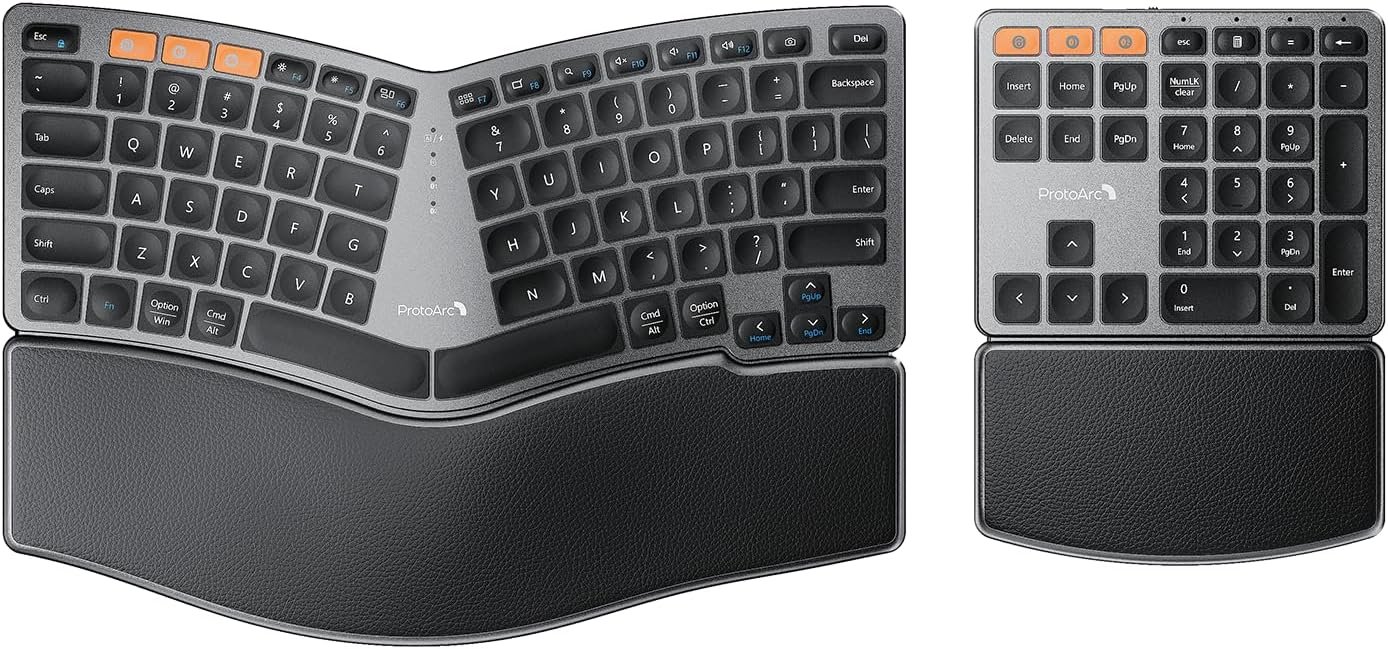
ProtoArc Bluetooth Ergonomic Keyboard, Wireless Split Keyboard with Separate Number Pad, Dual Bluetooth and USB, Hard Wrist Rest, Rechargeable for Windows/Mac/Android
$65.99
Related Products






Product description
The video showcases the product in use.The video guides you through product setup.The video compares multiple products.The video shows the product being unpacked. Wireless Ergonomic Keyboard Merchant Video
Comfort and Efficiency with ProtoArc 2-in-1 Wireless Ergonomic Keyboard
 Ergonomic Curved Design
Compact, split layout keyboard with number pad offer natural typing comfort and productivity.
 Ergonomic Split Design
Split keyset design helps to position your wrist and forearm in a more natural and relaxed typing posture.

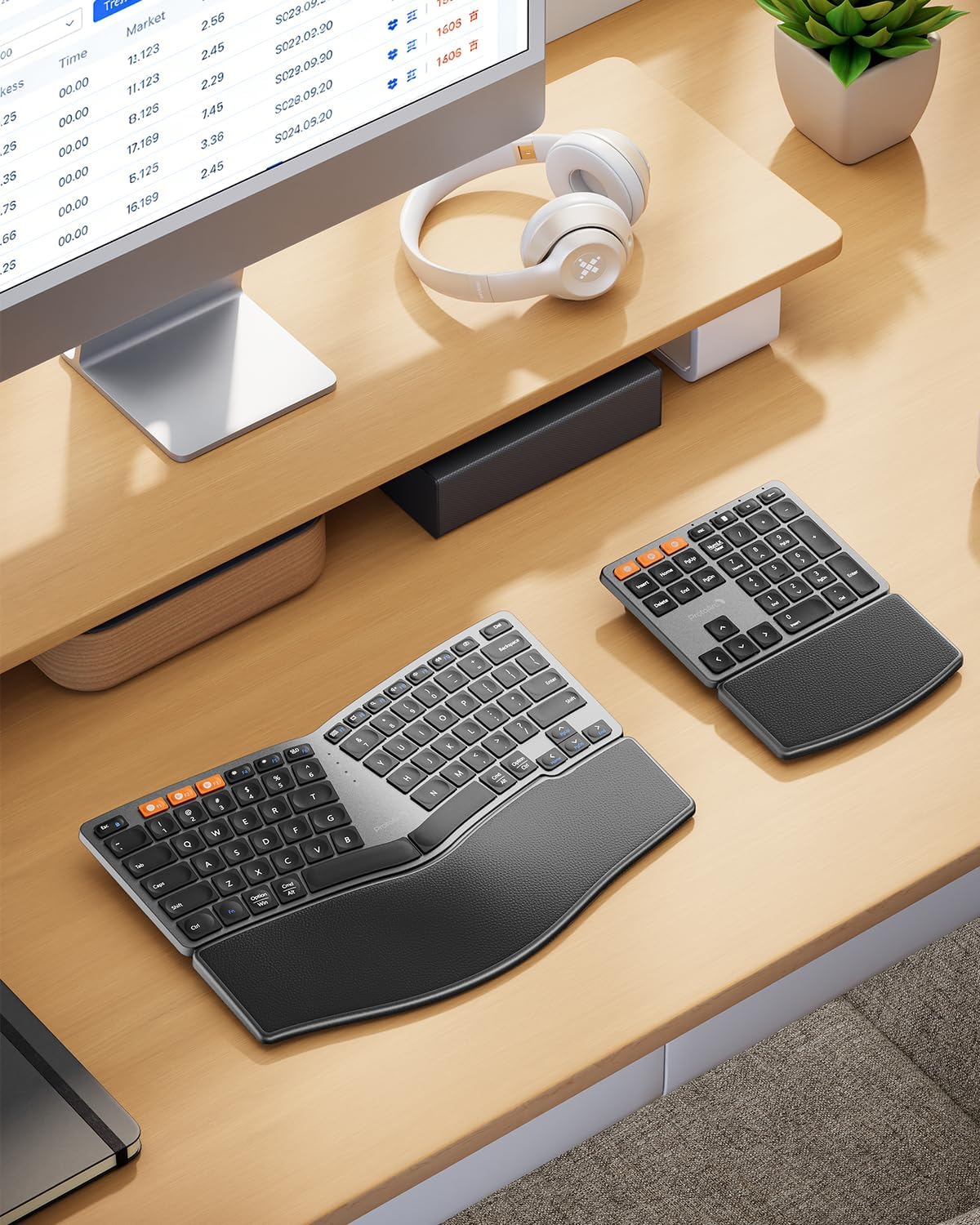
Separate Number Pad Provides Great Flexibility for Different Workspace
 Separate Numeric Keypad
Separate number pad provides greater flexibility for your workspace and improves work productivity.


Work with ProtoArc Ergonomic Mouse Series
 Pair with ProtoArc EM11 NL Ergonomic Mouse
ProtoArc EM11 NL ergonomic vertical mouse keeps your wrist naturally straight, putting your forearm and wrist in a more natural and relaxed position, which can reduce discomfort and strain.
 Pair with ProtoArc EM01 NL Trackball Mouse
ProtoArc EM01 NL wireless trackball mouse, with adjustable angle from 0 to 20 degrees according to your needs for a more natural, comfortable hand position and less muscle strain.
 Pair with ProtoArc EM15 Bluetooth Wireless Mouse
ProtoArc EM15 bluetooth wireless mouse features Bluetooth, USB and Type-C connectivity, supporting simultaneous connection to three different devices.
Are you new to ergonomic keyboard?
Unlike traditional keyboards, adjusting to the ergonomic keyboard layout may require an initial adaptation period as you become accustomed to its design and layout.
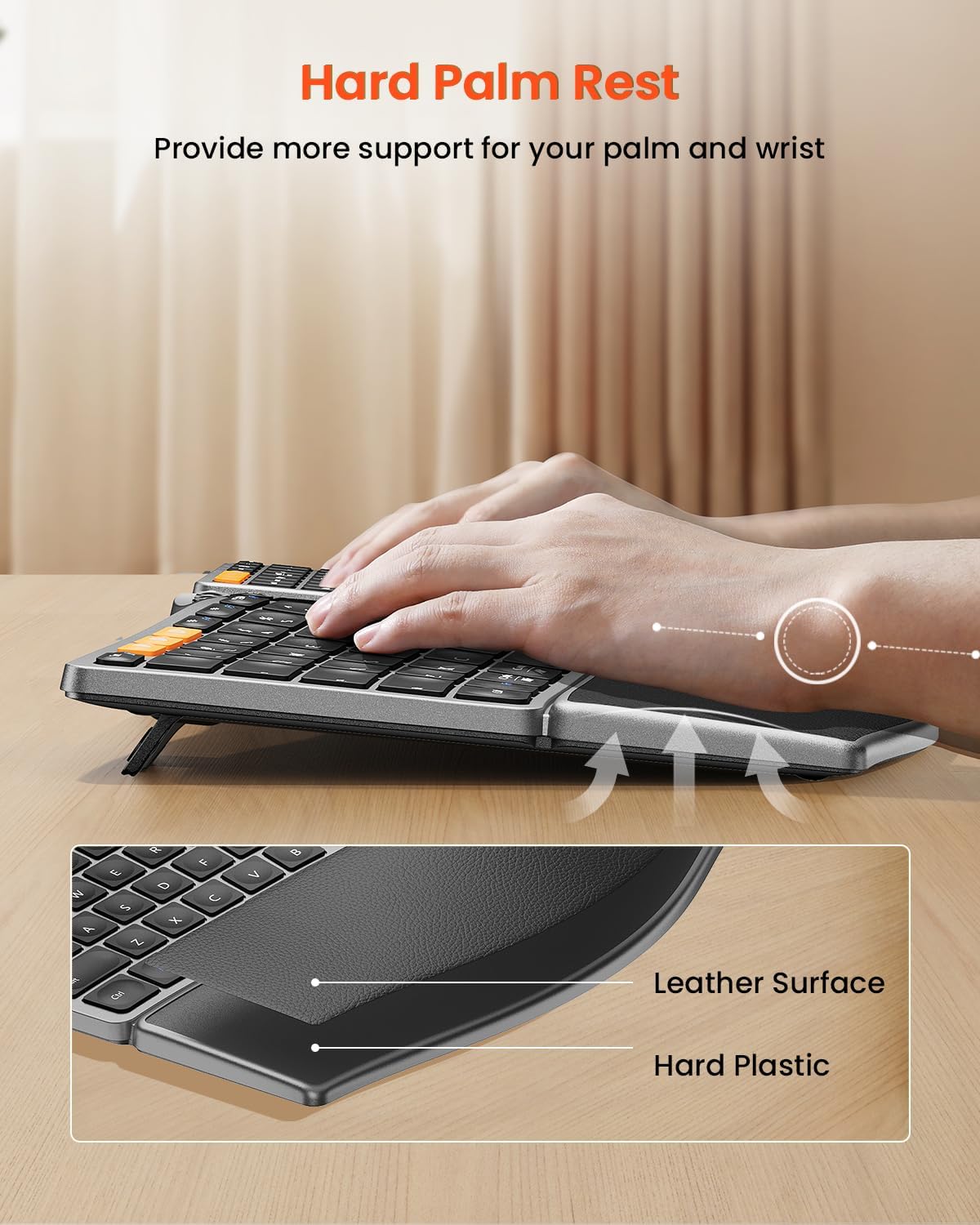
Is the palm rest soft cushioned and removable?
No, the palm rest is a non-removable hard wrist rest with leather surface on it, which will provide more wrist support and durability than a cushioned one.
Are the ergonomic keyboard and number pad backlit?
No, they are not backlit.
What are the dimensions of the ergonomic keyboard and number pad?
The dimensions of the ergonomic keyboard is 13 inch long and 9 inch wide, and the number pad is 6 inch long and 8 inch wide.
Ergonomic Comfort Design: The wireless ergonomic keyboard is featured with curved and split keyset design, which helps to position your wrist and forearm in a more natural and relaxed typing posture. Low-profile keys perfectly match the shape of your fingertips, offering quick response with every keystroke.
Personalize Your Setup: The separate numeric keypad provides greater flexibility for your workspace setup, greatly helps to improve your work productivity.
Hard Palm Rest: Curved, hard wrist rest with leather surface offers extended typing comfort with more wrist support and durability. Kindly Note: This wrist rest is not a soft cushioned one and non-removable.
Switch up to 3 Devices Seamlessly: The wireless ergonomic keyboard and number pad can be connected to 3 devices simultaneously through 2.4G USB receiver or Bluetooth, easily switch between 3 devices with a simple key press. Compatible with Windows 7/8/10, Mac OS X 10.12, and Android 4.3 or above.
Adjustable Tilt Legs: 4 adjustable tilt legs on the bottom of the ergonomic keyboard keeps your wrist in a relaxed and comfortable typing posture while sitting or standing.
USB-C Charging: The wireless ergonomic keyboard and number pad are built-in rechargeable battery with 250 hours of standby time after 2 hours of full charge. Auto sleep mode for power saving after 30 minutes of no operation. (The charging cable can only be used for charging, not for wired connection)
Warm Tips: The ergonomic keyboard and number pad are not backlit. The dimension of the ergonomic keyboard is 13″L x 9″W, and the number pad is 6″L x 8″W. Unlike traditional keyboards, adjusting to an ergonomic split keyboard layout may require an initial adaptation period as you become accustomed to its design and layout.
9 reviews for ProtoArc Bluetooth Ergonomic Keyboard, Wireless Split Keyboard with Separate Number Pad, Dual Bluetooth and USB, Hard Wrist Rest, Rechargeable for Windows/Mac/Android
Add a review

$65.99
TEarly –
Great keyboard for my Mac Mini M4
This is fast, comfortable, and slick-looking. Very happy with the purchase!
CKFIT –
Comfy keyboard with setup flexibility
ProtoArc makes great equipment, I’ve had a few of their different keyboards and mice in the past and they rarely miss. This one is no exception. Their agronomical setup is super comfortable, allowing you to lift either the front of back of the keyboard depending on personal comfort/needs. It did take a little time to get used to the angles of the keys the first time, but it’s so much better for my wrists that I struggle with a standard keyboard anymore.I love having a full size keyboard but don’t always need the number pad. There are times it’s super helpful though so I always get a keyboard with it. I love this option, because I can hide the number pad away in a drawer and just pull it out as needed without worrying about extra setup or connections. This could potentially also be a great benefit to left-handers in case that works better for you as well.Battery life on this seems super solid so far. My previous ProtoArc keyboard needs charged maybe one or twice a year with daily work use? All parts charge via USB-C so it’s easy to have cables and chargers around when you need it, and you can still use it while plugged in (crazy thought, huh Apple?) so no worries if you are running out of juice in the middle of the day.Keys are easy to strike and don’t make too much noise but still have a natural click to them. No issues with double keys or constantly missing the buttons I need.No backlighting on this, which some people love but isn’t a necessary feature for me, so I’m good.Clean color on the silver/black version I picked out. They also have a blue which was a bit more bright than I’d prefer but it’s great that there are choices for all different tastes!The one downside is that ProtoArc devices aren’t necessarily the cheapest option out there. But they are durable, easy to use and clean, the ergonomic options save tones of wear and tear on your joints, and they offer a ton of connectivity flexibility. If they fit your budget, they are actually worthy of the price tag, but I can understand that they may be pricing themselves out of some customer bases.Overall, this is a really nice keyboard set. My one complaint is that they don’t give you the ability to combine devices onto their USB dongles for wireless connectivity, so if you want a ProtoArc mouse to go with this, you’ll need to eat up two USB ports on your machine. If they can put together a pairing software for their dongles like Logitech has, they’ll be absolutely perfect in my eyes!
H. Haulman –
Well worth the price
Having been immersed in the PC and tech world since the TRS-80. I’ve used the lion’s share of keyboards, mice, trackpads, you name it. Now that I’ve amassed all these miles and currently suffer nerve damage on my dominant right side, I’ve had to adapt by becoming left handed. Left handed mouse, easy enough to find. A legit keyboard and number pad for lefty’s? Not so much. The Protoarc flat out excels at the task. Solid construction. Driverless and hassle free install. Quality materials, fit, finish, and function. Absolutely worth the money, and the ONLY reason for a missing star is no downloads, outside of a manual, and the Bluetooth comms don’t report battery percentage in Win11Pro. In fact, I’ll likely order another exact same set to replace my on site workstation inputs. Solid set, no question. Longevity is the only big downside possibility, and that will shake out soon enough.
Dave Daves Seaward –
Wow! The palm-rest ends up being a crucial factor; now I understand the “wave” shaped ergo keyboards
I recall seeing ergonomic keyboards where the centermost letters are raised, giving a slope like this product – on Microsoft’s 1998 or so introduction – I may have encountered them once or twice, but never owned one and never could discern why it would be better ergonomically. With the ergonomic (vertical) mice, the improvement isn’t usually felt right away, and new users could find them difficult. Same can be said for ergonomic keyboards like my ProtoArc XK-03 foldable ergonomic keyboard – when you’re accustomed to it the benefit is less stress and ache on the finger muscles over hours of continuous / high speed typing. When I let other people use my computer who haven’t used them, it can get frustrating – and still I recommend it as a great product. But THIS ergonomic full-sized keyboard with the palmrest built-in is AMAZING – right away it felt natural and easier, far more effortless compared to the Apple Magic Keyboard non-ergonomic standard layout (which doesn’t usually bother me). I’ve never known that palm rests could make all the difference, because that padded part is where all my weight is resting, on my palms. This is excellent!Bluetooth connection was instant once I remembered to choose either the middle or right-side of the 3 yellow buttons – I’ve had so many portable keyboards with three bluetooth device buttons that I was pressing the left-most yellow button (which is for the included Wifi receiver).The split configuration of having the keypad as an optional, independent modular-like component of the keyboard is a solid win. I’d never before realized its a good solution to my situation – I do all of my audio recording and production work from my home studio and there desktop space is at a premium because I want to maximize available space for (piano-style) keyboard controllers, other knobs, button, sliders controls, etc – no need for a number pad on this desk – UNLESS I’m working-from-home (which I do sporadically), and for the Excel-heavy work I do professionally the keypad is a must for efficiency and convenience. Ta-da I just take it out of the drawer! I find it funny that it has its own set of buttons for device selection, but also there could be situations when I could want to use that keypad independently, such as for its duplicated arrow keys and numpad keys – from my sofa when I’m further from the desk, for instance. And not often, but occasionally , I’ve wanted a keypad ; but not enough that I wanted to buy an external, dedicated keypad. Purchase of this keyboard, I suppose, forces acquisition of such and I’m glad because now I see how helpful it can be both in a detachable sense with the main keyboard, or independently. And I don’t see numpads (without Letter keys) with palm-rests! It makes sense that it’s more ergonomic to have it like this because it’ll help this product fit to wherever you want to use it. You won’t end up regretting not getting a full-sized keyboard with an inbuilt number pad (standard 110 key layout) or if you’d opted for the less wide keyboard now common (with no numpad) – you have the best of both worlds, and if/as your space and needs change, this product will adapt.I’ll finally add that it’s been great that it works for Apple Macintosh without requiring special configuration. The first keyboard XK-01 I got from ProtoArc was the first time I saw one of these multi-device keyboards that was meant for MacOS and/or Windows, and maybe this is detected via bluetooth connection because there’s no need to set the OS for each connection like many similar products. It’s labeled neatly with the Windows name on top and the Mac name below for the Opt/Win & Cmd/Alt keys. Crucially, it even solves an issue with the XK-01 and XK-03 – on those models the those left-bottom corner buttons are labeled just like this but when connected to a Mac they don’t function as labeled – they do what a Windows keyboard would do when connected to a Mac such that the main special key used for copy is the Win/Opt key when it should be the Cmd/Alt key directly beside the spacebar to its left. Funnily, when the XK-03 connects to a iPhone or iPad it interpolates correctly and the user can use the key marked command for command , and option for option, and they’re all in the correct order from the spacebar. This product, the ergonomic desktop keyboard, is getting it correct all the way around for Macintosh computer! This is wonderful and I suppose shouldn’t be unexpected given ProtoArc’s notable attention to the details – usually I don’t see multiple products released in succession over just two years becoming significantly improved with each iteration (even while the products probably would be considered best-in-class for non-overpriced peripherals).
Amazon Customer –
If packaging is a precursor to opening a products box and giving a it an automatic 5/5, then you’re in the right place. From the Quick Start Guide to the high-end card stock in an embossed envelope containing a personal message of thanks from the lead designer the mark of quality is already front and center.The keyboard is split into two separate components – the keyboard, and a fully decked-out number pad. Each can connect your Android, iOS, or Windows device by either Wi-Fi (using an included USB dongle conveniently stowed under the number pad, and held in place by a strong magnet when not in use), or by Bluetooth. Both the keyboard and num pad are synced separately to your device. There are individual hard off/on switches on each, as well a built-in sleep function, allowing you to maintain a longer battery charge on each when not in use. Two USB-C to USB cables are included, though no power bricks come with the units as the manufacturer strongly suggests using USB ports as the sole method of recharging the devices’ internal batteries to resist the temptation to use an over-spec power supply.I’m not picky about the feel of keystrokes. The travel is as good as any of the standard plain jane keyboards I’ve always used. The keys themselves feel solid with no indication that they’re going to pop off when you type at a rapid clip. The layout is of course from the product photos, a split design to facilitate improved ergonomics. The palm rests are cushy without feeling like their going to sink down too far into your palms. There are also four popout stands on both the keyboard and number pad, allowing you to tweak their angles by a few degrees. The typing experience takes getting used, but personally, a couple hours is all I needed to sync the layout with my fingers muscle memory.The hotkeys worked as expected (I tested them on a Windows laptop running Windows 11). The function keys are app-dependant and provided no issues.For my workflow and daily use, the keyboard/numpad comboworked fine, and a purchase gets a thumbs up.My only nitpick is that the labels embedded on the two orange frequency bands, and sync button on both the keyboard and number pad are extremely hard to read. Their functions though are clearly explained in the well written quick start guide.
Zakia Chaity –
This keyboard has really improved my typing comfort during long workdays. The split design feels natural, and the wrist rest provides good support. I like having a separate number pad that can be placed where it’s most comfortable. Switching between Bluetooth and USB is easy, and it works well across my devices. Battery life is solid, and the keys have a nice, quiet feel.A great ergonomic upgrade.
Khad –
I have used ergonomic keyboards before, but if you have not, they take some getting used to. Ergonomic keyboards like this help to reduce wrist strain, especially if they have a wrist rest/support like this one does. I don’t have to keep lifting my wrists or put them into awkward positions when typing for long periods.This ergonomic keyboard comes in two separate pieces – the keyboard itself and a separate number pad. It is wireless. It comes with a USB dongle – a single dongle supports both the keyboard and number pad. There are also two Bluetooth channel options. The USB dongle is not in the box, but there is a little slot for it on the underside of the number pad. When I first set this up, the number pad didn’t work initially because num lock was on by default. Once I pressed the num lock key to turn it off, the number pad started working.I am not sure what the advantage of a separate keyboard and number pad is. I guess having two separate pieces might be useful for portability and the two separate pieces take up slightly less space than a full sized one-piece keyboard.What I like:- The same USB dongle works for both the keyboard and number pad.- Wrist rest reduces wrist strain. Initially I thought the wrist rest might not be cushioned enough, but it works quite well and is comfortable to use when typing for long periods.- Keys are responsive.What I dislike:- The keyboard and number pad need to be charged separately. Two USB-C cables are included for charging if you don’t have your own.- Most keys are easy to find, but some, such as print screen, are not.- No backlight. This is a very useful feature when typing in a dark room and this keyboard does not have it.- Keys can be a bit loud.
W.K.L –
This set includes the main split keyboard, a separate number pad, two A to C charging cables, a thank-you card, and a manual 📋.The build quality is exceptional ✨.The separation of the main keyboard and the number pad allows you to customize your desk layout based on your needs 😎.A 2.4GHz USB receiver is tucked behind the number pad, allowing both units to connect instantly to one PC. Alternatively, you can use Bluetooth to pair them with up to four different devices!However, the design of the indicators is a bit flawed: the orange icons paired with white icons are hard to distinguish, and the white icons under the lights are also difficult to read against the metallic grey finish 🧐.On the plus side, the keyboard retains its settings (like Num Lock) even after being powered off and on.Both keyboards feature a unique “front and back” kickstand design 😳. While propping both up just elevates the board, the back kickstands (on the side closest to you) are a game-changer for standing desks. They create a much more natural, ergonomic typing angle while standing 🤩.That said, it has a steep learning curve. For me, the “tenting” angle in the center isn’t quite high enough, and the spacing between keys is wider than on standard laptops. This led to frequent typos because my fingers couldn’t quite reach where they expected the keys to be 🤨.The independent number pad is a standout, though—it can be used alone as a controller or a calculator, which is incredibly handy 💪.While you can feel the designer’s pride in the thank-you note, the wider key spacing might be a challenge for those with smaller hands 😮💨.But if you have “fat fingers” or a larger hand span, this beautifully crafted keyboard is a solid choice 🥸.Ok to buy 👌.
FairDinkumFinds –
This ergonomic keyboard feels well thought out and much kinder on the wrists than a standard flat board. The curved, split layout puts your hands in a more natural position, and the low profile keys have a nice responsive feel without needing a heavy press. The hard wrist rest took a little getting used to, but it does support your hands well during longer typing sessions and feels durable rather than cheap.The separate number pad is a great idea and lets you set up your desk how you like, especially if space is tight or you do a mix of typing and data entry. Switching between devices is dead easy and works smoothly across different systems, which is handy if you bounce between a work laptop and a home computer. Battery life has been solid too, and USB C charging keeps things simple.There is definitely a short adjustment period with the split layout, and it is worth noting there is no backlight, which might bother some people. Once your hands adapt though, it becomes very comfortable to use day to day. Overall, it feels like good value and a sensible choice if you spend plenty of time at the keyboard. Fair dinkum, it is a nice upgrade for your desk setup.