
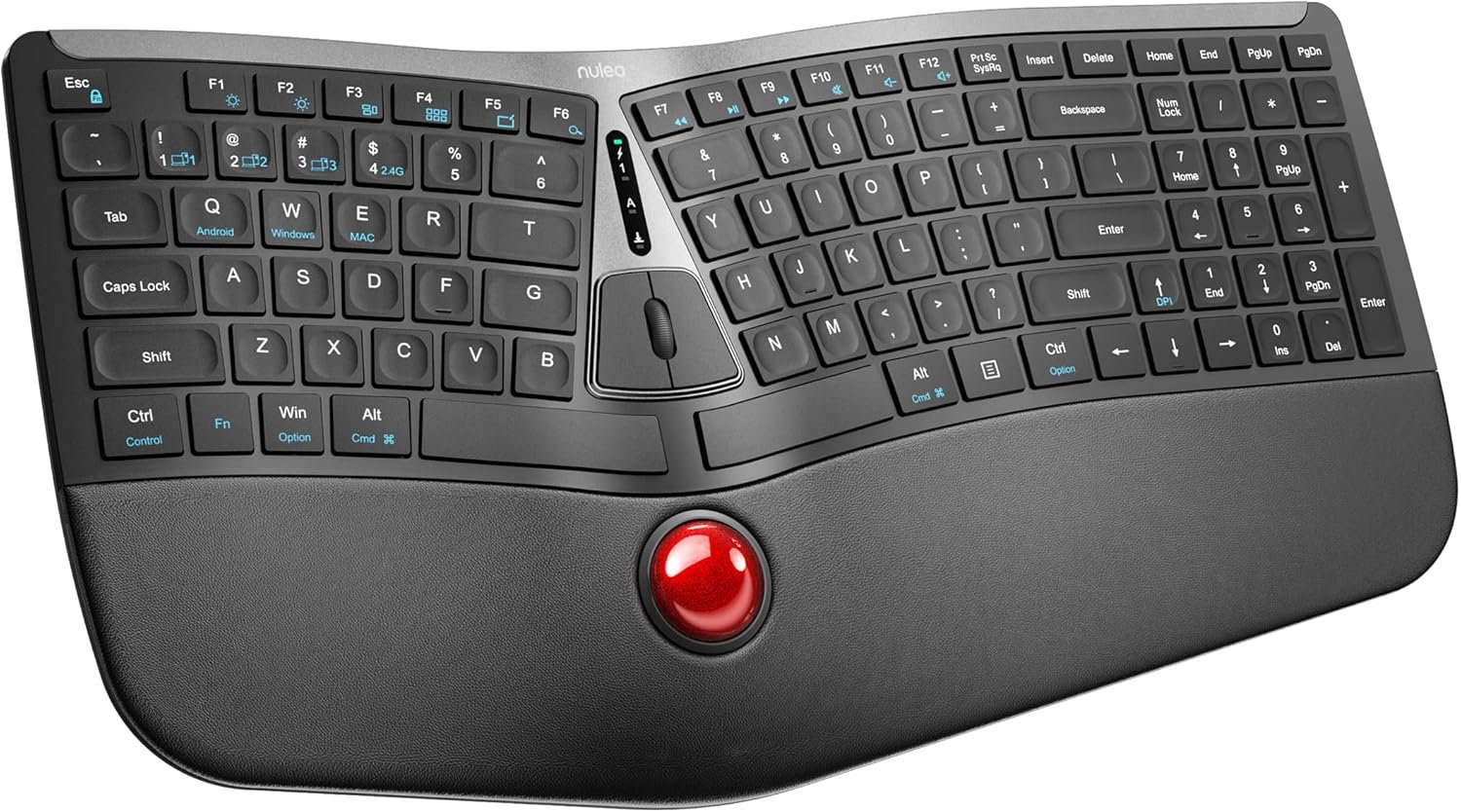
Nulea RT07 Wireless Ergonomic Trackball Keyboard – Bluetooth and 2.4G USB Connectivity, Natural Typing, Wrist Rest,Split Keyboard, USB-C Rechargeable,Compatible with Mac/Windows
$54.99
Related Products




Product description


Can the trackball on the keyboard be removed?
Yes, it can be removed. You can remove it from the keyboard and wipe it with a clean cloth to ensure its flexibility.
How to use the trackball to move the cursor correctly?
The design allows you to useyour thumb to control the trackball. This gesture is the best way to experience it.
Are ergonomic keyboards only for those who have carpal tunnel syndrome or some other injury already?
Absolutely not. Ergonomic keyboards are for anyone looking for greater comfort as they promote a more natural and relaxed posture.
Ergonomic Split Design for Optimal Comfort:Nulea trackball keyboard is designed with an ergonomic split layout that reduces forearm muscle twisting and eases the pain associated with carpal tunnel syndrome. It offers a natural and comfortable typing position for your wrists and forearms
Convenient Trackball Structure:The integrated trackball lets your hand remain on the wrist rest while typing and moving the cursor. This seamless experience reduces fatigue and boosts productivity
Comprehensive Palm Rest:The soft palm rest provides excellent support, keeping your wrists in the most comfortable position during extended use. It’s like a cozy cushion for your wrists
Scissor-Switch Keys for Superior Typing:The scissor-switch keys offer exceptional stability, rapid rebound, and even pressure. Enjoy a smooth and responsive typing experience with every keystroke
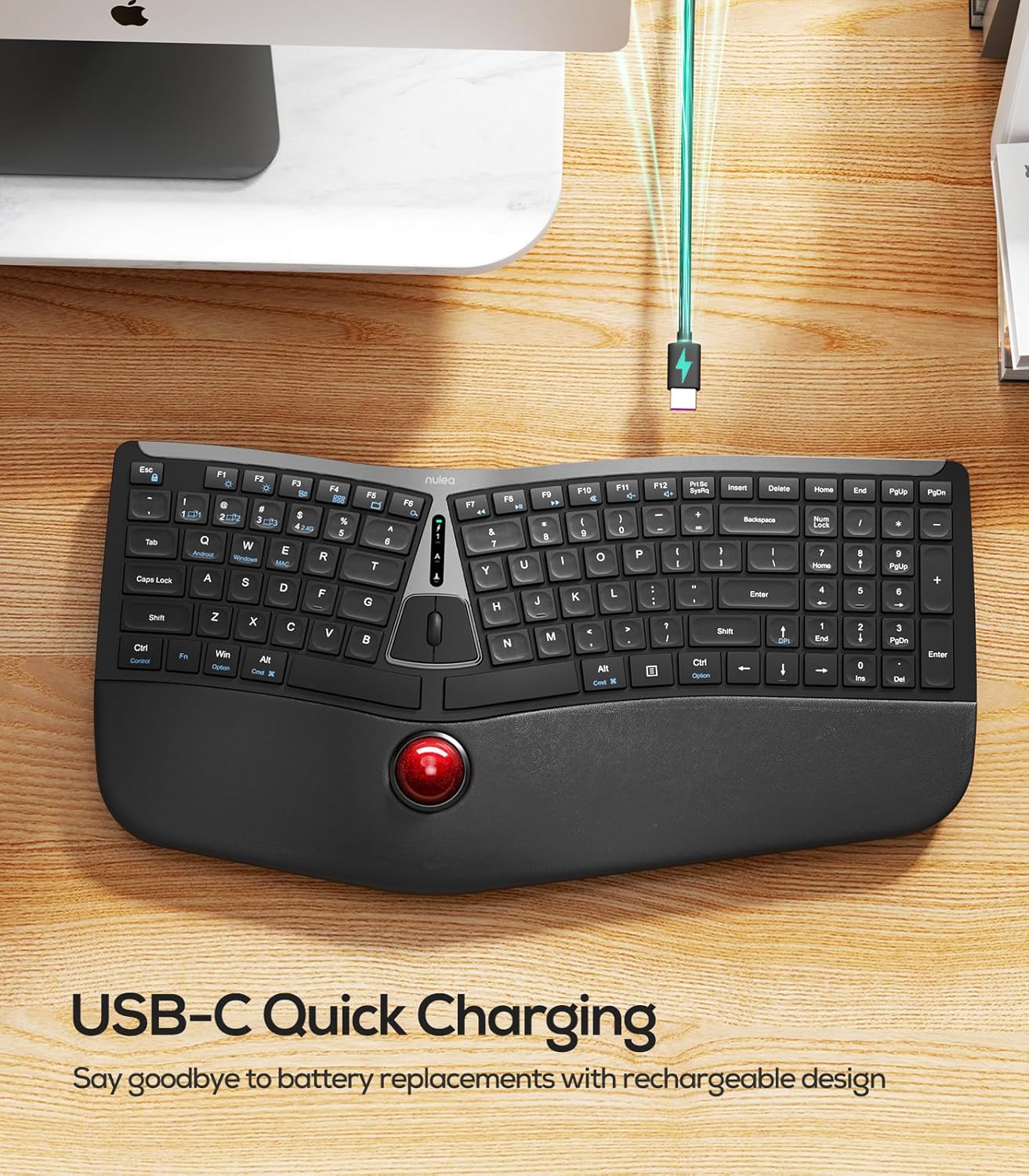
Seamless Dual-Mode Connectivity: Enjoy the flexibility of smooth transitions between devices with our dual-mode (Bluetooth & 2.4G) wireless ergonomic keyboard. Whether you’re at work or play, easily switch between different devices for a streamlined experience
13 reviews for Nulea RT07 Wireless Ergonomic Trackball Keyboard – Bluetooth and 2.4G USB Connectivity, Natural Typing, Wrist Rest,Split Keyboard, USB-C Rechargeable,Compatible with Mac/Windows
Add a review

$54.99
David –
Amazing
Instead of paying over 100 this keyboard is excellent I have 2 computers that I am using and from receiver to Bluetooth it works. I also have the mouse too.
Siva –
Satisfied 😌
Best one for the price. If there is a way to adjust the distance between trackball and the thumbs, I will pay $100 more to get that.
Ryan –
still a bit rough around the edges, steep learning curve on the mouseball
[Edit: changing from 3 to 4 stars after further use] The mouseball is a lot easier to use after some practice, I still think that it would be more ergonomic with the mouseball moved to above the spacebar, but it is much less tiring to my wrists than moving between a mouse and keyboard all day. I added little folded pieces of tape to the enter and backspace keys and that made it useable in XR. It would still be much much better with backlights like other Nulea keyboards. Also the function keys on the top should have the secondary options (volume, play/pause, etc… be default) like in other Nulea keyboards. Having to hold function to change the volume is annoying additional friction.I really like what Nulea is going for here, as I want to use ergonomic keyboards with builtin mouse functionality for using with XR glasses. However, this specific implementation is still a bit rough around the edges.1. The “b” key seems to take about twice as much pressure to register a press as the other keys, which makes typing weird. That might just be a defect specific to mine, I am not sure if it occurs across other keyboards of this model or not. I’m assuming there’s slight warping or something due to where the mouse buttons are installed. I am unsure if this defect is specific to the one I got, or if it is an issue with this model in general.2. This keyboard would be much better if it was backlit. I got the device with the integrated mouseball since I use Nulea ergo keyboards while working in XR glasses. It would be much easier to use for this purpose if the keys were backlit like other Nulea keyboards, such that I can see them through my XR glasses. Without the backlight, I must rely on muscle memory, which is fine since I’ve been using this Nulea layout for a while (using their other models). But if I was not already familiar with this layout, the lack of backlight would make the device unusable for this purpose.3. A larger battery would be nice. These keyboards are large (which is great for me, I have large hands) but seem to have a very small battery. This device is large and heavy enough, that it should be able to incorporate a much larger battery and therefore have much better battery life (even with backlights) without effecting the ergonomics/size/weight significantly.4. The possitioning of the mouse clicker buttons is awkward and feels unnatural. The way they are position, you click the left mouse button with your left pointer finger, and the right mouse button with your right pointer finger. This just feels way different than other devices. Maybe I’ll get used to it, but I think they should experiment more with mouse button placement.Overall, I love the idea that Nulea is going for with this, and if they iterate and improve a bit, they could have something awesome. But in its current state, the device needs a bit more refinement before it really feels ergonomic.
Rafael Gonzalez –
Like!
It’s quiet, connects well, like the track ball on it.
LAKE –
4
4
Kristin Lauterbach –
Great keyboard
It takes a bit to get used to but its worth the time.
Mr. and Mrs. R. Barkoski –
The trackball is so bad it ruins the rest of the keyboard.
Avoid this as the trackball is erratic and unusable. The keyboard itself is very comfortable with a nice wrist rest but you cannot get past just how BAD the trackball is. Stop selling these.
Jonny V –
Severely flawed design
There are several major flaws with this design:1) There is almost no relevant tactile feedback for orientation without looking at the keyboard. It is really easy to slip up since all the keys feel almost exactly identical, regardless of where they are or what kinds of keys they are. With a well-designed keyboard, it is relatively easy to feel where you are on the keyboard by gently dragging your fingertips across the keys, e.g. identifying the arrow keys or the numpad since those are generally quite distinct. Here, everything is just the same dull flat nothingness.2) The keyboard is not actually very ergonomic; if you need relief for your hands to prevent RSI, this will be only moderately effective. The old Microsoft Ergonomic Keyboard was about 3x as effective in this regard.3) The numlock indicator is nowhere near the numlock key — it is near the ever-blinking power indicator, which makes it easy to miss when it is accidentally hit while trying to reach some other key (which is difficult because of the lack of tactile feedback).4) The trackball is finicky: if you try to use any finger other than a thumb to move the mouse, it will often spin while the mouse stays largely motionless. If you are used to the Elecom Huge, this will be very unintuitive.The first two issues are dealbreakers. It is an okay stop-gap measure, but I will be replacing it with a proper ergonomic keyboard and an Elecom Huge trackball whenever I find a good keyboard. I will not be buying another of these.
Canada –
The split ergonomic layout really does help with wrist strain, especially if I’m typing on it for a whole day, but switching between this and a regular keyboard does confuse my brain a little so if you’re getting one for home, you may find yourself needing to get a second one for the office as well.The built-in trackball is a cool idea and convenient for quick cursor movement. I found myself really liking it when I’m doing low intensity work or just in spreadsheets where it’s more convenient not to have to move my hands off the keyboard. I’d never want to do anything precise or use it for extended periods of time though, I just don’t find it as effective as a mouse for that in terms of browsing speed… but this doesn’t need to replace your mouse completely!The connectivity is very good. I connected this via bluetooth and the connection was completely stable and solid.
Kelly M –
I loved this idea. A trackball integral to the wireless keyboard. Having both together for machines that are often headless but need occasional local work, with the nice tracking of a trackball.The positives-comfortable, although ergonomic keyboards are not my preferred style, this works with the trackball and button/scroll wheel in the center.Keyboard is a basic quiet membrane keyboard with soft action and is silent.Keycaps have a slight dish and are easy to locate on. The experience is basic and relatively generic in feel, but very functional.The wrist pad is nice. Wide and soft, enjoyable on the heel of your hands. Overall a comfortable keyboard.Features and connectivity.USB-C for charging or wired use, on/off switch on bottom and indicator lights for charge, num lock and cap lock. 3 BT connections, wired and 2.4g via the included USB dongle.Connection is good, and reliable. No serious lag was noticed.The trackball.I love the idea, the layout is surprisingly useful and comfortable. But the ball really struggle to track. Adjustable dpi and different connections did not matter. The ball, moving to the right and particularly to the right and up at an angle had significantly less on screen movement than moving in the other directions.It improved with more pressure on the ball, but there is un-equal sensitivity in the right/right+up direction.I do not know if it’s mechanical or a sensor or what. But this made it hard to use. I spent a couple of days with it and tried moving it in all directions quite a bit to see if it smoothed out, and it seemed better, but moving the keyboard, turning it upside down to shut off would sometimes make it revert back. And even when better, it was not right. I removed the trackball, ensured the area was clean, and no manufacturing or shipping debris was causing an issue. It’s an optical sensor, and I can’t see any reason why it would be inconsistent.What is apparent in the operation- it is velocity sensitive. If you move the ball the same distance slowly(from one side of your hand to the other) the distance it travels is much shorter than if you move your hand the same distance rapidly. As the options are fixed dpi at 200, 400, 800, and 1200 changing dpi on velocity did not seem to be expected operation.Like the layout, the idea is convenient, comfortable but the tracking was sub-par.Edit -I played around another day with it. And I think there could be some velocity curve baked into the firmware. Trackballs are expected to be absolute positioning devices, and a shift in dpi vs velocity negates the advantages of a trackball, in my opinion. For some users this may not matter, but I found it hard to reconcile with my workflow.
Bee –
This spacious, full-sized keyboard boasts a split, ergonomic design, a trackball, and an integrated wrist rest for added comfort. The wrist rest is comfortable and padded with a leather-like exterior. It is not removable, however, so that’s something to be aware of as the keyboard has quite a large footprint.The keyboard is rechargeable with a built-in battery and connects wirelessly to your device via either the included USB dongle or Bluetooth. Charging is convenient via USB-C (the charging cable is included) on the top edge. The battery life seems pretty solid as I haven’t yet needed to recharge it since the initial charge.There is a storage space on the top edge of the keyboard that holds the included USB dongle if it’s not being used. There are also four adjustable feet on the rear that allow you to angle the keyboard’s front or rear edge upwards.Connecting the keyboard to my iPad using Bluetooth went without a hitch, as did the dongle connection to a laptop. It supports up to three Bluetooth devices and a USB device, making it easy to switch between them using the function commands on the keyboard. The wireless functionality is great as it allows you to set the keyboard aside when not used and free up desk space for other tasks, or lean back and use it in your lap, etc.The keys have slight indentations with a pleasing satin-like feel. They are low-profile and quiet, providing satisfying tactile feedback.The ergonomic shape instantly feels natural and comfortable to rest your hand on the keyboard and its armrest. The keyboard’s contours naturally follow your hand and finger position, ensuring a comfortable and efficient typing experience.This design, however, demands a certain level of proper typing technique. If you’re usually a “pecker” who bounces your fingers across the keyboard and crosses sides, you won’t likely benefit much from this shape. If you’re familiar with the keys and can type without excessive hand movement, this design is a nice upgrade.The integrated trackball functions well. It does feel a little more sluggish when connected via Bluetooth, however. The ball feels like it has some weight to it and spins smoothly, but unlike the keyboard shape, I don’t feel it’s as ergonomically efficient, compared to a normal mouse or separate trackball device. It brings your right hand close to the other and can feel rather awkward to use, being in the middle of the keyboard with the buttons and scroll wheel above it a short distance. If you haven’t used a trackball before, there is also a bit of a learning curve before it feels natural like a mouse.The trackball being built into the keyboard can be convenient to free up desk space or to use in your lap, etc. It isn’t bad for moderate use, but think a separate mouse is still more efficient and comfortable for heavier usage.Overall, this keyboard is well-constructed with good features and functionality. The design is good for typists, and the integrated trackball frees up the need for another device if you can get used to it.
Blackrain –
This Nulea branded keyboard is on par with all the Nulea branded products that I have tried to date. Excellent build quality, superior performance and outstanding comfort.The Nulea brand seems to lean heavily into trackball usage and though I went a few decades with the standard moving mouse tech, a stationary trackball seemed to make more sense to me when I started to get chances to review their products. Now, I would go back. The same is true for their keyboards, I spent ages using a flat, typical keyboard. Along the way I experienced pitched, split keyboards but nonexonvinced me that they were a bettwr option than a standard, flat keyboard. Until… I tried a Nulea. It is hard to say that any one thing stands out in making this brand so good but I will say that the feel of the materials on your hands and fingers, the ergonomics of the design the tactile feel of the moving parts, all make them a step above anything else that I have used before.This Nulea RT07 keyboard with integrated trackball is kind of a full circle thing for me as I started to enjoy their products with the introduction of the trackball mouse. This keyboard has the most premium feel with relaxing ergonomics that just feel so comfortable. The tactile feel of the keys is sublime and the trackball (though it took some acclimation) has been placed in a very natural position and works beautifully, allowing you to save additional space on your work serves while simultaneously allowing you to keep both hands on your keyboard at all times which has to.l boost your efficiency. Making this keyboard wireless, is just the gravy on top. The trackball speed and sensitivity can also be adjusted, helping to tailor the functionality to your liking.Battery life isn’t even a factor. I am seeing a need to charge a the keyboard once every 2 weeks or so. This will vary based on usage level, of course. Charging is done via a USB-C cable and a full charge is acheived what I believe to be, less than an hour. I have only charged it twice and I did not record that figure, though I intended to do so for this review.Though this design may not be for everyone, I feel very strongly about it, having used it for some time now.Definitely recommended.
Ava Ryder –
A standard keyboard had my nephew’s wrists filing daily complaints, so this ergonomic trackball setup strolled in like the new manager and immediately improved workplace conditions. The split layout looks a little sci-fi at first, but it lets his hands sit in a natural position that does not have his forearms plotting revenge by the end of the day. The built-in wrist rest makes it feel more like his hands are on a cushioned lounge chair than on office equipment.The real star for him is the trackball. Instead of shoving a mouse around the desk, he just rolls the ball with his thumb and keeps his hand relaxed in one place. He swears it is a game-changer, both for comfort and for quickly zipping around the screen. Once he got used to it, going back to a regular mouse felt like going back to dial-up internet.Typing on it feels smooth and quiet, thanks to the scissor-style keys that give a soft but confident click without sounding like a typewriter. Switching between Bluetooth and the USB receiver is simple, so he uses it with both his laptop and his desktop without juggling a tangle of cables. The fact that it charges over USB-C means no digging for spare batteries in the middle of a work session.For anyone who spends long hours at a keyboard and is tired of sore wrists, cramped hands, or chasing a mouse around the desk, this thing earns its place. According to my nephew, once you get used to the trackball and the split layout, a normal keyboard just feels a little boring.