
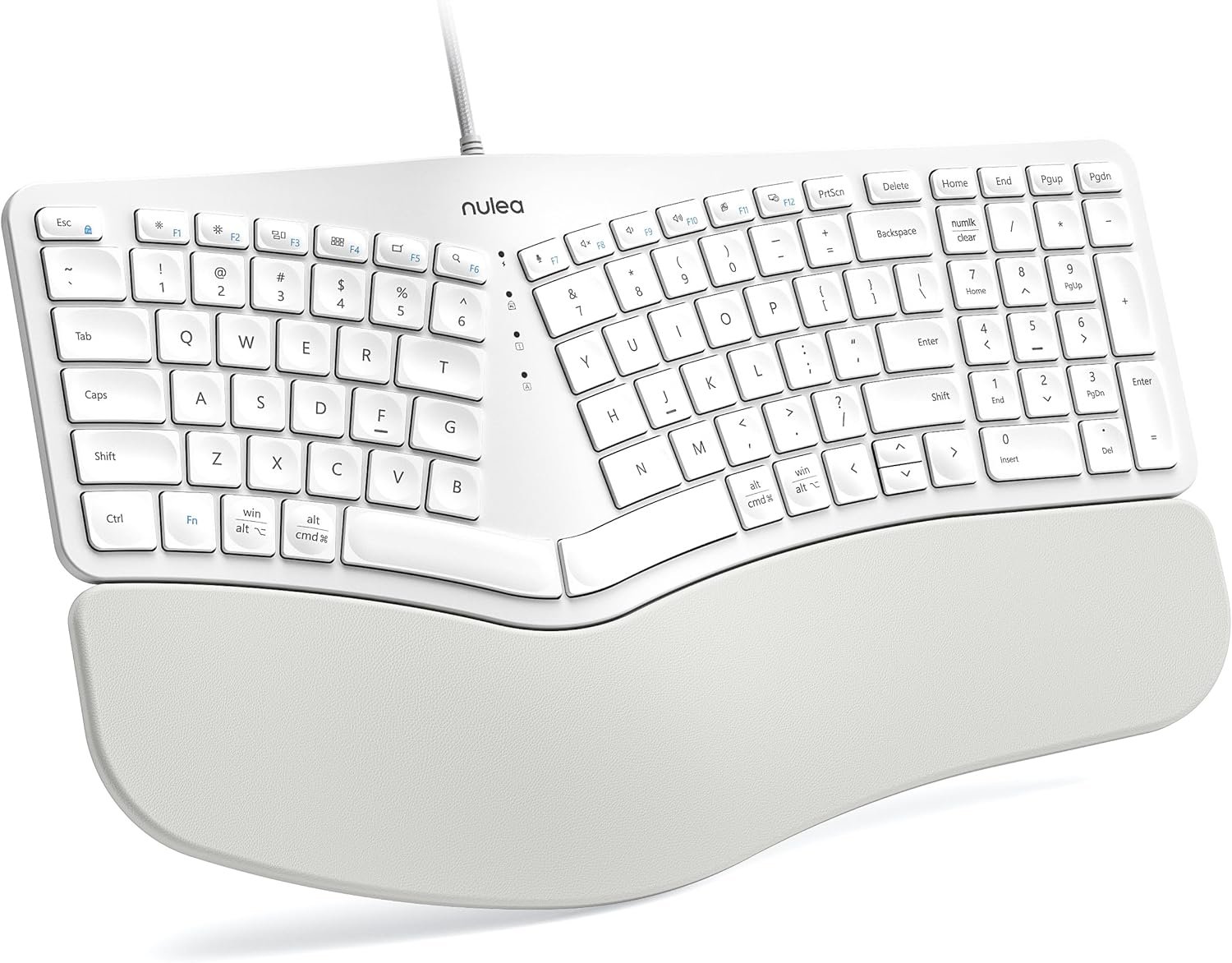
Nulea RT05C Wired Ergonomic Keyboard, Split Keyboard with Cushioned Wrist Rest, Adjustable Tilt Legs, Plug and Play, USB Corded, Compatible with Windows/Mac-White
$49.99
Related Products






Product description

 Ergonomic Split & Splayed Design
Type more naturally to reduce muscle strain on your wrists and forearms
 Larger Pillowed Palm Rest
Support your palm and wrist better and boost a more relaxed typing angle
 Adjustable Tilt Legs
Always keep your wrists in a comfortable
position for different postures

 Designed to fit your fingertips
With specially shaped keys, each tap offers satisfying feedback

 Meet Nulea Ergo Series
Promote natural postures and relaxed movements with innovative and smart designs
 Meet Nulea Ergo Series
Promote natural postures and relaxed movements with innovative and smart designs
 Meet Nulea Ergo Series
Promote natural postures and relaxed movements with innovative and smart designs
How to switch the keyboard’s F1-F12 usage function?
When “Fn” is in lock mode and pressing F1-F12 directly has no effect, then you need to press “Fn” while pressing F1-F12. Note: Press “Fn” and “Esc” at the same time to switch Fn function lock or unlock.
When the keyboard is jammed:
1. The issue was caused by a computer update. Attempt restarting your computer and reconnecting your keyboard.
2.Debris could fall into the crevices of the keys while in use. Try flipping the keyboard over and tapping to get rid of the object.
How to distinguish the use of alt and cmd function keys on different systems?
The silkscreen above the horizontal line corresponds to the Win system, and the silkscreen below the horizontal line corresponds to the Mac system
【Ergonomic Split Design】Embrace a more natural typing posture with Nulea ergonomic keyboard’s unique split design. It adapts to the natural alignment of your hands, ensuring comfort and reducing strain during long typing sessions.
【Luxurious Wrist Support】Experience the pinnacle of comfort with our keyboard’s oversized wrist rest, crafted with a soft, skin-friendly leatherette design. It provides ample support to your wrists, helping prevent fatigue and strain.
【Adjustable Tilt for Optimal Comfort】Customize your typing angle with ease! This keyboard features adjustable support tilts, offering three different angles to suit your personal preference and ensure ergonomic alignment.
【Stable Wired Connection】Experience the reliability of a stable wired connection, enhanced by a durable braided nylon cable that resists wear and tear. Say goodbye to wireless interference and connectivity issues for uninterrupted productivity and gaming.
【Easy Setup and Broad Compatibility】 Enjoy the simplicity of plug-and-play setup with no additional drivers required. This keyboard is compatible with Windows, macOS, and Linux, and features convenient shortcut keys to streamline your workflow and boost efficiency.
10 reviews for Nulea RT05C Wired Ergonomic Keyboard, Split Keyboard with Cushioned Wrist Rest, Adjustable Tilt Legs, Plug and Play, USB Corded, Compatible with Windows/Mac-White
Add a review

$49.99
Michael K –
Nulea RT05C Wired Ergonomic Keyboard – White
I’ve been using the Nulea RT05C Wired Ergonomic Keyboard for about a month now, and it’s been a solid upgrade. Some of the key sizes are different from my previous Logitech ergonomic keyboard, so there was a bit of an adjustment period. However, unlike my old Bluetooth keyboard that would occasionally lag, this corded one is consistently responsive, making for a smoother typing experience.The split design encourages a more natural hand position, which feels more comfortable compared to traditional layouts. The cushioned wrist rest stands out, providing excellent support and making long typing sessions much more manageable. The adjustable tilt legs are a great addition, letting me fine-tune the angle for better posture and comfort.Setup was effortless, I plugged it in, and it worked immediately with my MacBook Pro. Do wish it was a USB-C connection, but not a big issue. The keys have a nice tactile feel and respond well, which helps with typing speed. Overall, noise level from typing isn’t bad. If wrist strain from prolonged typing is an issue, this keyboard could be a worthwhile solution. Overall, it’s been a great experience so far, delivering both comfort and functionality for extended use.
rob decleene –
Terrific Product and Value
Terrific product. Less expensive than ergonomic competition. Compatible with Mac. Great function and instructions. Caps light still works unlike competitors that need to disconnect and reconnect to function.
GL –
Nice Work Keyboard
Used this keyboard for a few days for work. So far I like it. Not too clacky and easy on the wrist. Would recommend this keyboard for someone worried about carpal tunnel.
Tree Hopper –
Very comfortable keyboard
Update 11/4/2025: I have used this keyboard for 10-1/2 months now and everything I said originally (below) I still agree with. It is my favorite keyboard ever. The keys are still springy (as long as you don’t have a very heavy touch) and all the keys work as if they were new. I still wish there was a Ctrl key instead of a Windows key on the right side (but not enough to motivate me to downloaded 3rd-party keyboard mapping software to switch it). I definitely would buy it again.Pros:- Comfortable hand and wrist position- The space bars are not too high vertically. I had to abandon an early “ergonomic” keyboard because the slope was such that I was getting tenosynovitis (aka “mommy’s thumb”) in both wrists. This keyboard is not doing that to me.- Nice tactile and auditory feedback. (Some may complain the keyboard makes too much noise but I like it. If you like to hit the keys hard, you may find the keyboard not springy enough, but for a light touch it is quite good.)- Coming from an old Microsoft ergonomic keyboard, the main keys (letters and numbers above them) are where my fingers expect them, including the “Y” which is accessed by the right hand. (Some split keyboards have the “Y” positioned for the left hand, which is not what I’m used to.)- Not as wide as many keyboards that also including a number pad and arrow keys.- You can toggle the keys at the very top between normal function keys and keys that control brightness, volume, etc. (The default is the latter, but when you press Fn+Esc you toggle them to function keys.)Cons:- In order to make all the keys fit, some keys are not where I’m used to. What bugs me the most is that I have trouble finding the arrow keys, “home” and “end” without looking. “Pgup” and “Pgdn” are in a weird place too but as they are at the very top right, they are much easier to find. (“Delete” is above “Backspace”, so not so hard by touch.)- There is no “Ctrl” key to the right of the space bar, only to the left. (I may try remapping the “Win” key on the right to “Ctrl”, since I never use the right “Win” key and there is also a “Win” key on the left. This is not a programmable keyboard, but there are software tools that allow remapping any keyboard.)- There is no dedicated “Insert” (or “Ins”) key, but the number pad has “Insert” on the “0” key so it’s not a big deal to me.- The LEDs are very bright (but easily made dim by a sheet of paper over them).- No backlighting (which only bothered me when I couldn’t find the arrow keys by touch in the dark and when I hit the 0/Insert key by mistake and couldn’t find that in the dark either).By the way, I was puzzled by why the number pad wouldn’t work until I realized that I had Mouse Keys on. If your number pad isn’t working, try pressing the Alt + Left Shift + Num Lock keys to toggle Mouse Keys off. (If Mouse Keys was already off, you will get a dialogue box asking you to confirm that you want to turn Mouse Keys on.)
Leilani –
Perfect work from home
Really like this ergonomic keyboard . It helped aid in my recovery of tendonitis. I have wrist /hand pain and have this keyboard was better than regular keyboard. I worked in another office one day and sat in an office that had a regular keyboard and had immediate discomfort. I was glad to go back home and use this keyboard. I have 2 , one for work and for work from home . I work 8-10 hrs a day and thus helps
Pako –
Bastante cómodo, de muy buena calidad, recomendado
Stephanie –
Absolutely adore this keyboard. Fantastic ergo keyboard. Nice layout. Keys are quiet and made for typing. I loved it way better than my last one after only two min of using this one. Buy it, you won’t regret it. I love pink so of course grabbed that one on sale.
Jesus G. –
Todo excelente, sólo que no sabía que los teclados ergonómicos traen la tecla B del lado izquierdo y yo estoy acostumbrado a usar el dedo gordo de la mano derecha pera esa tecla. Fuera de eso todo excelente.
Jason in Edmonton –
Really good quality keyboard for a great price. Although I’m not getting used to it and keep hitting the wrong keys. But the keyboard itself is great.
Amazon Customer –
It’s a great product. The reason I did not give it a 5-star review is because it does not have a Ctrl button on the right-hand side, only on the left-hand side. That really messes up my ‘cut-and-paste’ routine. I don’t like it. I need a Ctrl button on the right-hand side to support my workflow. For this reason, I returned this product and purchased a different one that had a standard key layout. Otherwise, it’s a great keyboard, very nice design.