
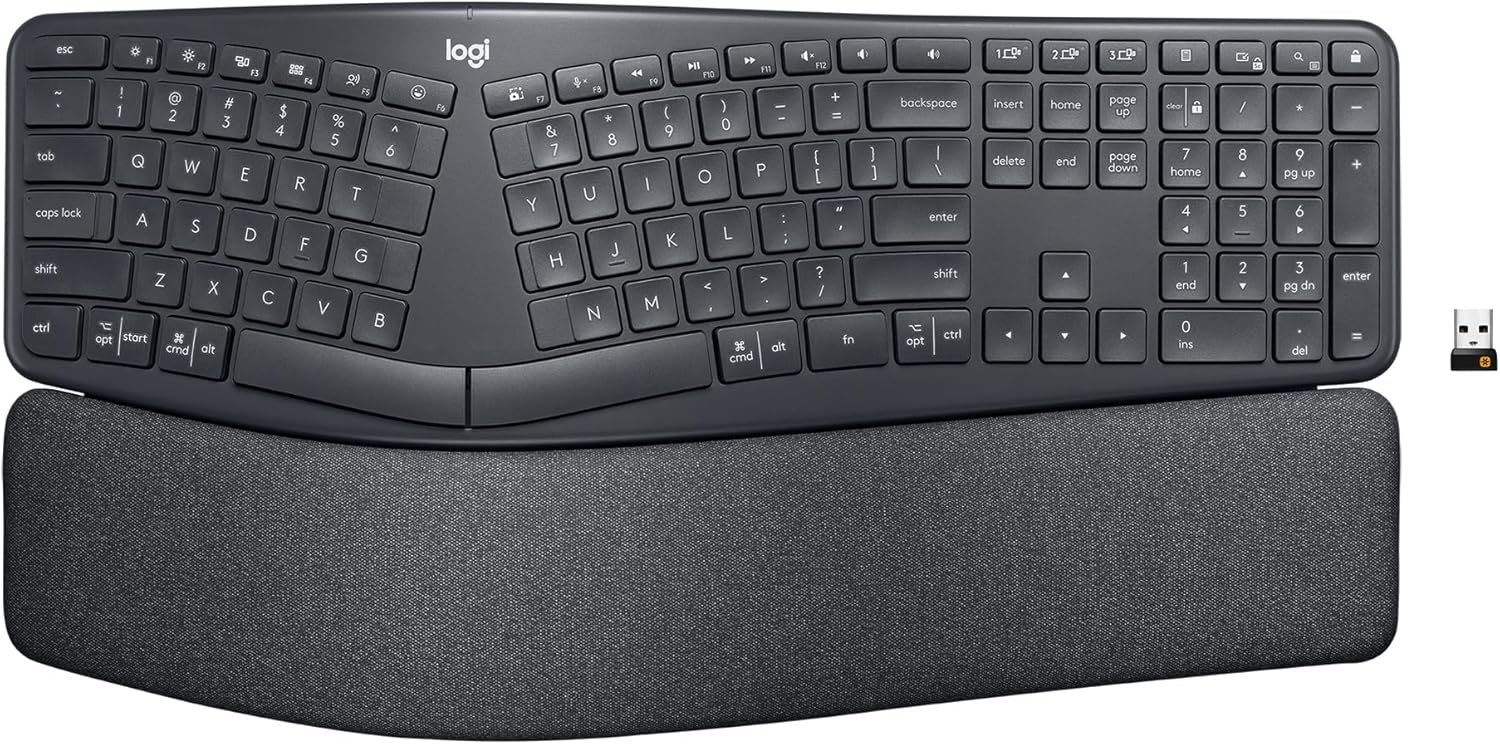
Logitech Ergo K860 Wireless Ergonomic Keyboard – Split Keyboard, Wrist Rest, Natural Typing, Stain-Resistant Fabric, Bluetooth and USB Connectivity, Compatible with Windows/Mac, Black
$149.99
Related Products




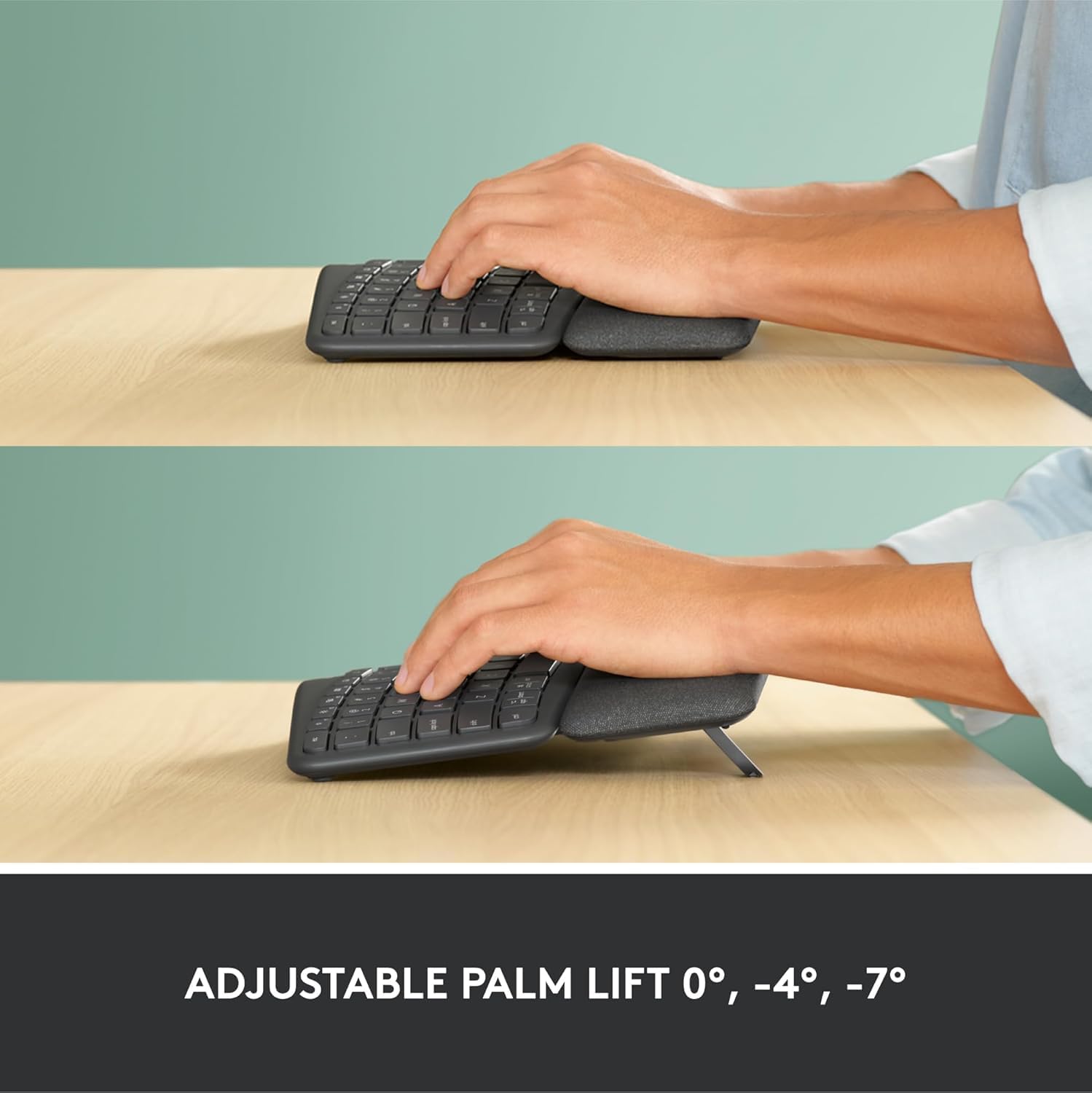


Type more naturally with ERGO K860 – an advanced ergonomic keyboard that promotes a more relaxed typing posture – reducing wrist bending by 25% and offering 54% more wrist support. The curved, split keyframe reduces muscle strain on your wrists and forearms. And the pillowed wrist rest offers comfort and the optimal ergonomic position. The adjustable palm lift feature keeps your wrists in a natural posture, whether you’re seated or standing. You’ll confidently type on Perfect Stroke keys—crafted for precision and fluidity. And an integrated numpad, multi-device capabilities, and two-year battery life ensure that you won’t compromise performance for ergonomics.
Improved Typing Posture: Type more naturally with a curved, split keyframe and reduce muscle strain on your wrists and forearms thanks to the sloping keyboard design
Pillowed Wrist Rest: Curved wrist rest with memory foam layer offers typing comfort with 54 per cent more wrist support; 25 per cent less wrist bending compared to standard keyboard without palm rest
Perfect Stroke Keys: Scooped keys match the shape of your fingertips so you can type with confidence on a wireless keyboard crafted for comfort, precision and fluidity
Adjustable Palm Lift: Whether seated or standing, keep your wrists in total comfort and a natural typing posture with ergonomically-designed tilt legs of 0, -4 and -7 degrees
Ergonomist Approved: The ERGO K860 wireless ergonomic keyboard is certified by United States Ergonomics to improve posture and lower muscle strain
Familiar Features: Conveniently connect with the USB receiver or Bluetooth, customise Fn key use, and enjoy the quiet keys, full-size layout and CAPS LOCK indicator
Sustainability: Plastic parts in ERGO K860 Graphite include 71% certified post consumer recycled plastic; uses FSC-certified paper for responsible packaging
Powered by Logitech Options: Customize Fn Keys, create custom shortcuts and get battery-life notifications via Logitech Options computer software
In case of wireless keyboard or combo (keyboard and mouse), the USB receiver is usually provided either inside the mouse (under the battery cover) or attached within the product packaging
3 reviews for Logitech Ergo K860 Wireless Ergonomic Keyboard – Split Keyboard, Wrist Rest, Natural Typing, Stain-Resistant Fabric, Bluetooth and USB Connectivity, Compatible with Windows/Mac, Black
Add a review

$149.99
A. Kintz –
Finally something competitive from Logitech
Although I’ve had a number of Logitech mice over the years, this is the first Logitech keyboard that I can recall ever buying for myself. It’s replacing a Microsoft Sculpt wireless keyboard that I really liked. I loved the simplicity of the Sculpt and have been used to that split design after many years with MS’s natural keyboards. Logitech, for as long as I can recall, has never had a good competitor in that basic, split layout ergo space. They’ve always had something like the K350 that was sort of a warped or stretched layout but wasn’t much different from a normal, if a bit distorted layout. And that one always seemed a bit cheap and clunky.I think it’s safe to say the K860 finally fills that gap. And so far it seems to be doing it well. I think there is a little bit of a difference in the spacing from one side to the other when comparing to the Sculpt but the overall layout is basically the same. So while I’m still getting a feel for where the differences are between the two (delete key, number pad, pg up/down, etc), the overall transition is easy.The GoodKeys are comfortable and quiet. I’m far from a keyboard expert or connoisseur, but the typing action is fine (if not a tad firm). I do tend to only use the left side of the spacebar and I think that particular key makes a little more noise than the others – but otherwise it’s pretty quiet. I also like having a number pad again (the Sculpt has a separate/external one which I usually kept in a drawer).Actual ergonomic feet. I’m happy to see that they got the feet in the right place for actual improved ergonomics. The lower of the two feet settings feels about right to me when comparing to what I’m used to with the Sculpt (I did use the riser on the Sculpt for max comfort) – but I like that there are two options and might try the taller one just to see if I notice a difference.There’s a power switch. It seems dumb, but I like that there’s actually a power switch. This will be handy when I want to give it a quick wipe down and cleaning. MS’s Sculpt did not have one and that just meant I had to pull the batteries or turn off my laptop if I wanted to clean it. Not the worst but not exactly convenient.Dual connection methods. Just like my M720 mouse, I like that there’s a USB receiver and it can do Bluetooth (and multi-device BT even!). I like using BT on my own computer to keep USB ports free but it’s nice to be able to pull the receiver out if I’m working on another system temporarily.The MehPalm rest is not as fancy as it looks. The palm rest is comfortable but I was surprised there isn’t really a texture to it. It’s just a pattern on the material made to look like a texture. It’s otherwise just as smooth as any other palm rest I’ve used. From the images, I expected maybe it would be some sort of microfiber or other soft textile. I am also surprised that the palm rest doesn’t detach from the keyboard. It kind of looked like it would from the photos but it’s all one piece. It’s fine though, since I’d probably only ever use it with it attached – it just gave that impression from the design.Feet are a little too rubbery? While I appreciate grippy feet to keep things in place, I tend to push my keyboard around my desk during the day depending on what else I’m working on and these feet are pretty grippy out of the box. Though that honestly might be a plus for a lot of other people.I’ve only been using it for a short time, so I don’t really have any negatives to put into this – but I’ll update if anything comes up. Otherwise it’s nice to see Logitech finally making a decent, modern, split layout keyboard.
Michael Wright –
Really nice ergo keyboard!
I’m in IT – I’m at a computer all day, every day. I had a boss early in my career who had severe carpal tunnel issues and he always preached ergonomics. Due to that I’ve been using an ergonomic keyboard for the last 17 years, specifically the Microsoft Ergonomic 4000. That keyboard is no longer produced but I’ve loved it, it’s held up well, and I’ve never had any issues with my wrists from typing all day. I recently got a new job and decided to upgrade my keyboard for the first time since 2007. The Logitech ERGO K860 came up in most searches for the best ergo keyboard in 2024 so I decided to give it a shot.I couldn’t be happier with it. The shape and key placement is very similar to my beloved MSE 4000. They keys are much quieter and very pleasant to type on. I was a little concerned that the “scooped keys” in the product description would be deep divots like I’ve seen on some keyboards and don’t care for, but I needn’t have worried. These are just ever-so-slightly scooped, in a way that’s barely noticeable until you focus on it, but enough that it does make a positive impact on typing.It’s well constructed and feels like it’ll hold up for a long time (we’ll see if I can get another 17 years!). The wrist rest is really comfy, nice and wide, and not a material that seems like it will wear out or get gross over time.It connected easily to two laptops and my phone, one laptop with the USB receiver and the other two via Bluetooth. Typing is nice and responsive and I don’t detect any delay with typing. I like that the function keys can be customized via the Logi Options+ app, although the default functions are pretty good right out of the box. I already had the Logi Options+ app for my MX Master 3 mouse (best mouse I’ve ever used!) but it wouldn’t recognize the keyboard until I updated it to the latest version, not a big deal though.The only change I’d make to it is the batteries. It runs on two AAA batteries. That’s fine I suppose, I do have rechargable AAAs I can use. I’d prefer that the keyboard be USB rechargeable like the MX Master 3 mouse – charge it once every few months and then don’t worry about it. Now when the batteries on this keyboard run low I’ll have to go searching for batteries to replace them instead of just plugging it in for a bit. Not my favorite, but it’s not huge deal.Overall incredibly happy with this keyboard! It’s definitely a good successor to my Microsoft Ergonomic 4000!
CAGirly5000 –
Love This Keyboard, Even though a few letters wore off after 2.5 years
This is easily the best keyboard for work I’ve ever owned. I’d buy again in a heart beat, although might choose the White instead of the Black that I bought. I absolutely love the layout, the low profile keys, soft sounds, extra buttons on top, and overall feel. I often work late (10+ hours) and my wrists are able to handle this configuration much better then a normal keyboard (still the occasional pain and stretches needed though). The batteries lasts about 1.5 – 2 months, although I use rechargeable batteries so if you use new it may last longer.The only negative is that after 2.5-3 years I’ve worn off the letters for four of the keys I use the most. I’m a touch typist so I don’t need to see the letters but beware incase you use the printed letters.