
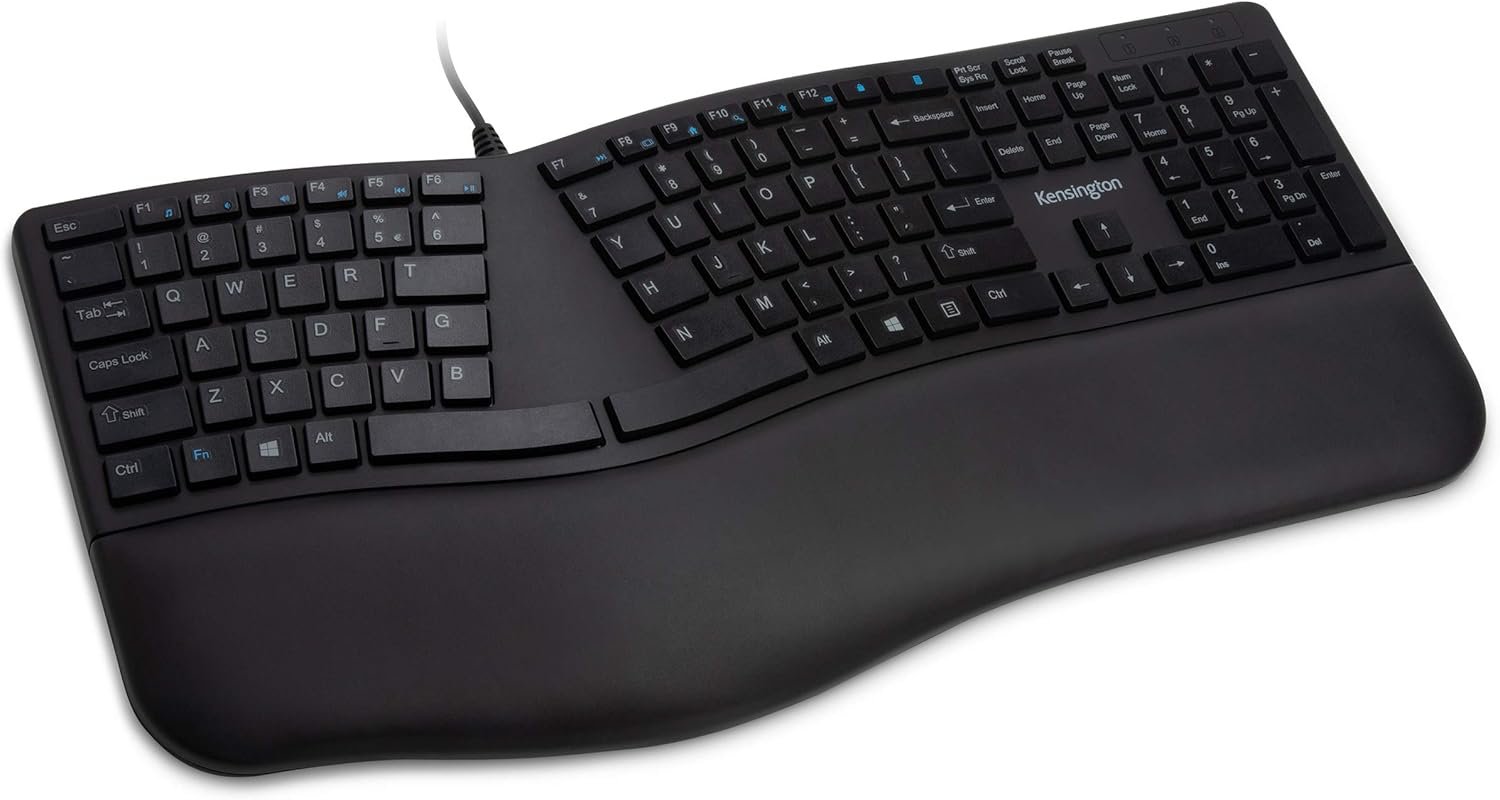
Kensington Pro Fit Ergonomic Wired Keyboard- Black (K75400US)
$30.19
Related Products




Product description

Kensington is a leading provider of desktop and mobile device accessories, trusted by IT, business, and home office professionals around the world for more than 35 years. Kensington strives to anticipate the needs and challenges of the ever-evolving workplace and craft professional-tier award-winning solutions that provide peak professionals with the tools they need to thrive.


Pro Fit Ergo Wired Keyboard (K75400US)
With its split and sloped keyboard with adjustable reverse tilt, and a built-in cushioned wrist rest, the ergonomist-approved Pro Fit Ergo Wired Keyboard positions your hands for improved comfort. Features include quiet typing; spill-proof keys; F-keys for shortcuts; caps lock, numbers lock, and scroll lock; and a plug & play USB connection.
Specifications Unit Dimensions: Width: 8.50in / Length: 18.23in / Height: 1.42in Unit Weight: 1.65lbs Product Color: Black Operating System: Windows 7/8/10 Connection: 1x Type A USB Port Plug & Play Cable Length: 5.9ft
Get comfortable with the ergonomist-approved Pro Fit Ergo Wired Keyboard.

Split and Sloped Keyboard with Adjustable Reverse Tilt
Positions hands, wrists, and forearms for comfort and neutral alignment.

Built-In Wrist Rest
Supports, cushions, and cradles the wrists.

Quiet Keys
For smooth, easy, non-disruptive typing.

Spill-Proof Keys
Make cleanup fast and easy.

Caps Lock, Numbers Lock, Scroll Lock, and F-Keys
Popular features that make typing and navigating easier and more efficient.

Plug & Play USB Connection
Simple and reliable.
*USB-C to USB-A connector is needed for newer Mac products
Built-in wrist rest and neutral grip supports, cushions, and positions the wrist for comfort and neutral hand alignment.
Built-in wrist rest supports, cushions, and cradles the wrists.
Quiet keys mean typing is smooth, easy, and non-disruptive.
Spill-proof keys make cleanup fast and easy; Meets MIL-STD-810H Method 504.3 Contamination by Fluids testing for resistance to breakdown when exposed to cleaning and disinfecting solvents such as alcohol and bleach for at least 24 hours
Caps lock, numbers lock, scroll lock, and F-keys are popular features that make typing and navigating easier and more efficient.

selknam style –
Excellent
The keys are nice and soft, the calculator key is above the backspace rather than the lock key above the backspace which is ideal (I’d rather accidentally pop up a calculator than lock my computer), and the arrangement of the keys is ideal. My only suggestion for improvement on this keyboard is to use mechanical (brown? – the ones that are quiet and with minimal actuation pressure) switches, and to widen the wrist pad on the left side because the left hand hangs off the edge. This model is slightly wider than the cherry keys model which is even worse in this aspect, but hey, why not try widening it a little more so it gets the whole hand. I’ll emphasize that the az, sx, dc, fv, and gb alignment is so nice. The keyboards that stagger these keys are far more inconvenient to type on. The funny thing is there are no keyboards on the market that have mechanical key switches and this type of keyboard alignment along with this keyboard layout. If someone made that keyboard, it would become the best keyboard in the entire world, and I have a feeling few people would take notice until maybe 10 years later. At which point it would become discontinued right as it was becoming a living legend. Because that is how the market for perfect keyboards works.
Miguel & Esme –
Solid keyboard, worth the price
I type seven days a week, multiple hours a day. I buy at least one keyboard and mouse per year. For the sub-$100 keyboards, this is the best I’ve bought in many years. I only buy wired keyboards b/c I don’t like changing batteries or when they stop working from dead batteries. There is nothing worse than keyboards that change the layout of the arrows or delete key (like Meetion, boo), so glad this one keeps the standard layout.PROS- Comfortable to type with- Not overly noisy- Six months of daily usage, no issues- Standard layoutCONS- Wish it came in colors other than black
Daniel Woodrum –
I love this keyboard
I tried two other keyboards before this one. and I was bracing myself to have to buy a super-expensive one, just to get something I liked. But this one is near perfect.I love the soft, almost-silent touch of the keys. The previous keyboard I tried had squishy keys that actually fatigued my hands by the end of the day, due to the effort needed to push them. On this keyboard it feels good to type.I also like that the caps lock light is in the upper right corner, not on the key, which means I can see it without moving my hand (this was a problem with one of the other keyboards I tried). The split between F6 and F7 threw me off for a bit, but I’ve adjusted (the old Microsoft ergo keyboard split between f5 and f6, so I had to adjust to the different positions). Aside from that, all the keys are in the right place and I’m pretty good at hitting them without looking.I like the spacing and layout of the arrow keys. This keyboard doesn’t try to do anything fancy with the layout, which means it looks plain, but the keys are all in the right place.If I had to complain? I’d rather there be no keys at all above the backspace key. It’s easy to aim too high and hit the calc or the lock key instead of backspace. A little extra space between the numbers and the F keys might be nice, as well. But it’s rare that I punch the wrong key. Maybe a little more padding on the wrist rest — this one isn’t as cushiony as the others I’ve tried. I’d also like pop-out feet at the top and bottom of the keyboard — this one only has them at the bottom, which seems like the opposite of what most people would want. But I’m very comfortable typing with it, the way it is.
CombatVetScott –
Better than comparable Microsoft items, but still not serious about quality
This is a huge improvement over the microsoft keyboards, which I only liked because of the layout until they changed it again. Still needs some work on materials and design.The legs for tipping up the keyboard aren’t strong enough to last very long, mine broke after about a month. Skimped on material strength and quality.The calculator and lock keys are too close to the Backspace key, so unless you are flawless in your typing you will be unlocking your screen and closing the calculator app a lot. Keys with a more positive travel (or cupped) instead of uber cheap and crowded would be great.Inferences:No (competent or serious) testing was done.Went cheap on design and materials cashing in the poor consistency and quality of Microsoft keyboards.Still it is better than MS hardware and leaves the opportunity open for a serious improvement over MS keyboards with a good layout.You’re not getting what you should for what you pay, but still a better value than Microsoft.
Zifnab –
Decent Replacement for a Microsoft Ergonomic Keyboard
This is a good budget-friendly replacement for a Microsoft Ergonomic 4000 Keyboard. I wish someone would make an exact replica of it, but this keyboard is pretty good. Some notable differences are lack of clips to raise the back end, dedicated internet and sound buttons (have to use Fn key in conjunction with function keys) and it has low-profile keys instead of full-size keys. However, I’ve been using this keyboard for programming and gaming for 3 weeks now and I like it a lot. I actually like the slightly smaller profile so I can have more room on my desk. I was a bit worried about the two spacebar buttons but that hasn’t been an issue at all. I’d highly recommend.
Stan1689 –
Insensitive keys and causes wrist pain after only an hour use!!!!
My Microsoft Natural keyboard died and was out of stock so I decided to give this Kensington keyboard a try thinking this a name brand. What a mistake! This keyboard is trash quality. The keys are very insensitive requiring hard presses to work and the design SUCKS altogether! My wrist will hurt after less than an hour of use each time. China made ergonomic keyboard with much cheaper price worked better than this piece of junk. Now have to throw this in the trash and buy another ergonomic keyboard.
Amazon Customer –
Comfortable, quiet, I love the negative tilt feature
I don’t understand all the hate for this keyboard, it’s quite great, and exactly what I was looking for. It’s quiet, comfortable, ergonomic in the sense it has negative tilt which is really important in standing desks; aside from the fixed split. I’d buy again.
Fariz –
Yaklaşık beş ay içerisinde çok kullanılan tuşların yazıları silindi, iade ettim, iadem kabul edildi.
Axiana –
I absolutely love this keyboard it’s perfectly ergonomically shaped for me I’m a 5 ft 2 female and my arms are proportional to my body so if you’re about my height that you just keyboard Maybe suitable for you. It keeps your arms in perfect natural resting position so when you’re typing you feel extremely comfortable the keys are placed in logical sense location for where your hands would naturally go and the extra features on the keyboard are a bonus
Kuber Sharma –
Quality is below average for this high price
Azahel D. –
creo que es buen teclado, al menos ya no me duelen las muñecas desde que empecé a usarlo
Luna Fox –
This keyboard is taking me some time to get used to, because of the split erogonomic design. But, with bad carpel tunnel syndrome, I was advised to buy an erogonomic keyboard. Sometimes, simple is best. I had ordered TWO other wireless keyboards by other brands, more expensive, and they were both faulty! I had to return them. I decided to go with a good old wired keyboard, and I’m glad I did. The keys on this keyboard are smooth like butter when you type. Some people like that, and some people prefer more clicky keys. This keyboard isn’t for those who like clicky keys. I am very impressed with this keyboard for the price. I’m noticing a reduction in my wrist and arm pain after having it almost a month now. The padded wrist pad is making all the difference. I paired this keyboard with a Tecknet erogonomic mouse, and they’re both helping a lot.