
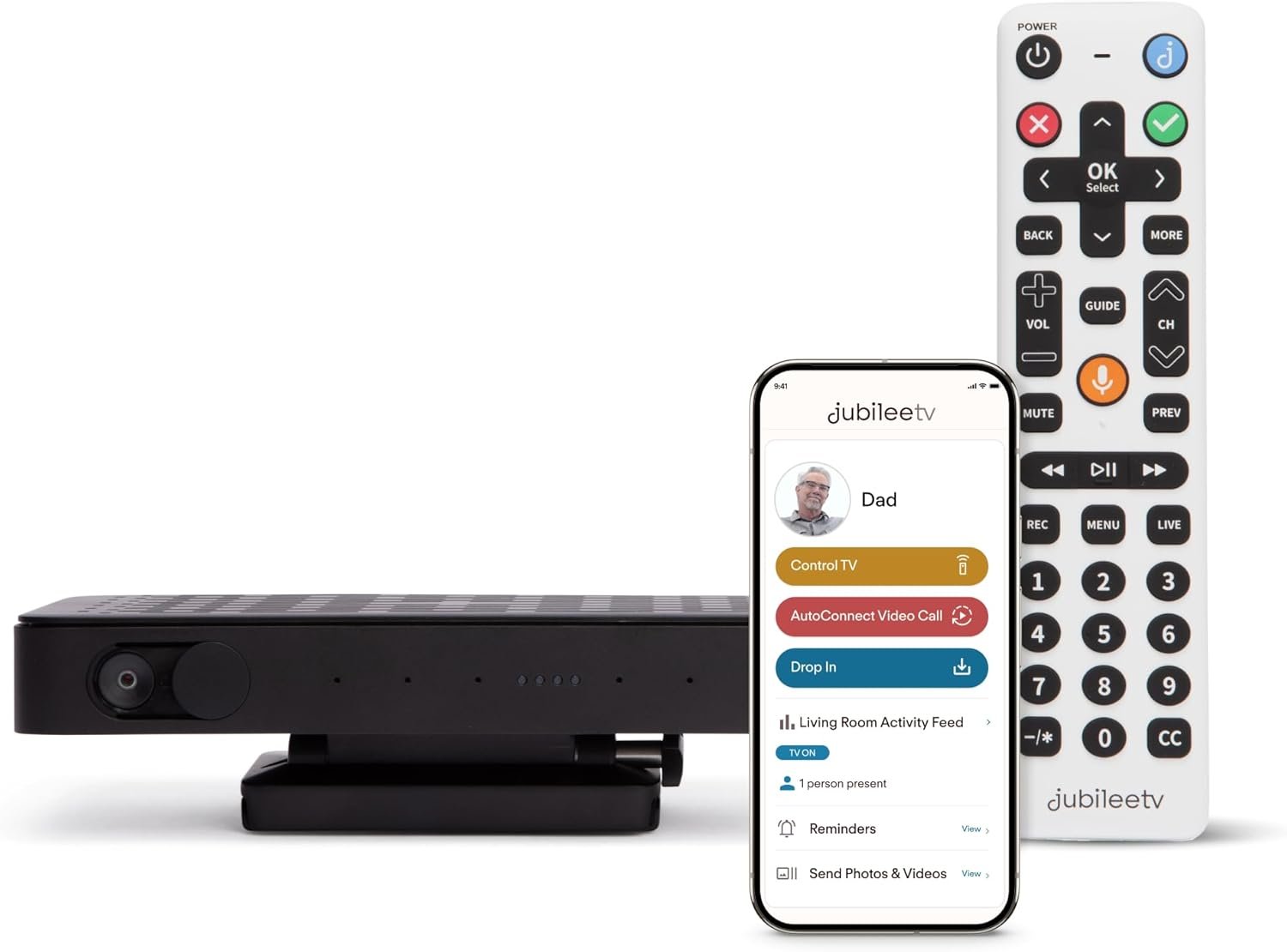
JubileeTV Remote Care System for Seniors — Stay Connected Through Their TV | Control TV Remotely from Your Phone | Video Calls, Reminders & Monitoring | Simple Setup + Voice Remote
$199.00
Related Products


Product description
Meet JubileeTV

JubileeTV Replaces TV Frustration with Meaningful Connection
Connecting JubileeTV to mom’s TV takes away her TV frustrations while opening new opportunities for togetherness. It lets people who care offer just the right help when she needs it.Simple voice-activated remote for seniorsPassive Mode option designed for people with dementia or anyone who wants a simpler TV experience. Enjoy JubileeTV’s essential features (Telescope remote TV control, video calling, Activity Feed) without your loved one having to learn a new remote or interface.With the JubileeTV App it’s simple to put on a show, make video calls to the TV, track TV routines, share photos & videos and set reminders, no matter the distance.You need to connect at least one supported set-top box or streaming player. You can connect up to 3 devices. JubileeTV will not work without a source device, so if your loved one uses only a Smart TV to watch TV, you’ll need to add a Roku or other source device.Please read if connecting JubileeTV in a Senior Living Community: You must have an external tuner or set-top box to connect cable or satellite service such as Spectrum, Dish, DirecTV. You cannot connect via Coax cable. Service Plan Required: First month included free, purchase at activation for $29/month or $269/prepaid annual (save 23%)
The JubileeTV Experience

The Hub
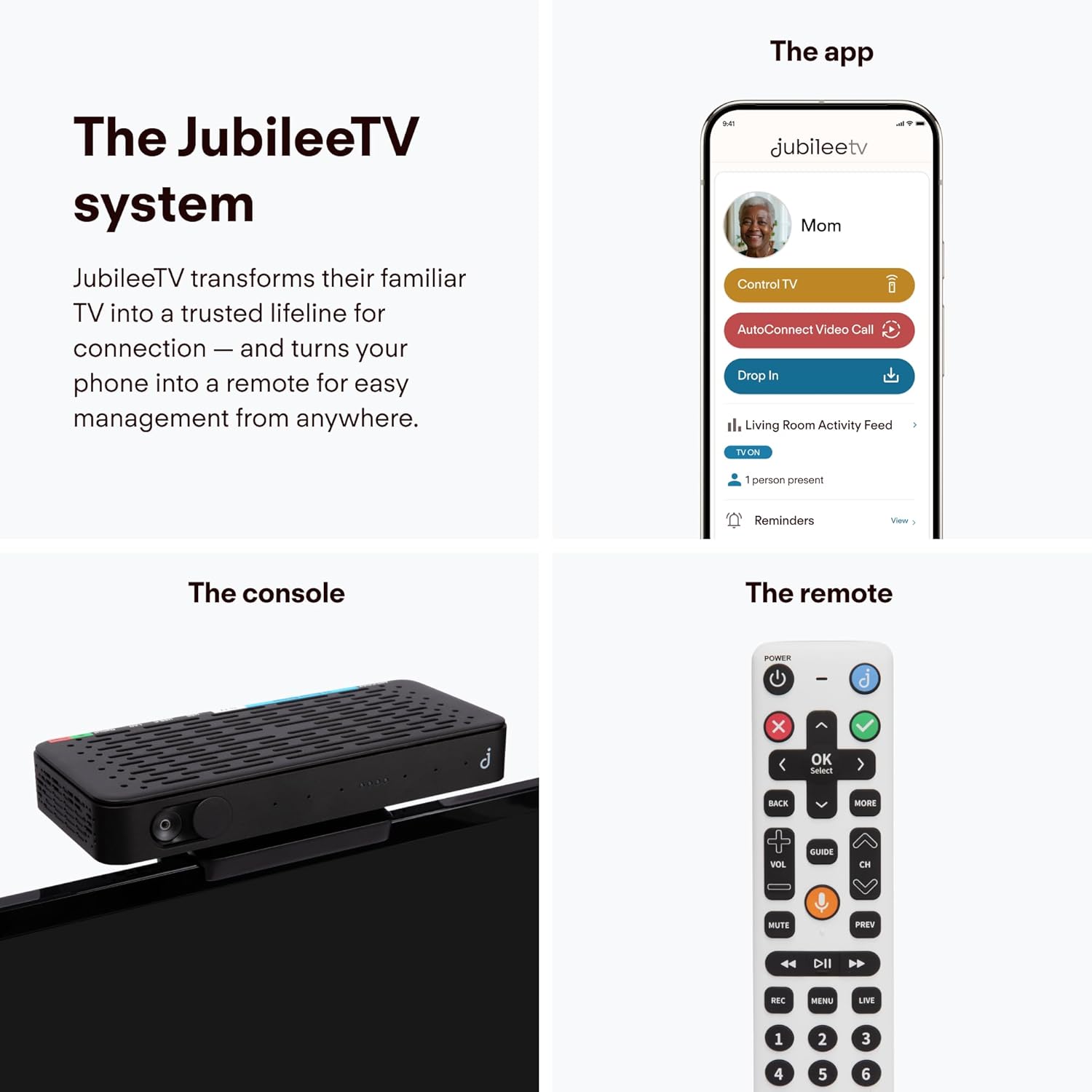
Connect The Hub to your aging loved one’s TV to simplify their experience and turn the TV into a place to engage & connect. The Hub includes a Console with built-in Camera and Voice Remote.
The App
Designed for families, The App provides an effortless way to stay connected with your aging loved ones and make sure they’re safe and well, all from your smartphone. Works with iOS, Android, and web browsers. Add as many family members as you’d like.

The Membership
JubileeTV Membership activates all the features within The Hub and The App and includes unlimited App access for as many contacts as you’d like. You’ll also enjoy access to high-quality phone, chat and email support and frequent updates with new features based on Member feedback.

Remote Control, Redefined
Control mom’s TV from your phone
Say goodbye to frantic ‘how-to’ calls – now you can help your loved ones effortlessly navigate their TV no matter the distance. They’ll feel like tech wizards—and you’ll feel like a hero.
See a snapshot of the television screen
No more flying blind while trying to help mom with the television. JubileeTV’s patented technology lets you see exactly what’s happening on the TV screen.
Dementia Option: Keep the original remote (or go remote-free)
Our Passive Mode feature is designed for those with dementia and cognitive decline or anyone who wants a simpler TV experience. When you turn on Passive Mode you can enjoy JubileeTV’s essential features without your loved one having to learn a new remote or interface. Your loved one can use their regular remote or even watch TV without one. And you’ll be able to control their TV from your phone.
Use the Virtual Remote to Control Any TV from Anywhere See what’s playing on the television screen in real time Full navigation of the TV and everything connected – navigate Roku, TV menus & more Switch between cable, streaming & DVD Change channels Control television volume

Bigger Screen, Bigger Smiles
Video calling with JubileeTV allows your loved ones to see every smile, every laugh, and every shared moment in life-sized glory! Use the JubileeTV App to all directly to your loved one’s television. They use the JubileeTV Voice Remote to make and receive video calls. Or use AutoConnect video calling, if enabled, to automatically connect a video call with no interaction required from the Senior. From the JubileTV App you can even turn up the television volume during the call to make sure dad can hear.

See a summary of TV actvity and capture an optional photo to make sure everything is okay
 Reminders
Give your loved one a gentle nudge to support their independence – great for medication reminders, appointments & family events, so they never miss out.
Get automatic notifications when your loved one responds to a Reminder All your loved one has to do is press a button on their remote control Add as many family connections as you’d like to keep everyone in the loop Automated Actions turn on the TV and tune to a channel at a set time. Great to put on the morning news, a sporting event or worship service.
Know they’re okay
Get non-intrusive peace of mind with Activity Feed
Tune into your loved one’s TV routines without intruding and get notified if they don’t follow their usual schedule. Capture an optional photo when the TV turns on or off. This gentle awareness lets you start supportive conversations and ensure their well-being without stepping on their independence.

What’s in the Box?
Connect the JubileeTV Console to the television and up to three TV source devices – including cable/satellite box, Roku, and DVD player and JubileeTV will switch seamlessly between everything. You’ll also be able to control all of it from your phone! With the built-in high-def web camera and you’ll be able to see your loved one from the comfort of their living room. Enjoy that wide-angle view to see them in their space instead of that close-up selfie style! The system also includes a power adapter.

Simple Voice Remote for Seniors
Your loved one uses the JubileeTV voice remote to control the television and everything connected. For example, they can say “Hallmark Channel,” “Channel 9,” “Netflix,” or “Mute” and JubileeTV will take care of the rest. Now they don’t have to juggle multiple remotes. Jubilee TV even brings voice to cable and satellite boxes that don’t have it!

Jubilee TV Hub with Web Camera and Power Adapter
In the box you’ll find several accessories that help ensure a seamelss experience, including IR blasters, a premium HDMI cable, and a Jubilee TV Smart Plug. These items are not required for every setup, and we’ll let you know if you need them during your setup call.
JubileeTV Console with Web camera & Power Adapter
Voice Remote with Batteries
JubileeTV Smart Plug, HDMI Cable + Optional Accessories (IR Blasters, extra HDMI cable, Y Splitter)
What Your Loved One Needs to Use JubileeTV at Home

Home Wi-Fi
To use the JubileeTV system, your loved one needs an internet connection with wi-fi in their home. Please note, if your loved one resides in a senior living community and uses Guest Wifi please reach out before you purchase.

Television Set
JubileeTV works with nearly any TV with HDMI, even older models. If your loved one normally only watches on a Smart TV and doesn’t have any devices connected, JubileeTV will NOT work for you. If you would like to use JubileeTV for watching streaming content, we recommend connecting a Roku.

TV Source Device(s)
Your loved one needs a supported cable or satellite TV box or a streaming player to connect to the Jubilee Hub. JubileeTV works with Comcast/Xfinity, Optimum, Spectrum, DirecTV, and DISH (you must have a set-top box), as well as Roku, and other streaming players, and DVD/Blu-Ray players.
EFFORTLESS TV CONTROL FROM YOUR PHONE. Turn the TV on/off, change channels, adjust volume, and more from your smartphone or tablet with the JubileeTV app.
STAY CONNECTED WITH DIRECT-TO-TV VIDEO CALLING. Make video calls directly to your loved one’s TV with an easy auto-answer feature and a full-room view.
QUIETLY CHECK IN WITHOUT DISRUPTION. Drop In feature allows you to make sure all is well via one way video and audio feed.
SMART MONITORING & ALERTS. See when the TV is used, remote control activity, duration of viewing, and when someone enters/exits the room, giving you insights into routine changes.
REMINDERS, MESSAGES & UPDATES. Send helpful medication reminders, notes, photos, or videos straight to their TV screen to keep them on track and feeling loved.
SENIOR-FRIENDLY INTERFACE & VOICE REMOTE. Large, backlit buttons and voice control are designed for ease of use for all seniors, including those with cognitive decline or in an assisted living facility.
WORKS WITH CURRENT TV SETUP. JubileeTV doesn’t replace their cable box, streaming device, or satellite, it works with what’s already there.
SECURE ACCESS & PRIVACY CONTROLS. Invite-only access, OTP authentication, end-to-end encryption, and physical camera cover ensure privacy is protected.
FLEXIBLE MEMBERSHIP PLANS. Choose the membership option that suits your lifestyle: monthly ($29/month), annual ($289), or one-time ($600). Purchase after receiving your shipment. You will be unable to access the JubileeTV system without an active Membership. Only supported in U.S.
6 reviews for JubileeTV Remote Care System for Seniors — Stay Connected Through Their TV | Control TV Remotely from Your Phone | Video Calls, Reminders & Monitoring | Simple Setup + Voice Remote
Add a review

$199.00
D. Shannon –
Easy for a senior to use. Also allows me to troubleshoot and control my mom’s TV from 400 miles away
I bought the Jubilee system because I understood I’d be able to control my 94-year-old mother’s TV from 400 miles away. She can’t find programs, sometimes doesn’t have her tv turned on when she thinks she does. I had it the system sent to me because I wanted to try it before installing it at my mom’s. The install was easy. After connecting all the cables and power, I did have to call tech support and they answered immediately and walked me through the rest of the installation. Took a total of 15-20 minutes of my time. The support person demoed some of the features important to me – control app for my iPhone, how to use the remote – I have Roku and the remote is mostly the same, with the bonus of setting up a favorites section. I have about 150 Roku apps and use 6 regularly (and probably never use about 100 of them), put those in the favorites section and now I’m just choosing between 6 rather than 150.My impressions after about a week of use:What I like:1. I’ll start by mentioning how impressed I was with support2. Easy to use. Remote seems more responsive than the Roku (I haven’t timed it, just my impression)3. The iPhone app is incredible. I’ll be able to troubleshoot my mom’s TV, change channels for her, see what she’s watching from 400 miles away4. Video calling. My mom could never use Facetime (nor anything that required her to use a smartphone 😊). Screen is big (tv size big), sound is loud (tv sound loud) and familiar (same as using a remote) – thinking about it, I’m pretty sure I could initiate a call to me from my mom using my iPhone app to control her TV.Features I’d like to see:1. Asterisk on the remote. There’s a work around using voice command, but I like my asterisk – tech support gave this to engineering upgrades come regularly without me having to anything.2. Weather – Allow scrolling through multiple zip codes, currently it’s the one you input when setting up the unit.3. Contacts other than people who have Jubilee.I haven’t used chat, photos yet, but I’m looking forward to using it. I’m pretty sure my 94-year-old mother would get a lot of use out of the photos if I could load them (pretty sure I can).I’m honestly excited to use this product (was going to give this one to my mom but may just have to buy her another one 😊). Given how relatively new the product is, it seems like a relatively mature product (just give me an asterisk! 😊)
E. Freund –
Totally Awesome !!!
Our father got to the point, in which he could not control his tv anymore. Believe me, it was impossible. He was confused even with voice commands. He is in assisted living, and we kept asking the staff to turn on his tv, change the channels, and turn off tv. It was a HUGE problem continuously calling the assistant living staff. We were so stressed, since we wanted dad to have the ability to watch TV.I found this product (JubileeTV) and thought it was worth a shot. This device has literally changed our life. Yes, it changed our stress level and it seemed like a miracle to us. Just so awesome. Was it worth $100? Absolutely YES.First, it was packaged extremely well. I look at how things are packaged, it tells me a lot.Second, the actual device is made of steel, not some cheap plastic. It’s nice and heavy and it’s well thought out. Where you plug in cables, it is well labeled.Third, it has all the cables you need. You don’t need to purchase any other cables. The cables are high quality too. Cables are individually packaged too.Fourth, we asked for a virtual phone call for the initial setup. Shaquille was our assistant and he was extremely professional and walked us through all the steps which were needed. We did not have any issues…the setup was well thought out. If we did have a question during the setup, Shaquille knew every answer. It was obvious he had done this hundreds of time. I would highly recommend using their free tech support during your setup. It will stream line your setup.Fifth, the TV controls in their app were so, so, so great AND so easy to use. We setup dad’s favorite channels, so the family can turn on his tv and turn to his favorite channels in literally 10 seconds. We can even see what is playing on his tv through the app. We setup up a “reminder” to have his TV automatically turned on at 9am to ESPN!! You can do that for your favorite shows. You want to watch Andy Griffith at 4pm, just setup a “reminder” and it will do it for you automatically. Just so awesome.Sixth, we setup the video camera so we can visit dad through their video camera. Dad will see our faces on his TV. He can hear us and he can talk with us. He does not need to do anything if we want to do a virtual meeting with him. That’s done through the app and us.There are other great features I’m sure we will explore later. Photos and video can be sent through the app, so he can view your photos and your video. Dad will kept in the loop on family functions. The app is well designed and easy to use. But if you are not sure, call their tech support.You can insert a ROKU device and control it too. Thats an option we will be investigating next. We have not set that up yet.One thing I also liked, their tech support number was on the remote control and easy to find within the app. It was NOT buried 12 levels down and hard to find.There is a monthly fee or a yearly fee. But you also get support 7 days a week!! For our family, this fee is well worth it. There is nothing worse than a product that has no support. They are located in the United States.If you have a parent or family member who can’t control their tv, and you need the ability to control their tv, this is the miracle you’ve waited for. In addition, there many other features you will find helpful. We wish we had found this product two years ago. Believe me this product is so great and helpful. Very Close to a perfect product.
Austin U –
Wonderful for dementia care, easy to use
This product was a life saver for our 95 year old grandma experiencing dementia. When she could no longer figure out the remote, we were able to turn on her favorite shows and baseball games. It was worth its weight in gold, and was even easy for my 70 year old parents to use the app and set it up for grandma. All you need is a strong WiFi connection, and in our case, a Roku, and it’s a wonderful product. We ended up upgrading the Roku to a higher end model which had stronger WiFi to alleviate some early issues.
Becky tate –
Wonderful product!
It can take a while to get it all set up, but Victor at Jubilee so patiently and kindly helped us figure out how to bypass the smart tv built-in apps in a way that they won’t come up every time she turns the TV on. Every TV has a different setting it seems like. My friend is happy as a clam and able to watch her DVDs and favorite streaming shows on the BBC app with the simple platform that Jubilee provides. And, we can video chat with each other, in a way where we don’t end up looking at each other’s chins like with our phones, and I can participate in medical visits even if I’m not there because it grabs the room with good sound and visual. I lovvve this product
Peter Traeger –
Impossible to Install
Impossible to set up. I am very tech savvy but this was extremely difficult to set up. My mother in law has a Roku TV and there was no setting for Roku even though Roku is recommended. I tried calling for help but gave up after 30 minutes on hold.Put back in the box .Also the monthly fee is ridiculous I never would have bought it if I had known it was $289 a year.I don’t believe the 5 star ratings.
Mark Dezzani –
The Jubilee TV box arrived on the date notified and works brilliantly. However, this has not been licensed for use in the UK. The Jubilee TV customer service team were very helpful though and suggested that if a US Zip Code was supplied then the subscription required to activate it and make it work could be activated. Additionally, I could not pay using my UK credit or debit cards. I had to ask a friend in the US if I could use their card. Once this was navigated, installation was easy and it all works perfectly and has been a tremendous help. Only two other points. One is that the times shown refer to the US time zone for the ZIP code used to register. The other is that there is a one month free trial period (once the subscription has been pre paid) and not two months as advertised by the UK reseller.