

Arteck Ergonomic USB Wired Keyboard with Cushioned Wrist & Palm Rest, Backlit 7 Colors & Adjustable Brightness Comfortable Natural Split Keyboard with 6 Feet Wire for Windows Computer Desktop Laptop
$56.99
Related Products







Product description


Make Typing More Comfortable
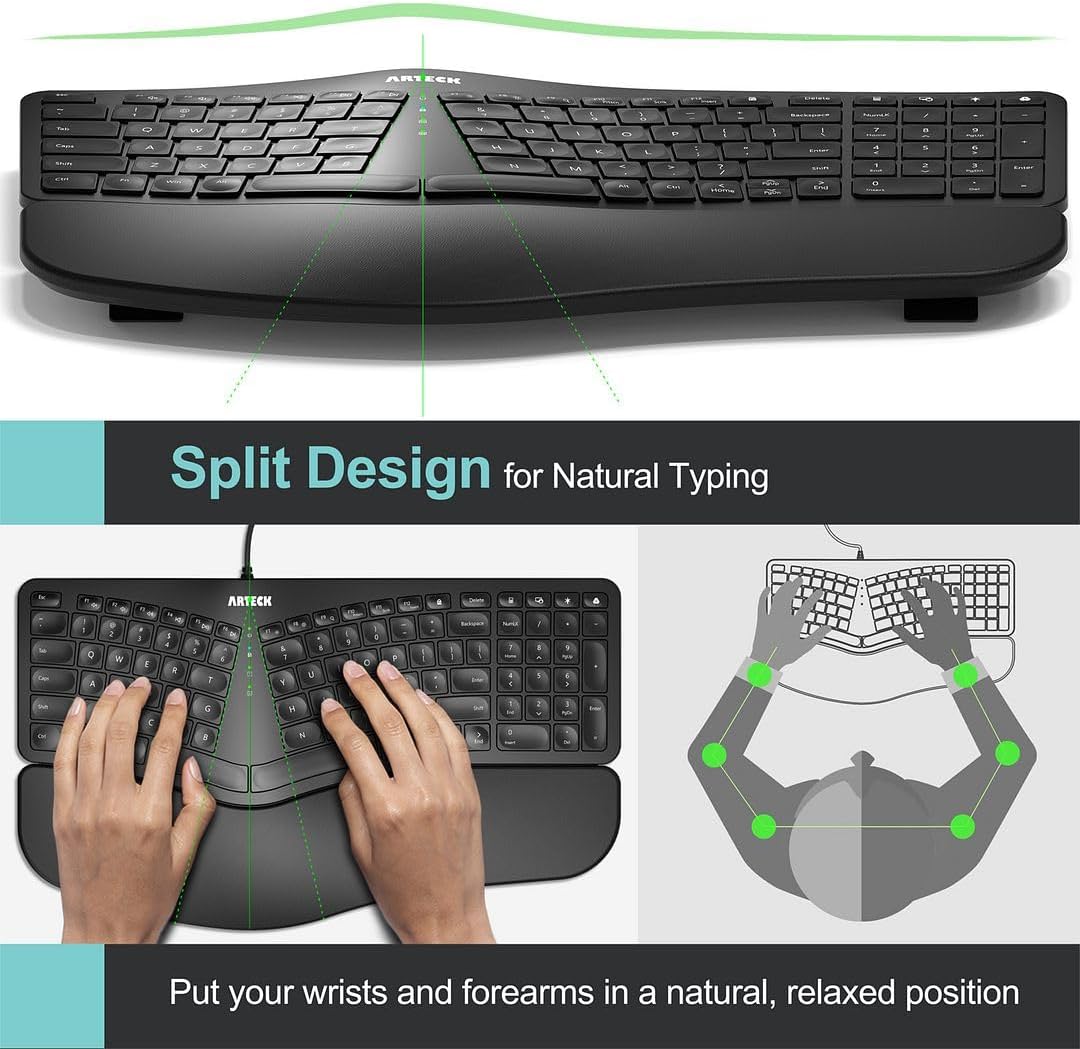
The split design helps to position wrists and forearms in a natural, relaxed position. The keyboard has comfortable wrist rest so you can place your wrist on the cushioned palm to rest and enjoy the typing. The keyboard has built-in 4 foldable legs so you can adjust to your favorite typing angle.
Let there be Light
Elegant LED backlight with 2 adjustable brightness level, 7 different colors(deep blue, soft blue, bright green, soft green, red, purple, cyan) making typing that much more enjoyable and awesome to look at. Backlight will auto turn off when idle to conserve power for when it is most needed.
Easy Setup and Use
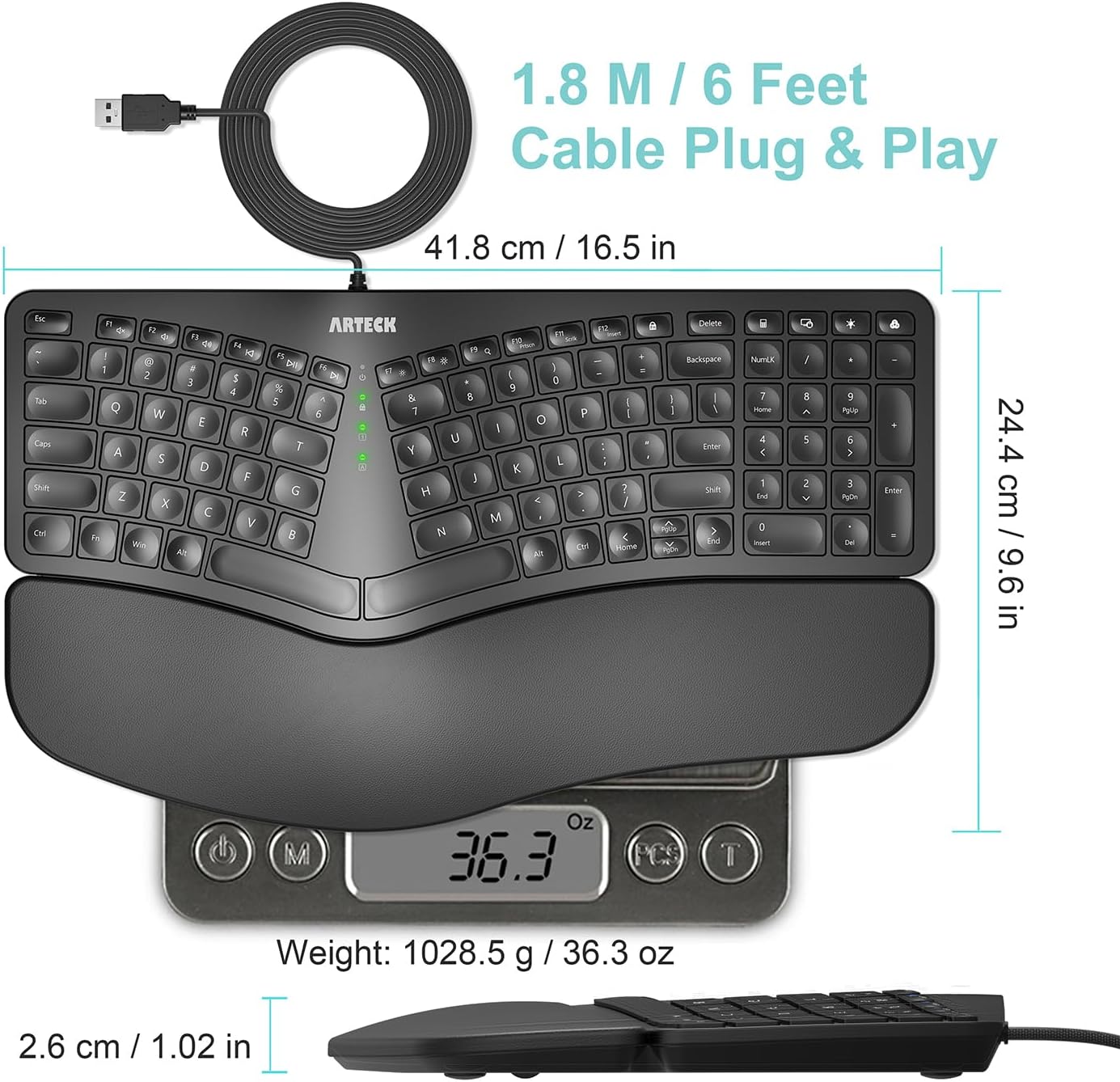
Just simply insert the 1.8M (6 feet) USB wire into your computer like desktop or laptop, then the keyboard can be used instantly. No need driver. The cable length is 1.8meters or 6 feet. It allows you to gain quick access to common functions, such as volume level, playback control, brightness, and more. It also provides number pad with slim and compact design. The keyboard doesn’t have separate arrow and Home End keys. Please press the Fn + Home /end keys to get the function if the key can not work.
Comfortable, quiet typing
The whisper-quiet, low-profile keys bring a whole new level of comfort to your fingertips. What’s more, keep all your most-used functions and media controls closer than ever Windows-dedicated hot keys. The construction of this scissors-kick keys can be used more than 3 million times continuously.
2 Years Customer Care
If you have problem using the keyboard, you can contact the support team printed at the back of the keyboard as the product has 2 years customer care.
Split Design Ergonomic: Split design helps to position wrists and forearms in a natural, relaxed position.
Wrist Rest: Soft cushioned wrist rest helps you to rest your wrist and forearm while typing and makes work easier and more comfortable.
7 Unique Backlight Color: 7 Elegant LED backlight with 3 brightness level.
Easy Setup: Simply insert the 1.8M (6 feet) USB wire into your computer and use the keyboard instantly.
Package contents: Arteck Backlit USB Wired Ergonomic Split Keyboard, welcome guide, our 24-month warranty and friendly customer service.
8 reviews for Arteck Ergonomic USB Wired Keyboard with Cushioned Wrist & Palm Rest, Backlit 7 Colors & Adjustable Brightness Comfortable Natural Split Keyboard with 6 Feet Wire for Windows Computer Desktop Laptop
Add a review

$56.99
Amazon Customer –
Precisely What I Was Looking For
I’ve used this keyboard daily for 3 months now, and it has been a great experience so far.It’s my first time purchasing an Arteck keyboard, so I wasn’t sure what to expect, but I had heard their brand is reputable for making solid, reliable devices, and thus far I would agree with that.I was looking for a very specific set of features in a keyboard, and this was literally the only one that checked all of the boxes on Amazon at the time of purchasing.Features I was looking for that it had:Ergonomic split key style with a padded wrist rest.Scissor-style key press mechanism (feels like a laptop keyboard when typing)Backlit keys with multiple color choices, including whiteA full sized number pad on the right sideWired, rather than wireless (although in hindsight, either would have been fine.)There are a few things about the keyboard that are relatively minor, not anything that makes it a bad experience, but that if I could have everything perfect in a single keyboard, I would prefer they were slightly different.The half-sized Up/Down arrow buttons, while functional, I would prefer full size ones like the right and left arrows. They feel a bit cramped to use.The delete key being about 3/4 sized is not that strange, but its position above and right-aligned to the backspace key is just awkward for me. I’m used to it being underneath, or off to the right side. Very often I will blind-press either the “FN Lock” (Function Lock) key to the left of it by mistake, thinking it is the Delete key, either that or the Calculator key (which works great in Linux by the way) to the right of it. 3 months in and I’m still not used to its size or placement unfortunately.Similarly, I’d rather the top row of keys on the number pad were positioned elsewhere, (or mainly just the color change button for the backlight not being above the – key) but I do understand that there are limitations to the amount of space they can work with, and appreciate that they managed to pack a bunch of extra feature keys.I’d prefer the print screen feature to have its own dedicated key, rather than being a toggle ON/OFF via the function lock. For example, to switch between the ability to take a screenshot, and the ability to refresh a webpage via the F5 key, you have to press the function lock key in between to toggle the functionality.Most of the functions controlled by FN Lock are used sparingly (volume controls, media playback controls, brightness settings, scroll lock and the insert key) but print screen is one of those that’s pretty common for me, and would have been more helpful having its own key instead.Two more minor things related to the lights… if I had it all my way…By the way, at the time of writing, there was a discrepancy in the product description in regards to the backlighting colors so, for those who are wondering, the key colors on the HA315B model are: yellow, purple, cyan, white, red, green, and indigo (blue.)The first one is just a personal preference. I’ve surprised myself by gravitating to the yellow color lights.I wish the yellow color was more to the orange/red side, like a golden color. Instead it is closer to a yellow-green, which is fine, I would have just preferred something a bit more gold if I could pick. Not a big deal at all. I like that it has a lot of color choices!The other “issue” was just that the green lights in the center of the keyboard that tell you what buttons are ON/OFF for capslock, function lock, numlock, and so on, are SUPER bright. Way too unnecessarily bright. It looks great when you’re using the green color on the backlight, since it matches well, but for everything else it’s too intense and visually distracting, especially in a darker room.But, I got some old solid black electrical tape I had laying around, and cut little tiny squares of out it, and covered about 75-90% of the visible lights with that, drastically reducing their brightness to a more sane and tolerable level, while also being careful not to completely cover the lights, so I can still tell when they are on or off in general.It’s a simple, low-tech fix, and again not a huge deal, but for future keyboard designs I would highly suggest putting a much dimmer and more subtle light in for those.All in all, it may sound like I have a lot of complaints, but honestly none of them are all that big of a deal.Almost every keyboard I’ve ever used has at least a few aspects that feel are a bit less than ideal compared to what I would prefer, and none of these things are detrimental enough to feel like a disservice to the experience.It’s a very enjoyable keyboard to use and I’m quite pleased with it. The pros far outweigh the cons, in other words.I would definitely recommend this keyboard if you are looking for these very specific combination of features, like I was, and I’m pleased with my purchase for sure.If everything continues to go this well throughout the rest of the year, I’d safely be able to recommend Arteck, or at least this specific product, to anyone interested.
Chip –
High quality Windows keyboard that’s a perfect fit for my needs
Have only been using a few days but love this keyboard. Very quiet, responsive keys that provides a high-quality, tactile feel and an accurate rendering (no extra or missed characters). Specifically selected a wired keyboard that is easy to use, just works once plugged in w/o any configuration hassle, and isn’t susceptible to unpredictable Bluetooth / wireless connectivity issues or delays.Very natural hand position, with flexible positioning by using front and/or rear stable kickstands under the keyboard to position to your liking. Fingers quickly adjusted to key size and spacing for predictable touch typing. Spacebars for each hand are broad enough that my thumb lands naturally on them without worrying about thumb position or a gap between keys. The result is a keyboard where I can type quickly, accurately, without hesitation.Visually maximizes readability if you’re not a fluid touch typist, whether typing in well-lit or low-light conditions. You can easily adjust brightness, and nice set of available colors for preference/variety. This keyboard is built for Windows so if that’s all you use like me there’s no clutter showing Mac content on keys. Left-hand keys (Tab, Caps, Shift, Ctrl) are slightly larger making them easy to hit, and are labeled rather than icons if you haven’t got those memorized. Fn toggle key is included on bottom left row (which surprising wasn’t there on some other keyboards I considered) along with a Fn Lock key to the right of the F12 key for camping out in that mode.Bottom line is that there isn’t a single thing I have found to complain about yet with this keyboard. Hoping you find this keyboard meets your needs as well as I do!
94Q45T –
UPDATE: Outstanding customer service – and Great value, good performance, not perfect`
SECOND UPDATE: Arteck responded to my support request (email) within hours. After trying a few of the normal fixes (update driver, rebooting, changing USB ports – the usual), they sent a replacement keyboard. Knowing how fast their support team is, I’d have no hesitation in buying from them again.UPDATE: We bought two. After a few weeks, one was working perfectly, but the other one started sending random signals to the PC. Sometimes it would lock. Other times it would send endless + signs to fill in field. Switched keyboards, and the problem followed the keyboard.This is a complete keyboard (includes number pad). It has an ergonomic design and padded wrist rest all offered at a great price. It is a wired (USB A) connection which I wanted since we’d had two wireless keyboards fail previously. The size fits easily on smaller desks, unlike the ergo behemoths from Microsoft and others. Plug n play, very easy.The key presses are a little mushy, but not nearly as much as Microsoft’s own ergo keyboard. Since the crisper mechanical models are much more expensive, this is a good compromise. The backlit keys are very nicely done. The backlight is adjustable for color and brightness and can be turned off if desired..
Cláudia –
Ótimo!
adam emsley –
If you are in the market for a well-rounded, budget-friendly ergonomic keyboard that offers a comfortable typing experience, the Arteck Ergonomic Wired Keyboard is a top contender. Here’s why:1. Design and Build Quality (5/5)The Arteck keyboard boasts a sleek and modern design that stands out in its price range. The build quality is impressive, featuring a robust structure that doesn’t feel flimsy or cheap. Its ergonomic shape immediately catches the eye, with a slight curvature that ensures your wrists are at a comfortable angle while typing. I’ve found this to be especially helpful during long work sessions.2. Ergonomics and Comfort (5/5)The standout feature of this keyboard is its ergonomic design. It provides excellent wrist support with a gentle slope and a soft, cushioned wrist rest. This helps reduce strain on your hands and wrists, making it ideal for people who type for extended periods. The keys are also well-spaced and have a satisfying tactile feel, making typing a pleasure.The adjustable stand at the back allows you to raise the keyboard to your preferred angle, which further enhances the comfort and reduces the risk of repetitive strain injury. After using it for a week, I noticed less fatigue compared to my previous flat keyboard.3. Typing Experience (4.7/5)Typing on this keyboard is smooth and comfortable. The keys have a nice bounce to them, and the low travel distance means you don’t have to press down too hard. This makes typing faster and more accurate. Additionally, the keys are quiet, so it’s perfect for shared office spaces or if you prefer a quieter working environment.One minor downside is that it may take a bit of time to adjust to the layout if you’re coming from a traditional keyboard. However, once you’re used to it, the typing experience is significantly improved. The backlit keys, which are adjustable for brightness, are a nice touch, especially when working in low-light conditions.4. Backlighting (4.5/5)The Arteck keyboard comes with adjustable backlighting that enhances both the aesthetic appeal and the functionality, particularly in dimly lit environments. You can adjust the brightness to your liking, and the illumination is evenly distributed across the keys, ensuring each key is clearly visible.While the back light works well, it offers limited customization colors or fancy lighting modes, which might be a deal-breaker for those looking for something more dynamic. However, for most users who need functional lighting, this is more than enough.5. Connectivity and Setup (5/5)Being a wired keyboard, the Arteck is incredibly simple to set up. It’s plug-and-play—no need to install drivers or software. Just connect it to your PC or laptop, and you’re good to go. The cable is long enough to accommodate various setups, whether you’re using it for a desktop or laptop.6. Durability and Longevity (4.8/5)After weeks of heavy use, the Arteck keyboard shows no signs of wear. The keys feel just as responsive as they did on day one. The materials used in the build are durable, ensuring this keyboard can handle regular usage without losing its quality.7. Value for Money (5/5)At its price point, the Arteck Ergonomic Wired Keyboard offers incredible value for money. It packs features you’d expect from higher-end models—like adjustable backlighting and ergonomic support—into a much more affordable package. Whether you’re working from home, gaming, or just want a more comfortable typing experience, this keyboard is a great investment.Final Verdict:Pros:Excellent ergonomic design with wrist supportQuiet, responsive keysAdjustable backlightingDurable build qualityPlug-and-play setupCons:Limited backlight customizationMay require a short adjustment period for some usersIn conclusion, the Arteck Ergonomic Wired Keyboard is a great product for anyone looking for an affordable yet high-quality typing experience. Its ergonomic design, quiet keys, and backlighting make it ideal for both work and leisure. I highly recommend this to anyone in need of a reliable, comfortable keyboard for everyday use.Would definitely buy again!
Karla –
First of all, this is a used keyboard not new and I find the price a bit high but it is a good keyboard, great quality and very comfortable on your hands, other that I recommend it.
Val –
I used the Microsoft ergonomic keyboard for years until it died. I really liked the ergonomic design, but it was big and clunky, and a bit old fashioned. I have used the Arteck HW315 at home for a while and loved it so chose the Arteck HA315B for work. This keyboard is essentially the same as the HW315 except it is wired and has multiple colour choice backlighting. I have been using this keyboard every day for over a month (as well as the HW315 at home for longer) and absolutely love it! It is comfortable with a padded but firm hand rest and four retractable feet. The ergonomic design is great for typing smoothly but Arteck have managed to do this whilst keeping the overall size slim and neat – it uses much less desk space than my old MS keyboard. The lead is a slim but sturdy braided design with good length. The keys are responsive and positive, but shorter and smoother than a traditional keyboard. The backlit colour and brightness are adjusted easily with two buttons above the number pad – it is fun choosing my colour of the day and it looks great at night with the lights out. It also has a keyboard shortcut for the calculator which is so handy. The function buttons double up as volume/brightness etc like a laptop, with a function lock button to switch between the two modes. I have can also vouch for Arteck’s after sales service as a leg broke on my wireless keyboard. After a single email, a replacement was sent out very quickly. Overall an excellent choice and very reasonable priced.
Alex Gray –
It’s better than the old Microsoft Ergo 4000 model. I was very surprised at how well it’s made and it has RGB functions which is a bonus.