
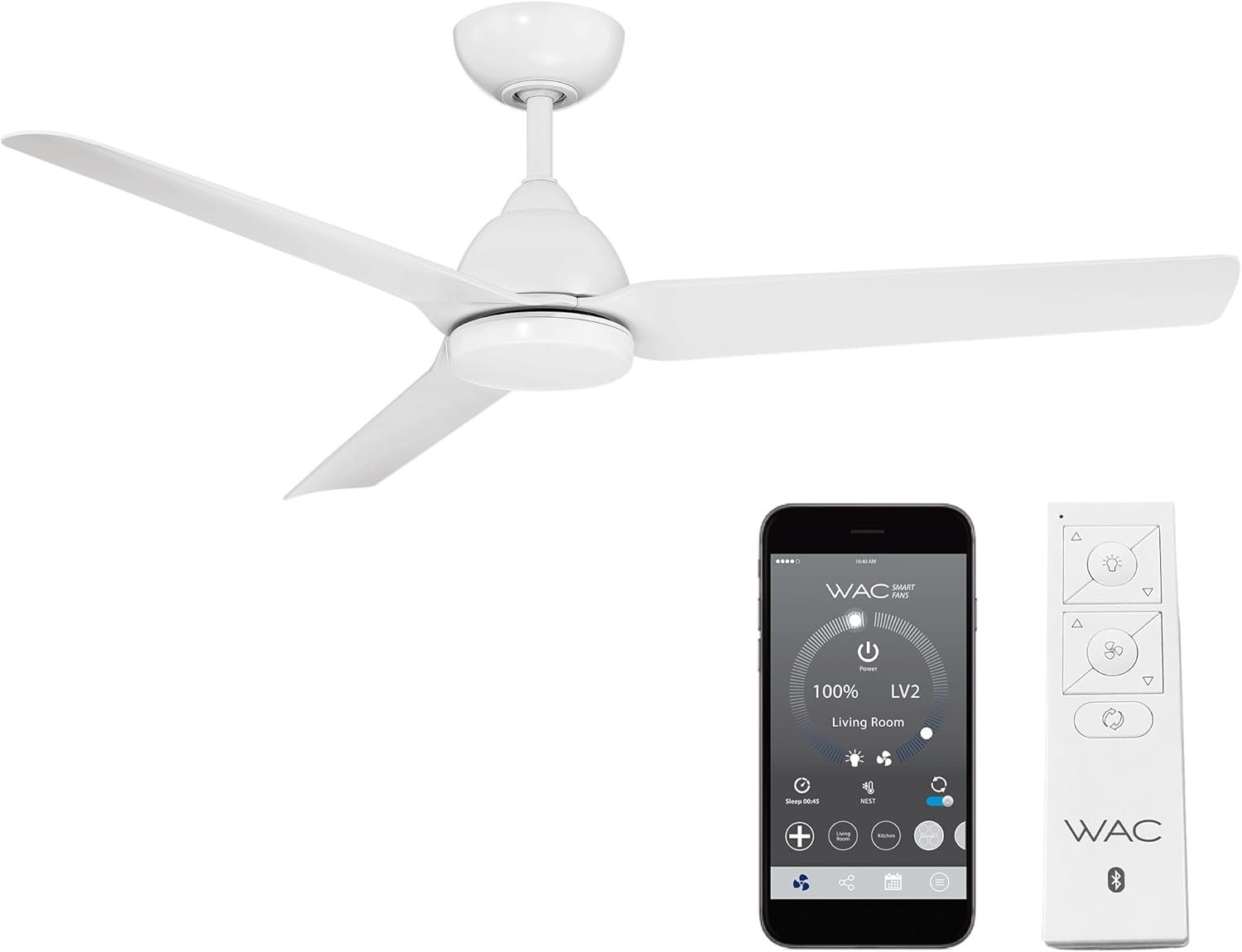
Mocha Indoor/Outdoor 3-Blade Smart Compatible Ceiling Fan 54in Matte White with Remote Control and Wall Cradle. Works with iOS/Android, Alexa, Google Assistant, Samsung SmartThings, and Ecobee.
$224.00
Related Products


From the brand
Shop Latest Fans
Shop Popular Fans
Downrod Fans
Flush Mount Fans
Fan Accessories
SMART: WAC Smart Fans can be controlled from the WAC Smart Fan app, enabling smart features and full control of your fan from an iOS or Android device. Download the app to pair with the smart home tech you know and love, including Google Assistant, Amazon Alexa, Samsung Smart Things, and more!
FEATURES: The WAC Smart Fan iOS or Android app can sync with your ceiling fan to control fan speed, use smart features like breeze mode, adaptive learning, create groups, and reduce energy costs. High quality ABS blades ensure your fan blades don’t droop or sag over time.
TRADITIONAL CONTROLS: Battery operated Bluetooth remote control with wall cradle is included (Part # RC20-WT). An optional Bluetooth hardwired wall control is sold separately (Part# WC20-WT). Wall and remote control use Bluetooth for improved range and can control an unlimited amount of fans within range.
TECHNOLOGY: WAC Smart Fans are made with incredibly efficient and completely silent DC motors and are up to 70% more efficient than traditional fans. Every fan is factory-balanced and sound tested to ensure each fan will never wobble, rattle or click.
STANDARDS: UL & cUL Wet Location Listed for indoor or outdoor applications. Includes a 6in Downrod and can be mounted on slope ceilings. Additional downrod lengths sold separately (SKU # DR-FINISH). WAC warranties all ceiling fans for 5-years.
NOTE: model # F-001L includes a high lumen output (1600 lumens) replaceable LED luminaire powered by WAC Lighting with smooth and continuous brightness control. Model # F-001 does not include the LED luminaire.
6 reviews for Mocha Indoor/Outdoor 3-Blade Smart Compatible Ceiling Fan 54in Matte White with Remote Control and Wall Cradle. Works with iOS/Android, Alexa, Google Assistant, Samsung SmartThings, and Ecobee.
Add a review

$224.00
Aaron Hall –
Great Fan, Easy Setup!
Have been looking for a good smart fan for a while, and this one really delivers!I was specifically looking for something to use for circulating down some of the hot air from my upstairs during summer to keep that area cooler and not have the A/C running so hard. This fan advertises itself as integrating with my Ecobee thermostat, so that’s why I took a chance on it.Price is pretty decent compared to alternatives I’ve seen, however, be aware that if you want to use the app and “smart” functions, there’s a $10/fan “upsell” charge for the privilege. I do admit that’s probably my only real gripe. If you don’t need the app/Alexa/third party thermostat integration, you won’t pay this fee.So about the fan installation… it’s very high quality parts that don’t feel cheap. It feels solid, and it mounts securely. Installation instructions were simple enough. Only one small nitpick that I noticed was that by default the WiFi SSID wasn’t enabled in broadcast mode, and my instruction book didn’t mention it. The updated book on the WAC Lighting website included several extra pages of instructions, one of which is holding Light Power + Season buttons for a few seconds until fan beeps and enables the broadcast. Once I found that, setup in the app was very simple too.In operation, the remote is very simple… Light on/off and dimming up/down buttons, Fan on/off and speed up/down buttons, and a season select to choose between Summer/Winter modes. The app allows the same functions plus integration to Alexa and Ecobee, etc. The fan itself is silent… even on highest speed, I can’t hear any motor noise, etc. On highest setting, I can slightly hear the actual air blowing around if I get close enough to it, but anything lower or farther than a few feet is completely silent.I’m still testing to see if the Ecobee integration works or not. So far, I’m just using the fan as normal “on” mode. Alexa functionality works as expected since it sets up as smart home devices and not just the complicated skills commands. In other words, “Alex, turn on/off Living Room Fan” and “Alexa, set living room fan speed to <1-6>” works great.I did not buy the light module for mine, as I already have several lamps in my room, but it’s nice to know it’s an easy add-on later if I want.Anyway, bottom line is that I’m very pleased with this fan already, and even with the annoying app fee, it’s still a great value.
BoilermakerATL –
Beautiful, high-performing fan that is almost perfect
These fans are very well built and powerful without being overwhelming. We have two in a screened in deck and they create a great amount of airflow that mimics a strong natural breeze without feeling like your getting pummeled with an industrial fan. I’ve been working remotely for the past 18 months, and these fans keep me comfortable on my deck in 88 degree Georgia summer heat and humidity. The remote has great functionality and looks sleek and modern unlike a lot of the 3 button remotes from other makes that look like cheap afterthoughts. The LED light also puts out a TON of lumens, which is something I was looking for since most LED integrated fans only put out as much light as a 60 watt bulb. The only issue i’ve run into has been an occasional non-response from the smartphone app, but usually turning the fan off and on from our wall switch gets it working properly. Compared to all of the other smart devices we have in our home, the fan has been far more reliable on connection.
J. Long –
Finicky and Unreliable = Frustration and Sweat
Reduced to one starIn November 2020, we ordered 2 WAC ceiling fans for our screened in back porch during construction of our new house. The ceiling fans worked initially, about two months ago as the temperatures warmed up and we needed the fans, the problems began. Somehow they got out of sync with one in summer mode and one in winter mode. Re-pairing them did not fix the problem. This was followed by one of them losing pairing and needing to be re-paired. Now, it won’t pair at all.These fans look nice and are relatively quiet and move sufficient air, but they are not reliable. We will bite the bullet and be replacing them soon.I would NOT recommend these fans.
D. Thompson –
Try assigning a static IP address for the fan in your router settings
If you’re here looking for help with the smart functions, the title is my best advice. You can skip the rest of the review. :)UPDATE: After a few months with this fan, we’re still really happy with it. Assigning it to a static IP address really was the answer, because we haven’t had ANY issues with it since then. They really need to include that bit of info with the instructions, it’s made all the difference!We bought this model because we wanted something with clean lines that wouldn’t draw a lot of attention. This fan is very quiet and moves a lot of air in our 12×15′ room with 9 ft ceilings, and the matte white looks great against the white ceiling. The app has a “breeze” function that mimics a real breeze that comes and goes, which is really nice, and an Away mode (I haven’t used it yet, but I assume it turns the light on at random times to simulate someone being home), as well as a sleep timer. These three options aren’t available with the included remote, only through the app. Getting it connected to Alexa wasn’t an issue, and incidentally, they no longer charge you for the privilege (I’ve read both $1 or $10 per fan). Overall, I was pretty pleased with the fan the first night after we got it installed.As far as installation, my husband (who’s installed a few fans over the years) said the instructions were kind of a joke. They aren’t very detailed, but he was able to figure it out without too much trouble. It took a lot of fiddling with the remote and the app to finally get it up and running the first day, locally (via the remote) as well as through the cloud (via both the app and Alexa). Not a cake walk by any means, but once it was working, it was pretty cool.The next morning after we installed it, the fan wasn’t responding to either the remote or the app. Rats.After waaaaay too much fiddling around, we got it working again. Obviously it’s not acceptable to spend 20 minutes messing with it every time you want to use it. In a last ditch effort, I assigned the device a static IP address (do this through your router settings) and IT HASN’T DISCONNECTED SINCE. (See the picture showing both cloud and wifi connections, near the top left of the screen). Other than that, occasionally the included remote won’t work (even though the app still does), but a flip of the light switch seems to take care of it. I would give it 4.5 stars if I could (minus half a star for the remote issues) for the way it’s working NOW, but I rounded down to 4 for the headaches involved in getting it there.If you’re on the fence about this fan, here are a couple things to consider: 1) Are you installing it yourself, or are you hiring an electrician? If the former, have you installed fans before? If so, you’ll probably be okay. If not, this is probably not the fan you want to start with, because the instructions aren’t very detailed and there are no YouTube videos (yet) for this specific fan. 2) Are you comfortable going into your router settings to assign a static IP address? If not, find someone who is. Otherwise, this fan may end up being an exercise in frustration. You could install it as a dumb fan, but then why spend the money in the first place when there are plenty of those out there for a lot less.
Alex Guindi –
No funcionan
Luis a. –
Nunca funciono el ventilador. Se activa y desactiva ….