

FIFINE USB Microphone, Plug and Play Home Studio USB Condenser Microphone for Skype, Recordings for YouTube, Google Voice Search, Games, for Windows and Mac-K668
$17.99
Related Products





Product description

Condenser Omni Pick-up Microphone-Smooth, Flat Frequency Response of 50Hz-16KHz is suits for singing, speech and Voice over.Plug and Play-Simply plug the computer microphone into available USB port and you’re ready to create your own audio.Simply plug in and start recording directly to your computer via Usb with the Fifine K668 pc microphone. A great choice for both vocal and recording as well as for creating podcasts and voiceovers for videos. Compatible with both Windows and Mac OS operating systems, you can simply plug the usb microphone into your computer and start recording, streaming with friends, speech recognition.Record studio-quality audio with desktop microphone. Excellent for vocals and voiceover. ***Tips for Use***1. Pls set up manual if your computer can not recognize the microphone. Go to your desktop and right-click the sound icon (the one that looks like speakers) and select “Recording Devices” and then follow the steps by steps. There are also a operation guide in user’s manual.2. Pls try to plug the usb mic on the back of your computer instead of the front usb port Sometimes the usb port with comparatively low power supply can not be boost because the usb mic need to be power supply by 5V power.Attention: If the mic suddenly stops working and doesn’t pick up sound after the most recent windows10 update, please go to settings > privacy > microphone and set it to allows apps to access the microphone.
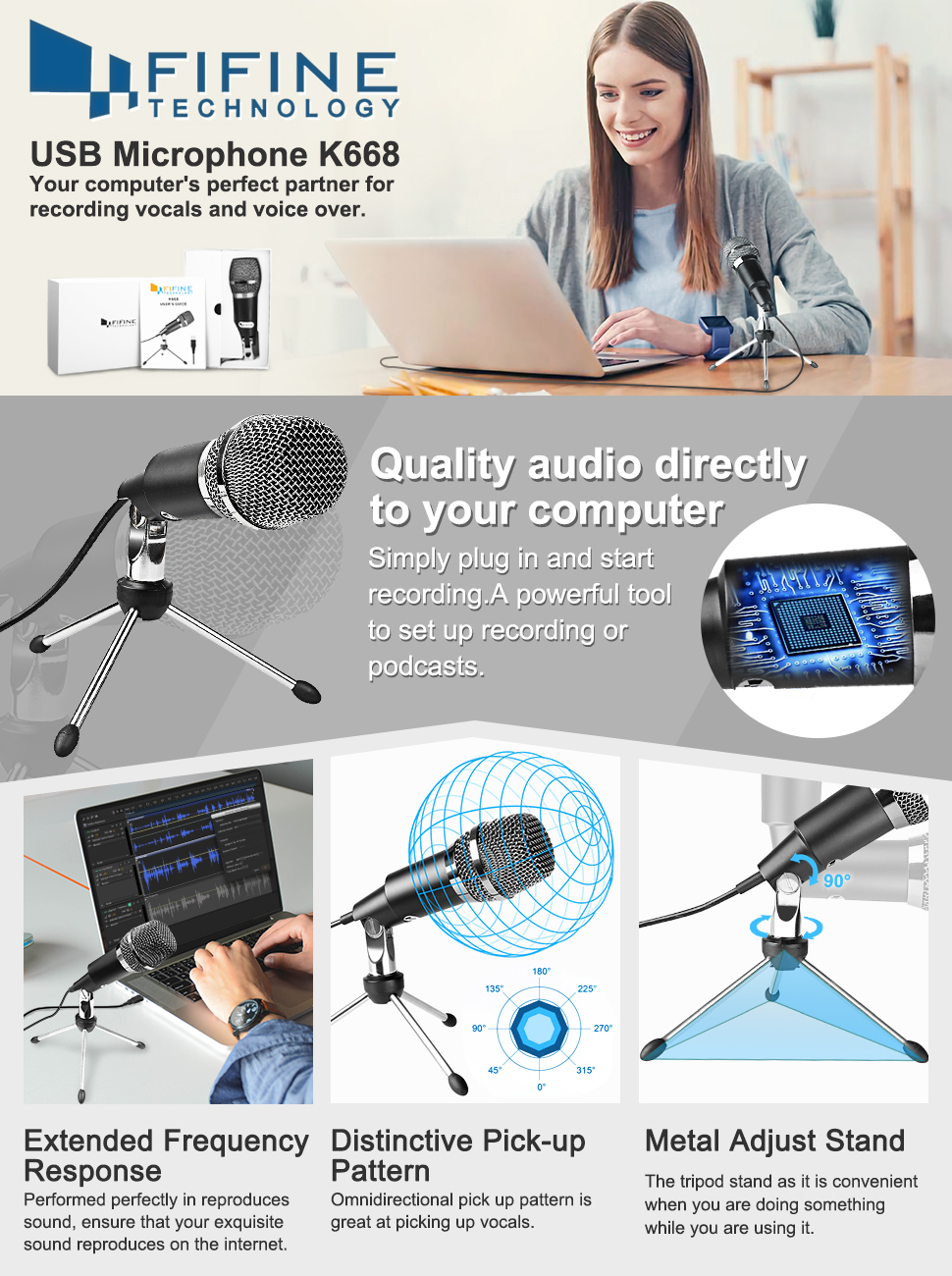
Plug-and-play USB microphone is great choice for skype, youtube audio and gaming ps4.
Add to Cart
Add to Cart
Add to Cart
Add to Cart
Customer Reviews
4.5 out of 5 stars 27,783
4.5 out of 5 stars 2,169
4.6 out of 5 stars 1,340
4.6 out of 5 stars 5,625
Price
$29.99$29.99 $49.99$49.99 $69.99$69.99 $39.99$39.99
Plug n’ Play – No Drivers Required
✓
✓
✓
✓
USB Cable Included
5.9-Foot 8.2-Foot 8.2-Foot 8.2-Foot
Volume Control Knob
✓
✓
✓
✓
Desktop Stand Included
✓
✓
Desktop Base
✓
Plug and Play and Portable – Simply plug it into any available USB port, select it as your input in your software settings and you’re ready to create your own audio. Compatible with Windows and Mac, and no software to install. (Incompatible with Xbox and Phones)
Distinctive Omni Pick-up pattern – Noise cancellation and isolates the main sound source. Good for home studio, chatting, Skype, Discord, Yahoo Recording, YouTube Recording, Google Voice Search and Steam.
Smooth, Flat Frequency Response of 50Hz-16KHz – Extended frequency response is excellent for singing, speech and Voice over. Performed perfectly in reproduces sound, high quality Mic & perfect voice recorder ensure that your exquisite sound reproduces on the internet.
Record Directly to Your Computer – This desktop microphone is ideal for everything from studio vocals, to speech, gaming, podcast and desktop recording. Great gift for streamer twitch, computer gamers and youtubers.
Wide Frequency Response for brilliant and transparent sound. Extremely high signal output lets your voice cut through. Durable 5.9-foot USB cable is included, flexible and long enough for multiple applications.
8 reviews for FIFINE USB Microphone, Plug and Play Home Studio USB Condenser Microphone for Skype, Recordings for YouTube, Google Voice Search, Games, for Windows and Mac-K668
Add a review

$17.99
A consumer. –
amazing value and durability
this could legitimately be the greatest mic of all time. i have had this for 8 years and it has been abused due to moves and the like, and yet i have zero issues. for the money, it cannot be beat. while i don’t get compliments on voice quality, i also never get complaints
Tony –
Fantastic Quality For Price
This thing is about as close as you’ll ever get to studio quality without spending a fortune and a half.The audio quality is fantastic and crisp, and although it may still pick up minor background noise, the quality itself is comparable to that of a studio microphone. It automatically adjusts to the level of noise in the room, and is usable by simply plugging in the USB.I’ve had it all year, ordered in February. I’ve knocked this thing over so many times you’d think it’d have broken by now.Nope, nada. No damage, zilch. The absolute worst is the screw slightly loosening up over time, which is an easy fix, and a very minor problem, as all it does is make the microphone’s angle change more loosely. Just tighten the screw a bit and it’s good as new.TL;DR near-studio audio quality, easy to use, auto-volume adjustment, and quite durable.Edit, 1/30/2022: Still using this baby. Quality is still pretty great overall. I think it might’ve degraded, like, a smidge?? Like, it’s nothing bad, just not quite the crispness I remember when I first got it. But, hell, I recently used it to record vocals for a cover as a personal project, in a CAR, and it was still pretty great audio overall. The tripod broke in the last year or two, sadly, and the usb is getting a bit finnicky with being recognized properly on my computer, but it’s been going strong otherwise for the last like.. idek how many years, when did I buy this again?? Like, four, five years now? Give or take.It’s a good microphone. Seriously, I’d argue if you bought some proper equipment to go with this, this could be USED as a studio microphone. I don’t really often write reviews for things I bought off amazon, but I couldn’t not for this. I just skimmed over it going through old orders and decided I’d just touch up on this.If the price is still the same as when I got it, like, ~20-30$, it’s a STEAL for the quality. If you need a nice mic, and you’re on a budget, unless you’re looking for *explicitly high-end professional grade gear*, this is a fantastic mic overall.I would recommend this microphone for basically any use, you wanna video chat with your family/etc and be able to be heard well? Go for it, just.. keep it away from the speakers. (Or just wear headphones.)You an ebic pro gamer? Go for it, this’ll make your voice clear as my window.Looking to record audio for narration, singing, voiceovers/acting, etc? This will suffice quite well, even with no additional equipment, though I would suggest getting other equipment. But, on it’s own, you can use this for more professional works, just make sure the room is quiet, or if you know how, just edit out background noise. Hell, even just using audacity would cut it for like a fan or something running in the background.Seriously, this microphone is amazing for the price. I can’t stress it enough.TL;DRLiterally like one of the biggest bangs for your buck you’ll find on the internet, you need a mic for LITERALLY ANY REASON? Buy this. It’s GREAT for the price.
John Campbell –
Testing of the Fifine USB MIC K668
02 April 2017The following is the result of testing the Fifine microphone USB MIC K668 and communications with the manufacturer after the first microphone they sent me was defective (DOA). Note that Fifine has very well placed itself for maintaining an interest in customer satisfaction in my book and contacted me directly merely upon learning that I had returned the initial microphone to Amazon. Prior to this I had made no review of their product, no attempt to contact Fifine, and just the return prompted contact from Fifine. Such speaks well for the company. Also, I am not compensated for this review in any way.Note also that I have treated this as a test of their product and given that I was initially informed after the failure of the initial purchased microphone that their microphone is designed around best operation of 1 to 2 inches from the users mouth I saw no value in it for my own purposes. As a result of this testing it seems both myself and Fifine have been proven wrong. The microphone works well whether 2 inches away or 2 feet. Simply make the necessary sound adjustments to your own computer to meet your desired usage. No artificial background buffers were used. If you want to sound like you’re talking from within a sewer pipe, well, to each their own.The microphone is top notch for desktop VOIP comms and gaming usage utilizing a speakers and microphone setup. Yes, there is the transmitted sounds of what is taking place on your own speakers when set up for being used at a distance, but without the feedback loop and without the distortion so long as the user takes the time and effort to set the microphone up properly for normal volume adjustments contained in the average Windows operating systems and utilizing Realtek audio adjustments commonly found in most onboard audio of motherboards and software today. The same as one would do for any desktop microphone. That also considers adjusting volume control knob settings on both the speakers and if a sub-woofer is utilized that also has a volume control. Keyboard strokes are audible for those of us who use mechanical keyboards such as the Corsair K70, but barley so. This is a result of adjusting for usage at a distance. You will likely not need any microphone boost with this unit as there is a clipping element to it at an extremely low level in reviews I have read by others, but the reviews of that nature that I’ve seen are based in studio singing, playing musical instruments, and the like at close range, and even in the video recordings of those reviews the sound quality was actually quite good. In fact, it works so well that you might want to consider keeping a close eye on any audio chat room application that you might unwittingly leave open utilizing a sound activation. Probably not a good way to make and keep friendships by leaving those running in the background while you’re away thus forcing people on the other end to have to listen to your music even if it is barely audible. When the microphone works so well that you might forget it’s turned on it might be a good idea to keep a microphone mute icon on your desktop for easy access. Colorful metaphors normally are not popular, if you know what I mean. Just saying. It’s either that or mind your language when you get your posterior blown out from under you in the latest episode of Battlefield. While cumbersome, Push-To-Talk (PTT) always works for such things.Note that I’m only able to give this product four stars as the center piece of the tripod is made of plastic and is still fragile. While the Fifine USB K668 microphone build itself appears to be of premium quality, the real test is the test of time and at this juncture I simply cannot do that since this product is new to me. Approximately a week. Please note that I am recommending this product despite the tripod shortcomings. Just be very careful with it and do not exert any undue pressure on the legs such as using the legs for leverage to manipulate the angle rotation of the microphone. Short of rough handling or a mishap of dropping something on the microphone, the tripod should hold up OK. In my application there is also no need to repeatedly open and stow the legs as the microphone only sits on my desktop 24/7/365. In my personal judgment repeatedly opening and stowing the tripod legs would likely wear out the friction based rigidity of the legs closed positioning thus making the legs susceptible to cracking the plastic center housing. That is a personal observation and judgement and can be wrong. For those wishing to use this microphone/tripod setup for traveling between business conferences and utilizing the microphone for such boardroom type communications you will be able to see what I’m speaking of for yourself and make your own best judgment from there. This does not mean to not give it a try. The tripod very well might work fine.Below you can find my test results response to Fifine. Hopefully this will help you in your decision as to what microphone to purchase.From copy/paste:Test results:Well, for starters, you’ll be glad to know that the mike is working perfectly. This test is taking place using a Windows 10 Pro operating system, Logitech speakers, and onboard audio utilizing Realtek audio software. Very basic setup that anyone with a Windows OS should have. The motherboard manufacturer’s software handles the rest.It took a little bit to get the settings right, but at present I have it sitting at 24 inches away, have used it on two different VIOP platforms, used it during game play on Battlefield 2 (Revive), used it during game play on Star Trek Online, used it for comms on Discord, and it has finally adjusted well to Ventrilo. Observations from several people now say the mike sounds great. Keep in mind that the mike is sitting on the desk about 24 inches to my right and right next to the right hand speaker. As such it took a bit of a balancing act to accomplish. I used the mike’s foam cover for best results. People using the same setup as my own should take into account that I do not use a headset. Also, because I use speakers on the desk top, there is a likelihood of a very loud feedback high pitched frequency signal occurrence that’s extremely uncomfortable to the ears until the volume levels are properly adjusted. This also includes any volume adjustment one might have separately on a sub-woofer.There was little to no washout while using the mike at this distance nor from any angle. Using RealTek onboard audio works best. Note that I also used the mike from a position of standing behind it as well (standing in the door way with the mike positioned away from me for normal desk top usage for someone at the keyboard) and with good results. The den here is very small. Roughly a 12×10 room, with acoustics that at present provide a nasty echo effect on a microphone due to there being little to nothing else in the room as we are still under construction here at my home. Despite that kind of an environment the mike performed well after the sound was adjusted with normal Windows OS and Realtek adjustments. Individuals results may vary, but I’m now confident that there is not much of problem areas that cannot be adjusted out.The stand connection on this one is fine and does not have the manufacturing defects of the first one. This might explain why some people are having difficulty with the legs on the tripod breaking due to a defective bracket resulting in the user applying too much force in an attempt to adjust the mike angle. The plastic center though is still something you might seriously consider upgrading to a better quality metal design. Avoid any and all downward pressure on the stand, even by mishap, when the mike is set up as the plastic center for the tripod will simply not hold up to it. Another area of contention in the plastic center piece is that repeated opening and stowing of the legs might provide for an early wearing out.The mike itself is quite presentable, materials and design, very respectable mike. Makes a classy presentation sitting on the desk. The sound quality is very good once everything is adjusted on ones computer. Frankly, your initial statement that had it operating from within 1 to 2 inches away had me spooked since that was not going to be anything close to my usage. The fact that is seems to be functioning perfectly at 24 inches away was a nice surprise. So much so that people on the other end claimed they couldn’t hear the clicking sounds from my Corsair K70 Keyboard as I typed. I’m not sure how that was possible since the keyboard distance from the mike is relatively the same as the mike distance from my mouth. However that came to be is just fine with me. All in all, a well rounded setup for a PC microphone.The only thing left to test is how well it holds up over the long haul. That of course is up to you. If you wish for me to return the test mike please supply me a return label. At this point it’s working so well I’d rather like to keep it! A far cry difference from the first one. If you decide to utilize my advice on the tripod regarding an upgrade I would be happy to test it as well.Should you have any other questions or testing request regarding this mike please feel free to make it. At your service.Sincerely,John Campbell
Daniel –
Muy bueno. Sencillo de utilizar. Mi MAC lo detectó sin problemas. En lo personal, el uso que le doy es para podcast. Con este único micrófono se escuchan de maravilla las intervenciones de todos los involucrados. Mucha fidelidad de audio. Recomendado.
Gonzalo Esparza –
Hard to believe how good this product is for the price. Quality and performance over expectations.
vik –
I bought this in 2019. I was not able to use it for the originally intended purpose for long before lockdown hit the world in March 2020 and we all switched to WFH.I added a LG soundbar to my WFH setup in early 2021, that is when I switched doing meetings from a wired Logitech headset to a soundbar + mic combo. Freedom from the the headset wires was definitely a bit overrated (I don’t move much anyway), but still, it’s good to not wear a headset all day for your 7+ hrs meeting marathons.The audio quality of my voice picked up by this mic is very good. My meeting colleagues rate the various microphones I use in this order:1. Logitech H390 (highest quality)2. This microphone3. Oneplus buds Z24. Samsung Galaxy buds proNote that the Logitech H390 headset is an awesome product for meetings (priced around 5K INR), its a USB headset so no noise introduced by loose connections of 3.5mm jacks. The audio from the Logitech H390 mic is crystal clear for the other party (best mic I have ever used for meetings), and speakers are also great, along with a mic mute button in hand. I have used Logitech H390 for 10+ years and I swear by its quality and durability, each unit of my H390 lasting over 3+ years of daily use. Get that blindly if you need a headset for meetings, or if you can’t afford to go to a soundbar + USB mic setup.If you want to switch your WFH meetings from a headset to a soundbar + USB mic setup, this mic is a good option for around 3K INR. Go for it!
山下 昌樹 –
低価格で十分使えます。少し大きいかな?
ishim7924 –
llevo más de 6 meses con este micrófono, y funciona perfectamente.Es buen micrófono para comenzar proyectos, buen sonido, es muy sensible a los ruidos, por lo que hay que ver maneras para reducir la saturación.La verdad se me ha caído algunas veces, pero sigue funcionando perfectamente.Se los recomiendo mucho para los que vayan comenzando proyectos o hobbies.